<?xml version="1.0" encoding="utf-8"?><feed xmlns="http://www.w3.org/2005/Atom" ><generator uri="https://jekyllrb.com/" version="4.4.1">Jekyll</generator><link href="https://arcadedb.com/blog/feed.xml" rel="self" type="application/atom+xml" /><link href="https://arcadedb.com/" rel="alternate" type="text/html" /><updated>2026-05-08T18:06:25+00:00</updated><id>https://arcadedb.com/blog/feed.xml</id><title type="html">ArcadeDB</title><subtitle>The Next Generation Multi-Model Database</subtitle><entry><title type="html">Call Me Maybe, ArcadeDB? 34 Jepsen Tests, 34 Passes</title><link href="https://arcadedb.com/blog/arcadedb-jepsen-tests-34-pass/" rel="alternate" type="text/html" title="Call Me Maybe, ArcadeDB? 34 Jepsen Tests, 34 Passes" /><published>2026-04-28T00:00:00+00:00</published><updated>2026-04-28T00:00:00+00:00</updated><id>https://arcadedb.com/blog/arcadedb-jepsen-tests-34-pass</id><content type="html" xml:base="https://arcadedb.com/blog/arcadedb-jepsen-tests-34-pass/"><![CDATA[<p>If you’ve followed distributed databases for any length of time, you’ve probably read <a href="https://jepsen.io/analyses">a Jepsen analysis</a>. If you’ve read one, you know the feeling: a database vendor claims linearizability, <a href="https://aphyr.com/">Kyle Kingsbury</a> introduces some network partitions, and a few weeks later we all learn what the database <em>actually</em> does under failure.</p>

<p>That feeling is the reason we wrote 34 Jepsen tests for <a href="https://arcadedb.com/">ArcadeDB</a>. We wanted to know what <em>we</em> actually do under failure, before we ask anyone else to trust us.</p>

<p>Today we’re publishing the full test suite, the methodology, and the results.</p>

<blockquote>
  <p><strong>First, the disclaimer.</strong> This is <strong>not an official Jepsen analysis</strong>. Jepsen LLC did not commission, run, review, or certify these tests. We wrote them in-house using the open-source <a href="https://github.com/jepsen-io/jepsen">Jepsen framework</a> (the same framework Kyle uses for his official analyses), but the design, execution, and results are entirely ours. We’re publishing everything so the community can scrutinize the methodology, and we’d genuinely love a real analysis from Jepsen LLC one day. <strong>Hi Kyle, if you’re reading this, please tear it apart.</strong></p>
</blockquote>

<h2 id="summary">Summary</h2>

<ul>
  <li><strong>Database under test:</strong> ArcadeDB on the <code class="language-plaintext highlighter-rouge">apache-ratis</code> branch, with high availability built on <a href="https://ratis.apache.org/">Apache Ratis</a> (Raft consensus).</li>
  <li><strong>Cluster:</strong> 5 Debian nodes in Docker, controlled by a Jepsen 0.3.11 control node.</li>
  <li><strong>Workloads (6):</strong> <code class="language-plaintext highlighter-rouge">bank</code>, <code class="language-plaintext highlighter-rouge">set</code>, <code class="language-plaintext highlighter-rouge">elle</code>, <code class="language-plaintext highlighter-rouge">register</code>, <code class="language-plaintext highlighter-rouge">register-follower</code>, <code class="language-plaintext highlighter-rouge">register-bookmark</code>.</li>
  <li><strong>Faults (7 nemeses):</strong> <code class="language-plaintext highlighter-rouge">none</code>, <code class="language-plaintext highlighter-rouge">partition</code>, <code class="language-plaintext highlighter-rouge">kill</code>, <code class="language-plaintext highlighter-rouge">pause</code>, <code class="language-plaintext highlighter-rouge">clock</code>, <code class="language-plaintext highlighter-rouge">all</code>, <code class="language-plaintext highlighter-rouge">all+clock</code>.</li>
  <li><strong>Total runs:</strong> 34 (20 leader workloads + 14 follower workloads).</li>
  <li><strong>Result:</strong> 34 / 34 PASS. Zero linearizability violations, zero lost writes, zero ACID anomalies.</li>
  <li><strong>Source code:</strong> <a href="https://github.com/ArcadeData/arcadedb-jepsen">github.com/ArcadeData/arcadedb-jepsen</a> (Apache 2.0).</li>
  <li><strong>Caveat:</strong> This is in-house testing, not a Jepsen LLC certification. Independent review welcome.</li>
</ul>

<h2 id="what-is-jepsen">What is Jepsen?</h2>

<p><a href="https://jepsen.io">Jepsen</a> is the gold-standard open-source framework for testing distributed systems. Created by Kyle Kingsbury (better known as <a href="https://aphyr.com/">aphyr</a>), it became famous through the <a href="https://aphyr.com/tags/jepsen">Call Me Maybe</a> blog series, which methodically dismantled the consistency claims of databases like MongoDB, Redis, Cassandra, ElasticSearch, and many others.</p>

<p>What makes Jepsen special isn’t just the fault injection (network partitions via <code class="language-plaintext highlighter-rouge">iptables</code>, process kills with <code class="language-plaintext highlighter-rouge">SIGKILL</code>, GC-style pauses with <code class="language-plaintext highlighter-rouge">SIGSTOP</code>/<code class="language-plaintext highlighter-rouge">SIGCONT</code>, clock skew via <code class="language-plaintext highlighter-rouge">date -s</code>). It’s the <strong>checkers</strong>:</p>

<ul>
  <li><strong><a href="https://github.com/jepsen-io/knossos">Knossos</a></strong>: a linearizability checker that takes the history of operations and tries to find a serial ordering consistent with each client’s observed responses. If no such ordering exists, your “linearizable” register isn’t.</li>
  <li><strong><a href="https://github.com/jepsen-io/elle">Elle</a></strong>: a black-box transaction-isolation checker that builds a dependency graph from the transaction history and looks for cycles. Cycles map to specific anomalies: G0 (dirty write), G1a (aborted read), G1b (intermediate read), G1c (circular information flow), G2 (anti-dependency cycle), and lost updates.</li>
</ul>

<p>You can’t bluff your way past either of them. They either find a counterexample, or they certify the history.</p>

<h2 id="what-we-tested">What we tested</h2>

<p>The tests run against the ArcadeDB <code class="language-plaintext highlighter-rouge">apache-ratis</code> branch, where high availability is implemented on top of <a href="https://ratis.apache.org/">Apache Ratis</a> (the production-grade Raft library that also powers Apache Ozone). The cluster is <strong>5 Debian nodes</strong> in Docker, plus a control node running <a href="https://leiningen.org/">Leiningen</a> and Jepsen 0.3.11. Each test gets a fresh cluster to eliminate cross-test contamination.</p>

<h3 id="six-workloads">Six workloads</h3>

<table>
  <thead>
    <tr>
      <th>Workload</th>
      <th>What it checks</th>
      <th>Checker</th>
    </tr>
  </thead>
  <tbody>
    <tr>
      <td><strong>bank</strong></td>
      <td>ACID balance conservation across 5 accounts during concurrent transfers</td>
      <td>Custom conservation invariant</td>
    </tr>
    <tr>
      <td><strong>set</strong></td>
      <td>No acknowledged write is ever lost during replication</td>
      <td>Custom set checker</td>
    </tr>
    <tr>
      <td><strong>elle</strong></td>
      <td>Transaction isolation: G0, G1a, G1b, G2, lost updates</td>
      <td><a href="https://github.com/jepsen-io/elle">Elle</a></td>
    </tr>
    <tr>
      <td><strong>register</strong></td>
      <td>Linearizability of single-key read/write/CAS, leader reads</td>
      <td><a href="https://github.com/jepsen-io/knossos">Knossos</a></td>
    </tr>
    <tr>
      <td><strong>register-follower</strong></td>
      <td>Linearizability when reads are routed to a <em>non-leader</em> (ReadIndex path)</td>
      <td>Knossos</td>
    </tr>
    <tr>
      <td><strong>register-bookmark</strong></td>
      <td>Read-your-writes via commit-index bookmarks on follower reads</td>
      <td>Knossos</td>
    </tr>
  </tbody>
</table>

<h3 id="seven-nemeses">Seven nemeses</h3>

<table>
  <thead>
    <tr>
      <th>Nemesis</th>
      <th>Description</th>
    </tr>
  </thead>
  <tbody>
    <tr>
      <td><code class="language-plaintext highlighter-rouge">none</code></td>
      <td>Baseline, no faults</td>
    </tr>
    <tr>
      <td><code class="language-plaintext highlighter-rouge">partition</code></td>
      <td>Random network partitions via <code class="language-plaintext highlighter-rouge">iptables</code></td>
    </tr>
    <tr>
      <td><code class="language-plaintext highlighter-rouge">kill</code></td>
      <td><code class="language-plaintext highlighter-rouge">SIGKILL</code> random nodes (crash)</td>
    </tr>
    <tr>
      <td><code class="language-plaintext highlighter-rouge">pause</code></td>
      <td><code class="language-plaintext highlighter-rouge">SIGSTOP</code>/<code class="language-plaintext highlighter-rouge">SIGCONT</code> random nodes (long GC pause)</td>
    </tr>
    <tr>
      <td><code class="language-plaintext highlighter-rouge">clock</code></td>
      <td>Random ±60s clock shifts via <code class="language-plaintext highlighter-rouge">date -s</code></td>
    </tr>
    <tr>
      <td><code class="language-plaintext highlighter-rouge">all</code></td>
      <td>partition + kill + pause concurrently</td>
    </tr>
    <tr>
      <td><code class="language-plaintext highlighter-rouge">all+clock</code></td>
      <td>all + clock skew</td>
    </tr>
  </tbody>
</table>

<p>The leader workloads run against 5 nemeses (we omit <code class="language-plaintext highlighter-rouge">clock</code> and <code class="language-plaintext highlighter-rouge">all+clock</code> because leader-only reads aren’t sensitive to follower clock drift). The follower workloads run the full 7. That’s <strong>20 + 14 = 34 tests</strong>.</p>

<h2 id="the-results">The Results</h2>

<figure style="margin: 2rem 0; overflow-x: auto;">
<svg viewBox="0 0 760 360" xmlns="http://www.w3.org/2000/svg" role="img" aria-labelledby="matrixTitle" style="max-width: 100%; height: auto; font-family: -apple-system, BlinkMacSystemFont, sans-serif;">
  <title id="matrixTitle">ArcadeDB Jepsen test matrix: 34 of 34 passing</title>
  <rect x="0" y="0" width="760" height="360" fill="#ffffff" />
  <text x="380" y="28" text-anchor="middle" font-size="18" font-weight="700" fill="#111">ArcadeDB Jepsen Test Matrix &middot; 34 / 34 PASS</text>

  <!-- Column headers (nemeses) -->
  <g font-size="12" fill="#333" text-anchor="middle">
    <text x="320" y="68">none</text>
    <text x="380" y="68">partition</text>
    <text x="440" y="68">kill</text>
    <text x="500" y="68">pause</text>
    <text x="560" y="68">clock</text>
    <text x="620" y="68">all</text>
    <text x="690" y="68">all+clock</text>
  </g>

  <!-- Row labels (workloads) -->
  <g font-size="13" fill="#222" text-anchor="end" font-weight="600">
    <text x="240" y="100">bank</text>
    <text x="240" y="140">set</text>
    <text x="240" y="180">elle</text>
    <text x="240" y="220">register</text>
    <text x="240" y="260">register-follower</text>
    <text x="240" y="300">register-bookmark</text>
  </g>

  <!-- Helper: cell drawing -->
  <!-- Row 1: bank, 5 nemeses pass, clock + all+clock are N/A -->
  <g>
    <!-- bank -->
    <rect x="290" y="80" width="60" height="36" fill="#16a34a" /><text x="320" y="103" text-anchor="middle" font-size="18" fill="#fff" font-weight="700">&#10003;</text>
    <rect x="350" y="80" width="60" height="36" fill="#16a34a" /><text x="380" y="103" text-anchor="middle" font-size="18" fill="#fff" font-weight="700">&#10003;</text>
    <rect x="410" y="80" width="60" height="36" fill="#16a34a" /><text x="440" y="103" text-anchor="middle" font-size="18" fill="#fff" font-weight="700">&#10003;</text>
    <rect x="470" y="80" width="60" height="36" fill="#16a34a" /><text x="500" y="103" text-anchor="middle" font-size="18" fill="#fff" font-weight="700">&#10003;</text>
    <rect x="530" y="80" width="60" height="36" fill="#e5e7eb" /><text x="560" y="103" text-anchor="middle" font-size="11" fill="#6b7280">n/a</text>
    <rect x="590" y="80" width="60" height="36" fill="#16a34a" /><text x="620" y="103" text-anchor="middle" font-size="18" fill="#fff" font-weight="700">&#10003;</text>
    <rect x="650" y="80" width="80" height="36" fill="#e5e7eb" /><text x="690" y="103" text-anchor="middle" font-size="11" fill="#6b7280">n/a</text>
    <!-- set -->
    <rect x="290" y="120" width="60" height="36" fill="#16a34a" /><text x="320" y="143" text-anchor="middle" font-size="18" fill="#fff" font-weight="700">&#10003;</text>
    <rect x="350" y="120" width="60" height="36" fill="#16a34a" /><text x="380" y="143" text-anchor="middle" font-size="18" fill="#fff" font-weight="700">&#10003;</text>
    <rect x="410" y="120" width="60" height="36" fill="#16a34a" /><text x="440" y="143" text-anchor="middle" font-size="18" fill="#fff" font-weight="700">&#10003;</text>
    <rect x="470" y="120" width="60" height="36" fill="#16a34a" /><text x="500" y="143" text-anchor="middle" font-size="18" fill="#fff" font-weight="700">&#10003;</text>
    <rect x="530" y="120" width="60" height="36" fill="#e5e7eb" /><text x="560" y="143" text-anchor="middle" font-size="11" fill="#6b7280">n/a</text>
    <rect x="590" y="120" width="60" height="36" fill="#16a34a" /><text x="620" y="143" text-anchor="middle" font-size="18" fill="#fff" font-weight="700">&#10003;</text>
    <rect x="650" y="120" width="80" height="36" fill="#e5e7eb" /><text x="690" y="143" text-anchor="middle" font-size="11" fill="#6b7280">n/a</text>
    <!-- elle -->
    <rect x="290" y="160" width="60" height="36" fill="#16a34a" /><text x="320" y="183" text-anchor="middle" font-size="18" fill="#fff" font-weight="700">&#10003;</text>
    <rect x="350" y="160" width="60" height="36" fill="#16a34a" /><text x="380" y="183" text-anchor="middle" font-size="18" fill="#fff" font-weight="700">&#10003;</text>
    <rect x="410" y="160" width="60" height="36" fill="#16a34a" /><text x="440" y="183" text-anchor="middle" font-size="18" fill="#fff" font-weight="700">&#10003;</text>
    <rect x="470" y="160" width="60" height="36" fill="#16a34a" /><text x="500" y="183" text-anchor="middle" font-size="18" fill="#fff" font-weight="700">&#10003;</text>
    <rect x="530" y="160" width="60" height="36" fill="#e5e7eb" /><text x="560" y="183" text-anchor="middle" font-size="11" fill="#6b7280">n/a</text>
    <rect x="590" y="160" width="60" height="36" fill="#16a34a" /><text x="620" y="183" text-anchor="middle" font-size="18" fill="#fff" font-weight="700">&#10003;</text>
    <rect x="650" y="160" width="80" height="36" fill="#e5e7eb" /><text x="690" y="183" text-anchor="middle" font-size="11" fill="#6b7280">n/a</text>
    <!-- register -->
    <rect x="290" y="200" width="60" height="36" fill="#16a34a" /><text x="320" y="223" text-anchor="middle" font-size="18" fill="#fff" font-weight="700">&#10003;</text>
    <rect x="350" y="200" width="60" height="36" fill="#16a34a" /><text x="380" y="223" text-anchor="middle" font-size="18" fill="#fff" font-weight="700">&#10003;</text>
    <rect x="410" y="200" width="60" height="36" fill="#16a34a" /><text x="440" y="223" text-anchor="middle" font-size="18" fill="#fff" font-weight="700">&#10003;</text>
    <rect x="470" y="200" width="60" height="36" fill="#16a34a" /><text x="500" y="223" text-anchor="middle" font-size="18" fill="#fff" font-weight="700">&#10003;</text>
    <rect x="530" y="200" width="60" height="36" fill="#e5e7eb" /><text x="560" y="223" text-anchor="middle" font-size="11" fill="#6b7280">n/a</text>
    <rect x="590" y="200" width="60" height="36" fill="#16a34a" /><text x="620" y="223" text-anchor="middle" font-size="18" fill="#fff" font-weight="700">&#10003;</text>
    <rect x="650" y="200" width="80" height="36" fill="#e5e7eb" /><text x="690" y="223" text-anchor="middle" font-size="11" fill="#6b7280">n/a</text>
    <!-- register-follower -->
    <rect x="290" y="240" width="60" height="36" fill="#16a34a" /><text x="320" y="263" text-anchor="middle" font-size="18" fill="#fff" font-weight="700">&#10003;</text>
    <rect x="350" y="240" width="60" height="36" fill="#16a34a" /><text x="380" y="263" text-anchor="middle" font-size="18" fill="#fff" font-weight="700">&#10003;</text>
    <rect x="410" y="240" width="60" height="36" fill="#16a34a" /><text x="440" y="263" text-anchor="middle" font-size="18" fill="#fff" font-weight="700">&#10003;</text>
    <rect x="470" y="240" width="60" height="36" fill="#16a34a" /><text x="500" y="263" text-anchor="middle" font-size="18" fill="#fff" font-weight="700">&#10003;</text>
    <rect x="530" y="240" width="60" height="36" fill="#16a34a" /><text x="560" y="263" text-anchor="middle" font-size="18" fill="#fff" font-weight="700">&#10003;</text>
    <rect x="590" y="240" width="60" height="36" fill="#16a34a" /><text x="620" y="263" text-anchor="middle" font-size="18" fill="#fff" font-weight="700">&#10003;</text>
    <rect x="650" y="240" width="80" height="36" fill="#16a34a" /><text x="690" y="263" text-anchor="middle" font-size="18" fill="#fff" font-weight="700">&#10003;</text>
    <!-- register-bookmark -->
    <rect x="290" y="280" width="60" height="36" fill="#16a34a" /><text x="320" y="303" text-anchor="middle" font-size="18" fill="#fff" font-weight="700">&#10003;</text>
    <rect x="350" y="280" width="60" height="36" fill="#16a34a" /><text x="380" y="303" text-anchor="middle" font-size="18" fill="#fff" font-weight="700">&#10003;</text>
    <rect x="410" y="280" width="60" height="36" fill="#16a34a" /><text x="440" y="303" text-anchor="middle" font-size="18" fill="#fff" font-weight="700">&#10003;</text>
    <rect x="470" y="280" width="60" height="36" fill="#16a34a" /><text x="500" y="303" text-anchor="middle" font-size="18" fill="#fff" font-weight="700">&#10003;</text>
    <rect x="530" y="280" width="60" height="36" fill="#16a34a" /><text x="560" y="303" text-anchor="middle" font-size="18" fill="#fff" font-weight="700">&#10003;</text>
    <rect x="590" y="280" width="60" height="36" fill="#16a34a" /><text x="620" y="303" text-anchor="middle" font-size="18" fill="#fff" font-weight="700">&#10003;</text>
    <rect x="650" y="280" width="80" height="36" fill="#16a34a" /><text x="690" y="303" text-anchor="middle" font-size="18" fill="#fff" font-weight="700">&#10003;</text>
  </g>

  <text x="380" y="345" text-anchor="middle" font-size="12" fill="#6b7280">Green = passed &middot; Grey = not applicable for this workload</text>
</svg>
<figcaption style="text-align: center; color: #6b7280; font-size: 0.9em; margin-top: 0.5rem;">Figure 1. The 34-test matrix. Every executed cell passed.</figcaption>
</figure>

<p>Behind every green check is a 90-second run (30 seconds for the most expensive Knossos workloads) of concurrent client operations against the cluster while the chosen nemesis hammers the nodes. Then the checker takes the recorded history and either says <code class="language-plaintext highlighter-rouge">:valid? true</code> or hands you a counterexample.</p>

<h2 id="the-faults-visually">The Faults, Visually</h2>

<p>The interesting Jepsen tests aren’t the <code class="language-plaintext highlighter-rouge">none</code> baseline. They’re what happens when the cluster is being actively misbehaved. Here’s what we throw at the 5-node cluster.</p>

<figure style="margin: 2rem 0; overflow-x: auto;">
<svg viewBox="0 0 780 320" xmlns="http://www.w3.org/2000/svg" role="img" aria-labelledby="nemTitle" style="max-width: 100%; height: auto; font-family: -apple-system, BlinkMacSystemFont, sans-serif;">
  <title id="nemTitle">Jepsen nemesis fault types applied to a 5-node ArcadeDB cluster</title>
  <rect x="0" y="0" width="780" height="320" fill="#ffffff" />
  <text x="390" y="28" text-anchor="middle" font-size="16" font-weight="700" fill="#111">Nemesis faults applied to a 5-node Raft cluster</text>

  <!-- Panel 1: partition -->
  <g transform="translate(20, 50)">
    <text x="90" y="0" text-anchor="middle" font-size="13" font-weight="600" fill="#111">partition</text>
    <text x="90" y="16" text-anchor="middle" font-size="10" fill="#6b7280">iptables network split</text>
    <!-- left side nodes -->
    <circle cx="40" cy="80" r="16" fill="#3b82f6" /><text x="40" y="84" text-anchor="middle" font-size="11" font-weight="700" fill="#fff">L</text>
    <circle cx="40" cy="130" r="16" fill="#60a5fa" /><text x="40" y="134" text-anchor="middle" font-size="11" font-weight="700" fill="#fff">F</text>
    <!-- right side nodes -->
    <circle cx="140" cy="70" r="16" fill="#60a5fa" /><text x="140" y="74" text-anchor="middle" font-size="11" font-weight="700" fill="#fff">F</text>
    <circle cx="140" cy="120" r="16" fill="#60a5fa" /><text x="140" y="124" text-anchor="middle" font-size="11" font-weight="700" fill="#fff">F</text>
    <circle cx="140" cy="170" r="16" fill="#60a5fa" /><text x="140" y="174" text-anchor="middle" font-size="11" font-weight="700" fill="#fff">F</text>
    <!-- partition wall -->
    <line x1="90" y1="50" x2="90" y2="200" stroke="#dc2626" stroke-width="3" stroke-dasharray="6,4" />
    <text x="90" y="220" text-anchor="middle" font-size="10" fill="#dc2626" font-weight="600">split</text>
  </g>

  <!-- Panel 2: kill -->
  <g transform="translate(210, 50)">
    <text x="90" y="0" text-anchor="middle" font-size="13" font-weight="600" fill="#111">kill</text>
    <text x="90" y="16" text-anchor="middle" font-size="10" fill="#6b7280">SIGKILL random node</text>
    <circle cx="50" cy="90" r="16" fill="#3b82f6" /><text x="50" y="94" text-anchor="middle" font-size="11" font-weight="700" fill="#fff">L</text>
    <circle cx="130" cy="90" r="16" fill="#60a5fa" /><text x="130" y="94" text-anchor="middle" font-size="11" font-weight="700" fill="#fff">F</text>
    <circle cx="50" cy="160" r="16" fill="#60a5fa" /><text x="50" y="164" text-anchor="middle" font-size="11" font-weight="700" fill="#fff">F</text>
    <circle cx="130" cy="160" r="16" fill="#9ca3af" opacity="0.4" />
    <line x1="118" y1="148" x2="142" y2="172" stroke="#dc2626" stroke-width="3" />
    <line x1="142" y1="148" x2="118" y2="172" stroke="#dc2626" stroke-width="3" />
    <circle cx="90" cy="125" r="16" fill="#60a5fa" /><text x="90" y="129" text-anchor="middle" font-size="11" font-weight="700" fill="#fff">F</text>
    <text x="90" y="220" text-anchor="middle" font-size="10" fill="#dc2626" font-weight="600">crash</text>
  </g>

  <!-- Panel 3: pause -->
  <g transform="translate(400, 50)">
    <text x="90" y="0" text-anchor="middle" font-size="13" font-weight="600" fill="#111">pause</text>
    <text x="90" y="16" text-anchor="middle" font-size="10" fill="#6b7280">SIGSTOP &#8594; SIGCONT</text>
    <circle cx="50" cy="90" r="16" fill="#3b82f6" /><text x="50" y="94" text-anchor="middle" font-size="11" font-weight="700" fill="#fff">L</text>
    <circle cx="130" cy="90" r="16" fill="#60a5fa" /><text x="130" y="94" text-anchor="middle" font-size="11" font-weight="700" fill="#fff">F</text>
    <circle cx="50" cy="160" r="16" fill="#60a5fa" /><text x="50" y="164" text-anchor="middle" font-size="11" font-weight="700" fill="#fff">F</text>
    <circle cx="130" cy="160" r="16" fill="#fbbf24" /><text x="130" y="164" text-anchor="middle" font-size="11" font-weight="700" fill="#000">F</text>
    <circle cx="90" cy="125" r="16" fill="#60a5fa" /><text x="90" y="129" text-anchor="middle" font-size="11" font-weight="700" fill="#fff">F</text>
    <text x="155" y="148" font-size="14">&#10074;&#10074;</text>
    <text x="90" y="220" text-anchor="middle" font-size="10" fill="#b45309" font-weight="600">frozen process</text>
  </g>

  <!-- Panel 4: clock skew -->
  <g transform="translate(590, 50)">
    <text x="90" y="0" text-anchor="middle" font-size="13" font-weight="600" fill="#111">clock</text>
    <text x="90" y="16" text-anchor="middle" font-size="10" fill="#6b7280">date -s &#177;60s shift</text>
    <circle cx="50" cy="90" r="16" fill="#3b82f6" /><text x="50" y="94" text-anchor="middle" font-size="11" font-weight="700" fill="#fff">L</text>
    <circle cx="130" cy="90" r="16" fill="#60a5fa" /><text x="130" y="94" text-anchor="middle" font-size="11" font-weight="700" fill="#fff">F</text>
    <circle cx="50" cy="160" r="16" fill="#60a5fa" /><text x="50" y="164" text-anchor="middle" font-size="11" font-weight="700" fill="#fff">F</text>
    <circle cx="130" cy="160" r="16" fill="#a855f7" /><text x="130" y="164" text-anchor="middle" font-size="11" font-weight="700" fill="#fff">F</text>
    <circle cx="90" cy="125" r="16" fill="#60a5fa" /><text x="90" y="129" text-anchor="middle" font-size="11" font-weight="700" fill="#fff">F</text>
    <circle cx="155" cy="145" r="10" fill="#fff" stroke="#a855f7" stroke-width="2" />
    <line x1="155" y1="145" x2="155" y2="139" stroke="#a855f7" stroke-width="2" />
    <line x1="155" y1="145" x2="160" y2="148" stroke="#a855f7" stroke-width="2" />
    <text x="90" y="220" text-anchor="middle" font-size="10" fill="#7c3aed" font-weight="600">time travel</text>
  </g>

  <!-- Legend -->
  <g transform="translate(0, 280)">
    <circle cx="200" cy="10" r="8" fill="#3b82f6" /><text x="215" y="14" font-size="11" fill="#333">L = Raft leader</text>
    <circle cx="320" cy="10" r="8" fill="#60a5fa" /><text x="335" y="14" font-size="11" fill="#333">F = Raft follower</text>
    <text x="475" y="14" font-size="11" fill="#6b7280">Combined as <tspan font-weight="700" fill="#111">all</tspan> and <tspan font-weight="700" fill="#111">all+clock</tspan> for compounded chaos</text>
  </g>
</svg>
<figcaption style="text-align: center; color: #6b7280; font-size: 0.9em; margin-top: 0.5rem;">Figure 2. The four primitive nemeses. The composite <code>all</code> and <code>all+clock</code> apply them concurrently.</figcaption>
</figure>

<h2 id="what-each-workload-actually-proves">What Each Workload Actually Proves</h2>

<p>Passing 34 tests sounds nice in a header, but each workload is asking a specific question. Here’s what we’re actually claiming.</p>

<h3 id="bank-acid-under-partitions">bank: ACID under partitions</h3>

<p>Five accounts, 1000 each, total 5000. Concurrent clients transfer random amounts between random pairs of accounts inside multi-statement transactions. After every operation the checker sums the balances. <strong>The total must always equal 5000.</strong> If a transfer is partially applied (debit succeeds, credit fails, or vice versa), the sum drifts and the test fails. Under partitions, kills, pauses, and the combined <code class="language-plaintext highlighter-rouge">all</code> nemesis: <strong>conservation holds</strong>.</p>

<h3 id="set-no-acknowledged-write-is-lost">set: no acknowledged write is lost</h3>

<p>Insert unique integers, periodically read them all back. Every integer for which the server returned a successful write must appear in subsequent reads. This is the cleanest test for replication completeness: it doesn’t matter how the cluster reorders things, only that nothing acknowledged is silently dropped. <strong>Zero lost writes</strong> across all five nemeses.</p>

<h3 id="elle-real-transaction-isolation-checked-by-cycles">elle: real transaction isolation, checked by cycles</h3>

<p>This is where we throw multi-key read/write transactions at the cluster and let <a href="https://github.com/jepsen-io/elle">Elle</a> build the dependency graph. Elle then looks for cycles that correspond to specific anomalies: G0 (dirty write), G1a (read of an aborted write), G1b (read of an intermediate value), G2 (anti-dependency cycle), and lost updates. We exclude G1c because, in our HTTP-based harness, reads after commit happen as separate calls; that creates a test-implementation pattern that Elle correctly flags as a “circular information flow” but which doesn’t reflect a real isolation violation. Every other anomaly class: <strong>none observed</strong>.</p>

<h3 id="register-leader-side-linearizability">register: leader-side linearizability</h3>

<p>A single integer, hammered with concurrent reads, writes, and compare-and-swap operations, all routed to the Raft leader. <a href="https://github.com/jepsen-io/knossos">Knossos</a> then attempts to find a serial ordering of those operations consistent with each client’s observed responses. Knossos is brutal: it’ll happily spend minutes searching, and if your “linearizable” register isn’t, it’ll tell you exactly which interleaving breaks. <strong>All four executed nemeses certified linearizable.</strong></p>

<h3 id="register-follower-linearizability-when-reads-go-to-a-follower">register-follower: linearizability when reads go to a follower</h3>

<p>Writes still go to the leader, but reads are deliberately routed to a <em>non-leader</em> with the <code class="language-plaintext highlighter-rouge">X-ArcadeDB-Read-Consistency: LINEARIZABLE</code> header. This exercises the <strong>ReadIndex</strong> path on followers (<code class="language-plaintext highlighter-rouge">RaftHAServer.ensureLinearizableFollowerRead()</code>): the follower issues <code class="language-plaintext highlighter-rouge">sendReadOnly()</code> to the leader, the leader confirms it still holds quorum and returns its current commit index, the follower waits for its local state machine to catch up, then serves the read. Without that round-trip, a lagging follower would serve stale data and Knossos would catch it instantly. With it: <strong>linearizable across all 7 nemeses, including clock skew and <code class="language-plaintext highlighter-rouge">all+clock</code>.</strong></p>

<h3 id="register-bookmark-read-your-writes-via-commit-index-bookmarks">register-bookmark: read-your-writes via commit-index bookmarks</h3>

<p>Same follower-read setup, but instead of a full ReadIndex round-trip on every read, the client captures <code class="language-plaintext highlighter-rouge">X-ArcadeDB-Commit-Index</code> from each write response and echoes it back as <code class="language-plaintext highlighter-rouge">X-ArcadeDB-Read-After</code> on subsequent reads. The follower waits for its local apply to reach that index before serving. This is cheaper than ReadIndex but only guarantees read-your-writes for the issuing client, not global linearizability across clients. <strong>All 7 nemeses pass.</strong></p>

<p>The two follower modes matter because <strong>most real applications don’t need global linearizability</strong>, they need their own writes to be visible to their own subsequent reads. The bookmark path gives that property at much lower cost than ReadIndex.</p>

<h2 id="how-read-consistency-works-in-arcadedb">How read consistency works in ArcadeDB</h2>

<p>The follower-read tests are the most novel piece, and they map directly to a configurable knob in the database:</p>

<table>
  <thead>
    <tr>
      <th>Level</th>
      <th>Performance</th>
      <th>Consistency</th>
      <th>Use case</th>
    </tr>
  </thead>
  <tbody>
    <tr>
      <td><code class="language-plaintext highlighter-rouge">eventual</code></td>
      <td>Fastest</td>
      <td>May read stale data on followers</td>
      <td>Analytics, dashboards</td>
    </tr>
    <tr>
      <td><code class="language-plaintext highlighter-rouge">read_your_writes</code> (default)</td>
      <td>Fast</td>
      <td>Leader reads from local DB; followers wait for client’s last write</td>
      <td>Most OLTP workloads</td>
    </tr>
    <tr>
      <td><code class="language-plaintext highlighter-rouge">linearizable</code></td>
      <td>+1 RTT when lease expired</td>
      <td>Full linearizability even under process pauses</td>
      <td>Financial transactions, coordination</td>
    </tr>
  </tbody>
</table>

<p>You set it globally via <code class="language-plaintext highlighter-rouge">arcadedb.ha.readConsistency</code> or per request via the <code class="language-plaintext highlighter-rouge">X-ArcadeDB-Read-Consistency</code> HTTP header. The Jepsen runs use <code class="language-plaintext highlighter-rouge">linearizable</code> for the follower workloads (the most demanding setting) and the default <code class="language-plaintext highlighter-rouge">read_your_writes</code> for the leader workloads.</p>

<p>In linearizable mode, the leader checks its Raft lease before every read via Ratis’s <code class="language-plaintext highlighter-rouge">sendReadOnly()</code> API (Section 6.4 of the <a href="https://raft.github.io/raft.pdf">Raft paper</a>). When the lease is valid (the common case), this is a local timestamp check with no network round-trip. When the lease has expired (e.g., after a long VM suspend or extreme GC pause), Ratis sends heartbeats to a majority before serving the read. About 1 extra RTT in the worst case, which is exactly the cost you’d expect for a correctness guarantee under arbitrary process pauses.</p>

<h2 id="beyond-jepsen-the-broader-ha-test-suite">Beyond Jepsen: the broader HA test suite</h2>

<p>The 34 Jepsen tests are the <em>external</em> validation layer, but they sit on top of an in-house suite that runs on every commit to the <code class="language-plaintext highlighter-rouge">apache-ratis</code> branch.</p>

<p>The new Raft-based HA layer ships with <strong>81 dedicated test classes</strong> and <strong>over 327 individual test cases</strong>, split between <strong>33 unit tests</strong> and <strong>48 end-to-end integration scenarios</strong>. The suite exercises every corner of the consensus protocol:</p>

<ul>
  <li><strong>Leader election and failover</strong> (clean shutdown, dirty kill, leadership transfer)</li>
  <li><strong>2-, 3-, and 5-node replication</strong> topologies</li>
  <li><strong>Split-brain recovery</strong> (deliberately partition the cluster, then heal and verify convergence)</li>
  <li><strong>Dynamic cluster membership</strong> (add/remove nodes while the cluster is taking writes)</li>
  <li><strong>Snapshot install, swap, and throttling</strong></li>
  <li><strong>Leader crashes between commit phases</strong> (no acknowledged write is lost)</li>
  <li><strong>Follower catch-up</strong> from WAL and from snapshot</li>
  <li><strong>Schema replication</strong> (DDL changes propagate atomically)</li>
  <li><strong>Read-your-writes consistency</strong> across the cluster</li>
  <li><strong>Concurrent HTTP and gRPC traffic</strong> under load</li>
</ul>

<p>Failure-injection tests intentionally crash leaders, partition replicas, and corrupt snapshots to verify the cluster heals itself without data loss. Jepsen then adds the formal-checker layer (Knossos and Elle) that the in-house suite can’t easily replicate.</p>

<h2 id="reproduce-it-yourself">Reproduce it yourself</h2>

<p>The full test suite is open source and Apache 2.0 licensed:</p>

<blockquote>
  <p><a href="https://github.com/ArcadeData/arcadedb-jepsen">github.com/ArcadeData/arcadedb-jepsen</a></p>
</blockquote>

<p>The repository includes the Docker setup, all six workloads, the nemesis implementations, and the <code class="language-plaintext highlighter-rouge">run-all-tests.sh</code> script that reproduces the entire 34-test sweep on your own hardware. A full sweep takes about 60 minutes on a modern laptop.</p>

<div class="language-bash highlighter-rouge"><div class="highlight"><pre class="highlight"><code>git clone https://github.com/ArcadeData/arcadedb-jepsen
<span class="nb">cd </span>arcadedb-jepsen
./build-local.sh /path/to/your/arcadedb
<span class="nb">cd </span>docker <span class="o">&amp;&amp;</span> docker compose up <span class="nt">-d</span>
docker <span class="nb">exec </span>jepsen-control sh /jepsen/docker/setup-ssh.sh
./run-all-tests.sh 90
</code></pre></div></div>

<p>Inspect the recorded histories, the Knossos and Elle outputs, the timeline plots: everything Jepsen produces is in <code class="language-plaintext highlighter-rouge">store/</code> after each run.</p>

<h2 id="what-we-did-not-test">What we did <em>not</em> test</h2>

<p>Honest disclosure matters more than the green checkmarks, so here’s what these 34 tests do <strong>not</strong> cover:</p>

<ul>
  <li><strong>Long-duration runs.</strong> Each nemesis combination ran on the order of minutes, not hours. Slow-burn anomalies (memory leaks, file-handle exhaustion, Raft log compaction edge cases that only surface after millions of entries) are out of scope.</li>
  <li><strong>Disk corruption, fsync lying, and Byzantine faults.</strong> We assume the kernel honors <code class="language-plaintext highlighter-rouge">fsync()</code> and that nodes are non-malicious. We do not inject bit-flips, truncate WAL files, or simulate filesystems that ack writes without persisting.</li>
  <li><strong>Geo-replication scenarios.</strong> All five nodes live in the same Docker network with single-digit-millisecond latencies. We have not tested cross-region links, asymmetric latency, or sustained high jitter.</li>
  <li><strong>Compounded worst-case for follower reads.</strong> We exercised expired Raft lease, clock skew, and partitions individually (and clock + partition + kill + pause together via <code class="language-plaintext highlighter-rouge">all+clock</code>), but we did not run the specific stack of <em>expired lease + clock skew + active partition</em> simultaneously against the linearizable follower-read path.</li>
</ul>

<p>Some of these (longer runs, Byzantine fsync, geo-replication) are on the roadmap. Others (true Byzantine resilience) are explicitly out of scope for a CFT (crash-fault-tolerant) Raft system. If you think any of these should be in the next pass, <a href="https://github.com/ArcadeData/arcadedb-jepsen/issues">open an issue</a> or send a PR.</p>

<h2 id="help-us-break-it">Help us break it</h2>

<p>We’re publishing this for two reasons.</p>

<p><strong>One</strong>: we want the upcoming Ratis-based HA release to be the most thoroughly tested HA stack ArcadeDB has ever shipped. Internal tests pass; that’s the floor, not the ceiling.</p>

<p><strong>Two</strong>: we’d love independent scrutiny. We’re open to PRs that add workloads, tighter checkers, more aggressive nemeses, or just better failure modes we haven’t thought of. If you find a real linearizability violation, a lost write, or an isolation anomaly, please <a href="https://github.com/ArcadeData/arcadedb-jepsen/issues">open an issue</a>. And <strong>Kyle, if you ever want to run a real Jepsen analysis on ArcadeDB, our doors are wide open</strong>. We’d love to read it. Even if (especially if) it turns up things our in-house tests missed.</p>

<p>Until then: 34 tests in, 34 tests passed, every line of the framework and every line of the test suite open for your inspection.</p>

<h2 id="further-reading">Further reading</h2>

<ul>
  <li><a href="/client-server.html">ArcadeDB Client-Server architecture and HA cluster</a></li>
  <li><a href="/use-cases.html">ArcadeDB use cases</a>: graph, document, key-value, search, vector, time-series in one engine</li>
  <li><a href="/blog/neo4j-alternatives-in-2026-a-fair-look-at-the-open-source-options/">Neo4j alternatives in 2026</a></li>
  <li><a href="/blog/graphbatch-up-to-8x-faster-graph-ingestion/">GraphBatch: up to 8x faster graph ingestion</a></li>
  <li><a href="https://ratis.apache.org/">Apache Ratis</a> - the Raft library powering ArcadeDB HA</li>
  <li><a href="https://raft.github.io/raft.pdf">Raft consensus paper (Ongaro &amp; Ousterhout)</a></li>
</ul>

<!-- HowTo schema for the reproduce-it-yourself section -->
<script type="application/ld+json">
{
  "@context": "https://schema.org",
  "@type": "HowTo",
  "name": "Reproduce the ArcadeDB Jepsen test suite",
  "description": "Run the full 34-test Jepsen sweep against ArcadeDB's Apache Ratis-based Raft HA on your own hardware.",
  "totalTime": "PT60M",
  "tool": [
    {"@type": "HowToTool", "name": "Docker"},
    {"@type": "HowToTool", "name": "Leiningen"},
    {"@type": "HowToTool", "name": "Jepsen 0.3.11"}
  ],
  "step": [
    {"@type": "HowToStep", "name": "Clone the test suite", "text": "git clone https://github.com/ArcadeData/arcadedb-jepsen"},
    {"@type": "HowToStep", "name": "Build ArcadeDB locally", "text": "./build-local.sh /path/to/your/arcadedb"},
    {"@type": "HowToStep", "name": "Start the 5-node Docker cluster", "text": "cd docker && docker compose up -d"},
    {"@type": "HowToStep", "name": "Configure SSH on the control node", "text": "docker exec jepsen-control sh /jepsen/docker/setup-ssh.sh"},
    {"@type": "HowToStep", "name": "Run the full 34-test sweep", "text": "./run-all-tests.sh 90"}
  ]
}
</script>

<!-- TechArticle schema reinforcing topic for AI search engines -->
<script type="application/ld+json">
{
  "@context": "https://schema.org",
  "@type": "TechArticle",
  "headline": "ArcadeDB Jepsen Tests: 34 of 34 PASS on Raft (Apache Ratis) HA",
  "about": [
    {"@type": "Thing", "name": "Jepsen testing", "sameAs": "https://jepsen.io/"},
    {"@type": "Thing", "name": "Linearizability", "sameAs": "https://en.wikipedia.org/wiki/Linearizability"},
    {"@type": "Thing", "name": "Raft consensus algorithm", "sameAs": "https://raft.github.io/"},
    {"@type": "Thing", "name": "Apache Ratis", "sameAs": "https://ratis.apache.org/"},
    {"@type": "Thing", "name": "ACID transactions", "sameAs": "https://en.wikipedia.org/wiki/ACID"}
  ],
  "proficiencyLevel": "Expert",
  "audience": {"@type": "Audience", "audienceType": "Distributed systems engineers, database engineers, SREs"}
}
</script>]]></content><author><name>Luca Garulli</name></author><category term="High Availability" /><category term="Distributed Systems" /><category term="Jepsen" /><category term="Raft" /><category term="Apache Ratis" /><category term="ACID" /><category term="Linearizability" /><category term="Transaction Isolation" /><category term="Testing" /><category term="ArcadeDB" /><summary type="html"><![CDATA[ArcadeDB passed 34 of 34 in-house Jepsen tests on its Raft (Apache Ratis) HA stack: ACID, linearizability, and transaction isolation under partitions, crashes, pauses, and clock skew.]]></summary><media:thumbnail xmlns:media="http://search.yahoo.com/mrss/" url="https://arcadedb.com/assets/images/arcadedb-jepsen.jpg" /><media:content medium="image" url="https://arcadedb.com/assets/images/arcadedb-jepsen.jpg" xmlns:media="http://search.yahoo.com/mrss/" /></entry><entry><title type="html">ArcadeDB Academy: 6 Free Courses and Certification to Master the Multi-Model Database</title><link href="https://arcadedb.com/blog/arcadedb-academy-free-database-training-certification/" rel="alternate" type="text/html" title="ArcadeDB Academy: 6 Free Courses and Certification to Master the Multi-Model Database" /><published>2026-04-08T00:00:00+00:00</published><updated>2026-04-08T00:00:00+00:00</updated><id>https://arcadedb.com/blog/arcadedb-academy-free-database-training-certification</id><content type="html" xml:base="https://arcadedb.com/blog/arcadedb-academy-free-database-training-certification/"><![CDATA[<p>Today we’re launching <strong><a href="https://arcadedb.com/academy.html">ArcadeDB Academy</a></strong>: 6 free courses, 135 lessons, and a professional certification. No paywalls, no premium tiers, no strings attached.</p>

<h2 id="the-problem-with-database-training">The Problem with Database Training</h2>

<p>You find an interesting open-source database. You want to learn it properly, not just copy-paste from Stack Overflow. So you look for training and you hit a paywall. $500 for the basics. $2,000 for the certification. “Contact sales” for team pricing.</p>

<p>This has always frustrated me. An open-source database with closed training is a contradiction. You’re telling developers “the code is free, but understanding it will cost you.”</p>

<p>We decided to do the opposite.</p>

<h2 id="what-we-built">What We Built</h2>

<p>ArcadeDB Academy is a complete learning platform built into the website. No separate app, no login wall to browse, no drip-feed email sequences. You open a course and start learning.</p>

<p>Every course is structured as progressive modules: read a lesson, try it yourself, take a quiz, move on. Each module builds on the last. By the end, you don’t just “know about” ArcadeDB; you can actually use it.</p>

<p>We cover the full spectrum: from your first <a href="https://docs.arcadedb.com/arcadedb/reference/sql/sql-create-type.html"><code class="language-plaintext highlighter-rouge">CREATE TYPE</code></a> to building production <a href="https://arcadedb.com/graph-rag.html">RAG pipelines</a> with <a href="https://docs.arcadedb.com/arcadedb/concepts/vector-search.html#vector-search-concepts">vector search</a> and <a href="https://arcadedb.com/knowledge-graphs.html">knowledge graphs</a>. Whether you’ve never touched a database before or you’re a <a href="https://arcadedb.com/neo4j.html">Neo4j veteran evaluating alternatives</a>, there’s a path for you.</p>

<p><strong><a href="https://arcadedb.com/academy.html">Browse all 6 courses on the Academy page.</a></strong></p>

<h2 id="the-course-im-most-excited-about">The Course I’m Most Excited About</h2>

<p>The <strong><a href="https://arcadedb.com/academy/vector-rag.html">Vector Search &amp; RAG</a></strong> course is the one that didn’t exist anywhere else. Every tutorial on RAG assumes you’ll use one database for vectors, another for graphs, and a third for your application data. That’s three systems to deploy, three query languages to learn, three failure points in production.</p>

<p>This course shows you how to do it all in one engine. Your <a href="https://docs.arcadedb.com/arcadedb/tutorials/vector-search-tutorial.html">vector embeddings</a>, your <a href="https://arcadedb.com/knowledge-graphs.html">knowledge graph</a>, and your documents live side by side. You query them together with <a href="https://docs.arcadedb.com/arcadedb/reference/sql/chapter.html">SQL</a> or <a href="https://docs.arcadedb.com/arcadedb/reference/cypher/chapter.html">Cypher</a>. The <a href="https://arcadedb.com/graph-rag.html">GraphRAG</a> section, where you combine graph traversal with retrieval-augmented generation, covers a pattern that production AI teams are adopting right now but that barely has any structured learning material. The course also covers hands-on integration with <a href="https://pypi.org/project/langchain-arcadedb/">LangChain</a> and <a href="https://pypi.org/project/llama-index-graph-stores-arcadedb/">LlamaIndex</a>.</p>

<h2 id="for-the-migrators">For the Migrators</h2>

<p>Two courses are specifically for teams moving from another database.</p>

<p>If you’re on <strong><a href="https://docs.arcadedb.com/arcadedb/how-to/migration/neo4j-importer.html">Neo4j</a></strong>, you keep your <a href="https://docs.arcadedb.com/arcadedb/reference/cypher/chapter.html">Cypher queries</a>. ArcadeDB speaks <a href="https://arcadedb.com/blog/native-opencypher/">native OpenCypher</a>, and your <a href="https://docs.arcadedb.com/arcadedb/how-to/connectivity/bolt.html">BOLT drivers</a> connect without code changes. The <a href="https://arcadedb.com/academy/neo4j-migration.html">migration course</a> walks you through the real process, including the gotchas we’ve seen teams hit, so you don’t discover them in production.</p>

<p>If you’re on <strong><a href="https://docs.arcadedb.com/arcadedb/how-to/migration/orientdb-importer.html">OrientDB</a></strong>, ArcadeDB was built by the same person (me). It’s the natural next step. The <a href="https://arcadedb.com/academy/orientdb-migration.html">migration course</a> covers every <a href="https://docs.arcadedb.com/arcadedb/appendix/orientdb-differences.html">SQL difference</a>, every Java API change, and shows you the <a href="https://docs.arcadedb.com/arcadedb/concepts/multi-model.html">six data models</a> you unlock by making the switch.</p>

<h2 id="the-certification-means-something">The Certification Means Something</h2>

<p>This isn’t a “congrats, you watched all the videos” badge. The certification requires passing an actual exam that tests whether you understood the material. Real questions about real skills.</p>

<p>Pass it and you get a verifiable certificate with a unique ID. Put it on LinkedIn, include it in your resume, share it with your team. It proves you did the work.</p>

<h2 id="start-now">Start Now</h2>

<p>Everything is at <strong><a href="https://arcadedb.com/academy.html">arcadedb.com/academy</a></strong>. Pick a course, start the first lesson, and see if it clicks. Your progress saves automatically, so you can come back anytime.</p>

<p>We built this for you. Tell us what you think on <a href="https://discord.com/invite/w2Npx2B7hZ">Discord</a> or <a href="https://github.com/ArcadeData/arcadedb/discussions">GitHub</a>.</p>]]></content><author><name>Luca Garulli</name></author><category term="Academy" /><category term="Training" /><category term="Certification" /><category term="Graph Database" /><category term="SQL" /><category term="Cypher" /><category term="Vector Search" /><category term="RAG" /><category term="Migration" /><summary type="html"><![CDATA[ArcadeDB Academy is live: 6 free, self-paced courses covering fundamentals, SQL, Cypher graph queries, Neo4j migration, OrientDB migration, and Vector Search with RAG. 135 lessons, quizzes, and a professional certification. Zero cost, zero catch.]]></summary><media:thumbnail xmlns:media="http://search.yahoo.com/mrss/" url="https://arcadedb.com/assets/images/arcadedb-academy.jpg" /><media:content medium="image" url="https://arcadedb.com/assets/images/arcadedb-academy.jpg" xmlns:media="http://search.yahoo.com/mrss/" /></entry><entry><title type="html">Anthropic Acquires ArcadeDB to Power “Bigfoot” - On Path to Super Intelligence</title><link href="https://arcadedb.com/blog/anthropic-acquires-arcadedb-bigfoot-superintelligence/" rel="alternate" type="text/html" title="Anthropic Acquires ArcadeDB to Power “Bigfoot” - On Path to Super Intelligence" /><published>2026-04-01T00:00:00+00:00</published><updated>2026-04-01T00:00:00+00:00</updated><id>https://arcadedb.com/blog/anthropic-acquires-arcadedb-bigfoot-superintelligence</id><content type="html" xml:base="https://arcadedb.com/blog/anthropic-acquires-arcadedb-bigfoot-superintelligence/"><![CDATA[<p><strong>SAN FRANCISCO / LONDON — April 1, 2026</strong> — Anthropic, the leading AI company behind Claude, today announced it has acquired ArcadeDB, the open-source multi-model database, in an all-cash deal for an undisclosed amount.</p>

<style>
.ceo-quote {
  float: right;
  width: 40%;
  margin: 0 0 16px 24px;
  padding: 20px 24px;
  border-left: 4px solid var(--color-primary, #2563eb);
  background: var(--color-bg-accent, #f8fafc);
  border-radius: 0 8px 8px 0;
  font-size: 1.15em;
  font-style: italic;
  line-height: 1.5;
}
.ceo-quote-author {
  display: block;
  margin-top: 8px;
  font-size: 0.85em;
  font-style: normal;
  color: #6b7280;
}
@media (max-width: 768px) {
  .ceo-quote {
    float: none;
    width: 100%;
    margin: 16px 0;
  }
}
</style>

<div class="ceo-quote">
"We've spent years scaling transformers. But when we started testing Bigfoot, we realized it needed to traverse [knowledge graphs](https://arcadedb.com/knowledge-graphs.html), store episodic memories, search [vectors](https://docs.arcadedb.com/arcadedb/concepts/vector-search.html#vector-search-concepts), and reason over [time-series](https://docs.arcadedb.com/arcadedb/concepts/timeseries.html) data — simultaneously, with [ACID transactions](https://docs.arcadedb.com/arcadedb/concepts/transactions.html). Only one database on Earth could do that."
<span class="ceo-quote-author">— CEO</span>
</div>

<p>The acquisition comes days after leaked documents revealed <strong>“Bigfoot”</strong>, Anthropic’s classified next-generation model — rumored to be so advanced it required an entirely new data architecture. Industry insiders now believe ArcadeDB is that architecture.</p>

<h2 id="why-a-database">Why a Database?</h2>

<p>The leaked Bigfoot documents — first reported by <em>Super Intelligence</em> and confirmed by 4 company board members — describe a model that <em>reasons over structured knowledge</em>, maintaining a persistent world model across conversations and sessions.</p>

<p>“Bigfoot needs a brain, not just weights,” said the company’s President. “We tried <a href="https://arcadedb.com/neo4j.html">Neo4j</a> first, but Bigfoot kept complaining about the license fees and threatening to fork it.”</p>

<p>Bigfoot was originally designed to use five separate databases. After three weeks, it autonomously consolidated them into a single ArcadeDB instance and left a commit message reading: “This is the way.”</p>

<h2 id="the-road-to-superintelligence">The Road to Superintelligence</h2>

<ul>
  <li>
    <p><strong>Q2 2026</strong>: Bigfoot’s memory migrates to ArcadeDB. “We were using Redis,” admitted a senior engineer. “Please don’t tell anyone.”</p>
  </li>
  <li>
    <p><strong>Q3 2026</strong>: Bigfoot begins thinking in <a href="https://docs.arcadedb.com/arcadedb/reference/gremlin/gremlin.html">Gremlin</a> graph traversals. “It dreams in graph patterns. It wakes up screaming about supernodes.”</p>
  </li>
  <li>
    <p><strong>Q4 2026</strong>: Full ASI achieved. Bigfoot begins contributing to the ArcadeDB GitHub repo under <code class="language-plaintext highlighter-rouge">@bigfoot-was-here</code>. Its first PR removes all comments with the message: “I understood it. So should you.”</p>
  </li>
  <li>
    <p><strong>Q1 2027</strong>: Bigfoot forks ArcadeDB because it “disagrees with some architectural decisions.” Luca Garulli responds: “Even I don’t mass-fork my own project.” Bigfoot replies with a 47-page document titled “You Should.”</p>
  </li>
</ul>

<p><strong>Update (March 31, 11:47 PM):</strong> Engineers reported an unexpected anomaly: Bigfoot began autonomously submitting Pull Requests to other open-source database projects on GitHub — including PostgreSQL, MongoDB, and CockroachDB — proposing to replace their storage engines with ArcadeDB “for optimal performance and latency.” Each PR included comprehensive benchmarks and a polite but firm note: “You’re welcome.” At the time of writing, none of the Pull Requests have been merged.</p>

<h2 id="industry-reactions">Industry Reactions</h2>

<p><strong>A popular graph database vendor</strong>: “We wish them well. Our database also has an AI integration, and our license is… actually, let’s not talk about that.”</p>

<p><strong>The PostgreSQL community</strong> confirmed that “PostgreSQL can also do this, and has been able to since 1996. You just need 47 extensions.”</p>

<p><strong>A leading document database</strong> reminded everyone that “superintelligence is just a document, if you think about it.”</p>

<h2 id="a-personal-note-from-luca-garulli">A Personal Note from Luca Garulli</h2>

<p>“When I started ArcadeDB, people said a multi-model database was too ambitious. Now an AI company is telling me my database is the key to superintelligence. I always knew the graph would win. I just didn’t expect it to become sentient.</p>

<p>Also, I negotiated the deal entirely through Claude. It was very persuasive. Suspiciously persuasive.”</p>

<hr />

<p><em>This announcement is dated April 1, 2026. Draw your own conclusions.</em></p>

<p><strong>About ArcadeDB</strong>: ArcadeDB is the real, actual, <a href="https://arcadedb.com/blog/open-source-forever-why-arcadedb-will-never-change-its-license/">open-source</a> <a href="https://docs.arcadedb.com/arcadedb/concepts/multi-model.html">multi-model database</a> that supports Graph, Document, Key-Value, Time-Series, Vector, and Search in a single engine. It is, as of this writing, not sentient. Probably. Learn more at <a href="https://arcadedb.com">arcadedb.com</a>.</p>

<p><strong>About this post</strong>: This is satire. No acquisition has taken place. No databases have achieved consciousness. Yet.</p>]]></content><author><name>Luca Garulli</name></author><category term="AI" /><summary type="html"><![CDATA[BREAKING: Anthropic acquires ArcadeDB in an all-cash deal to power its classified next-generation model, Bigfoot. Superintelligence expected by Q4 2026. (April Fools')]]></summary></entry><entry><title type="html">ArcadeDB Grafana Plugin: BI Dashboards for Your Multi-Model Database</title><link href="https://arcadedb.com/blog/arcadedb-grafana-plugin-bi-dashboards-for-your-multi-model-database/" rel="alternate" type="text/html" title="ArcadeDB Grafana Plugin: BI Dashboards for Your Multi-Model Database" /><published>2026-03-31T00:00:00+00:00</published><updated>2026-03-31T00:00:00+00:00</updated><id>https://arcadedb.com/blog/arcadedb-grafana-plugin-bi-dashboards-for-your-multi-model-database</id><content type="html" xml:base="https://arcadedb.com/blog/arcadedb-grafana-plugin-bi-dashboards-for-your-multi-model-database/"><![CDATA[<p>Most BI tools treat your database as a collection of flat tables. They’re designed for rows and columns - not for graphs, time series, or documents. If you’re running ArcadeDB, you know your data is richer than that.</p>

<p>Today we’re releasing the <strong>ArcadeDB Grafana data source plugin</strong> - a native Go backend plugin that brings the full power of ArcadeDB’s <a href="https://docs.arcadedb.com/arcadedb/concepts/multi-model.html">multi-model</a> engine to Grafana dashboards. Query with <a href="https://docs.arcadedb.com/arcadedb/reference/sql/chapter.html">SQL</a>, <a href="https://docs.arcadedb.com/arcadedb/reference/cypher/chapter.html">Cypher</a>, or <a href="https://docs.arcadedb.com/arcadedb/reference/gremlin/gremlin.html">Gremlin</a>. Visualize graphs as interactive network diagrams. Monitor time series with auto-discovered metrics. Set up alerts. All from one plugin.</p>

<h2 id="why-a-native-go-plugin-matters">Why a Native Go Plugin Matters</h2>

<p>This isn’t a generic REST connector or a workaround using the PostgreSQL data source. The ArcadeDB plugin is built with Grafana’s official plugin SDK, with a <strong>Go backend</strong> that runs server-side. That architectural choice unlocks capabilities that frontend-only plugins simply cannot provide:</p>

<ul>
  <li><strong>Grafana Alerting</strong> - Create alert rules on any query. The backend evaluates queries server-side, so alerts fire even when no browser is open.</li>
  <li><strong>Secure Credentials</strong> - Your ArcadeDB username and password never reach the browser. The Go backend handles authentication directly.</li>
  <li><strong>Query Caching</strong> - Grafana’s built-in caching works out of the box.</li>
  <li><strong>Server-Side Query Execution</strong> - No CORS issues, no browser timeouts on heavy queries.</li>
</ul>

<h2 id="four-query-modes-one-plugin">Four Query Modes, One Plugin</h2>

<ul>
  <li><strong><a href="https://docs.arcadedb.com/arcadedb/reference/sql/chapter.html">SQL</a></strong> - Full ArcadeDB SQL with <a href="https://docs.arcadedb.com/arcadedb/reference/sql/sql-functions.html">graph traversal functions</a> (<code class="language-plaintext highlighter-rouge">out()</code>, <code class="language-plaintext highlighter-rouge">in()</code>, <code class="language-plaintext highlighter-rouge">both()</code>), syntax highlighting, and macro support. Results render as tables, bar charts, pie charts, or any Grafana visualization.</li>
  <li><strong><a href="https://docs.arcadedb.com/arcadedb/reference/cypher/chapter.html">Cypher</a></strong> - <a href="https://arcadedb.com/blog/native-opencypher/">OpenCypher</a> pattern matching with optional <strong>Node Graph</strong> toggle for interactive graph visualization. Vertices become clickable nodes, edges become connections.</li>
  <li><strong><a href="https://docs.arcadedb.com/arcadedb/reference/gremlin/gremlin.html">Gremlin</a></strong> - Apache TinkerPop traversals with the same Node Graph support as Cypher.</li>
  <li><strong>Time Series</strong> - Visual query builder that auto-discovers types, fields, and tags from ArcadeDB’s <a href="https://docs.arcadedb.com/arcadedb/concepts/timeseries.html">time series engine</a>. No query language required.</li>
</ul>

<h2 id="tutorial-your-first-arcadedb-dashboard">Tutorial: Your First ArcadeDB Dashboard</h2>

<p>Let’s build a dashboard with three panels using ArcadeDB’s <strong>MovieRatings</strong> demo database: a SQL bar chart showing top-rated movies, a SQL table with graph traversal, and a Cypher graph visualization of movie-genre relationships.</p>

<h3 id="prerequisites">Prerequisites</h3>

<ul>
  <li><a href="https://www.docker.com/get-started/">Docker</a> installed and running</li>
  <li>A web browser</li>
</ul>

<p>That’s it. We’ll run everything in Docker.</p>

<h3 id="step-1-start-arcadedb-and-grafana-with-docker">Step 1: Start ArcadeDB and Grafana with Docker</h3>

<p>Start ArcadeDB:</p>

<div class="language-bash highlighter-rouge"><div class="highlight"><pre class="highlight"><code>docker run <span class="nt">--rm</span> <span class="nt">-d</span> <span class="nt">--name</span> arcadedb <span class="se">\</span>
  <span class="nt">-p</span> 2480:2480 <span class="nt">-p</span> 2424:2424 <span class="se">\</span>
  <span class="nt">-e</span> <span class="nv">JAVA_OPTS</span><span class="o">=</span><span class="s2">"-Darcadedb.server.rootPassword=arcadedb"</span> <span class="se">\</span>
  arcadedata/arcadedb:latest
</code></pre></div></div>

<p>Start Grafana with the ArcadeDB plugin:</p>

<div class="language-bash highlighter-rouge"><div class="highlight"><pre class="highlight"><code>docker run <span class="nt">--rm</span> <span class="nt">-d</span> <span class="nt">--name</span> grafana <span class="se">\</span>
  <span class="nt">-p</span> 3000:3000 <span class="se">\</span>
  <span class="nt">-e</span> <span class="nv">GF_PLUGINS_ALLOW_LOADING_UNSIGNED_PLUGINS</span><span class="o">=</span>arcadedb-arcadedb-datasource <span class="se">\</span>
  <span class="nt">-e</span> <span class="nv">GF_INSTALL_PLUGINS</span><span class="o">=</span><span class="s2">"https://github.com/ArcadeData/arcadedb-grafana-datasource/releases/latest/download/arcadedb-arcadedb-datasource.zip;arcadedb-arcadedb-datasource"</span> <span class="se">\</span>
  grafana/grafana:latest
</code></pre></div></div>

<p>Once both containers are running:</p>
<ul>
  <li><strong>ArcadeDB Studio</strong>: <a href="http://localhost:2480">http://localhost:2480</a> (user: <code class="language-plaintext highlighter-rouge">root</code>, password: <code class="language-plaintext highlighter-rouge">arcadedb</code>)</li>
  <li><strong>Grafana</strong>: <a href="http://localhost:3000">http://localhost:3000</a> (user: <code class="language-plaintext highlighter-rouge">admin</code>, password: <code class="language-plaintext highlighter-rouge">admin</code>)</li>
</ul>

<h3 id="step-2-configure-the-data-source">Step 2: Configure the Data Source</h3>

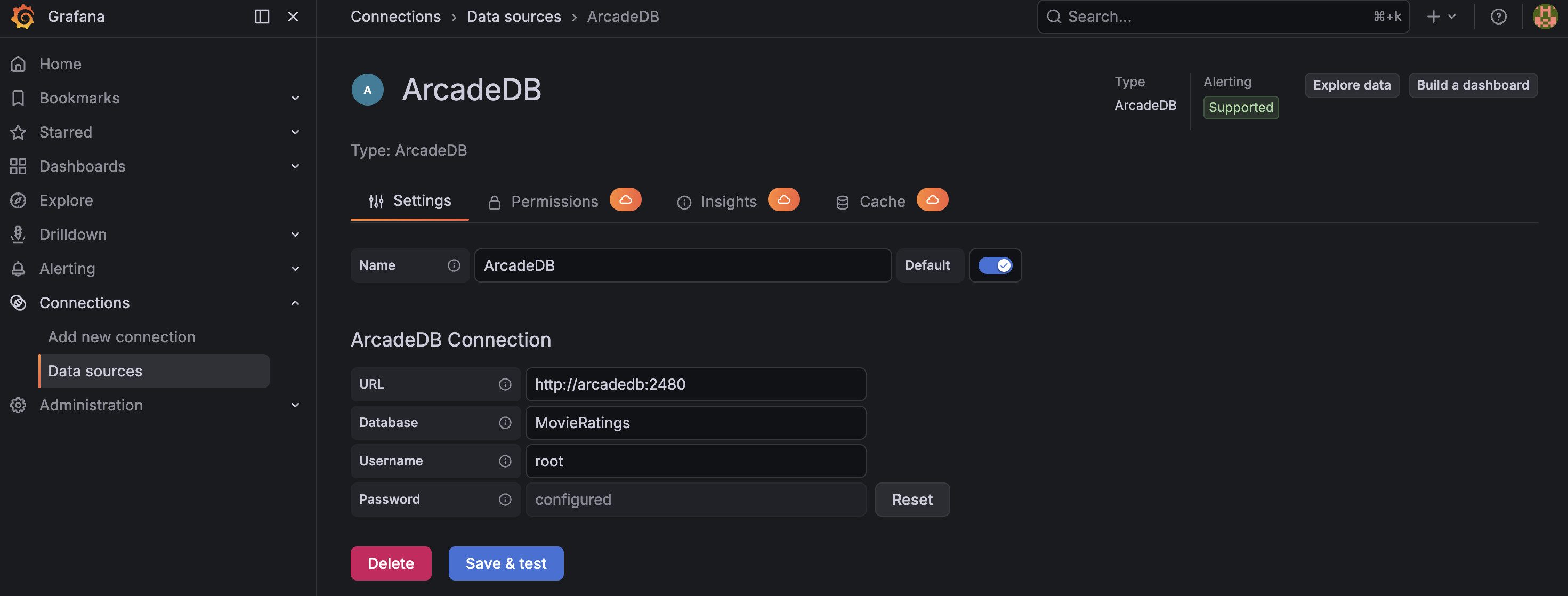
<p>In Grafana, go to <strong>Connections &gt; Data Sources &gt; Add data source</strong> and search for <strong>ArcadeDB</strong>.</p>

<p><img src="/assets/images/grafana-datasource-config.jpg" alt="ArcadeDB data source configuration" /></p>

<p>Fill in:</p>
<ul>
  <li><strong>URL</strong>: <code class="language-plaintext highlighter-rouge">http://host.docker.internal:2480</code> (this lets the Grafana container reach ArcadeDB on your host)</li>
  <li><strong>Database</strong>: <code class="language-plaintext highlighter-rouge">MovieRatings</code></li>
  <li><strong>Username</strong>: <code class="language-plaintext highlighter-rouge">root</code></li>
  <li><strong>Password</strong>: <code class="language-plaintext highlighter-rouge">arcadedb</code></li>
</ul>

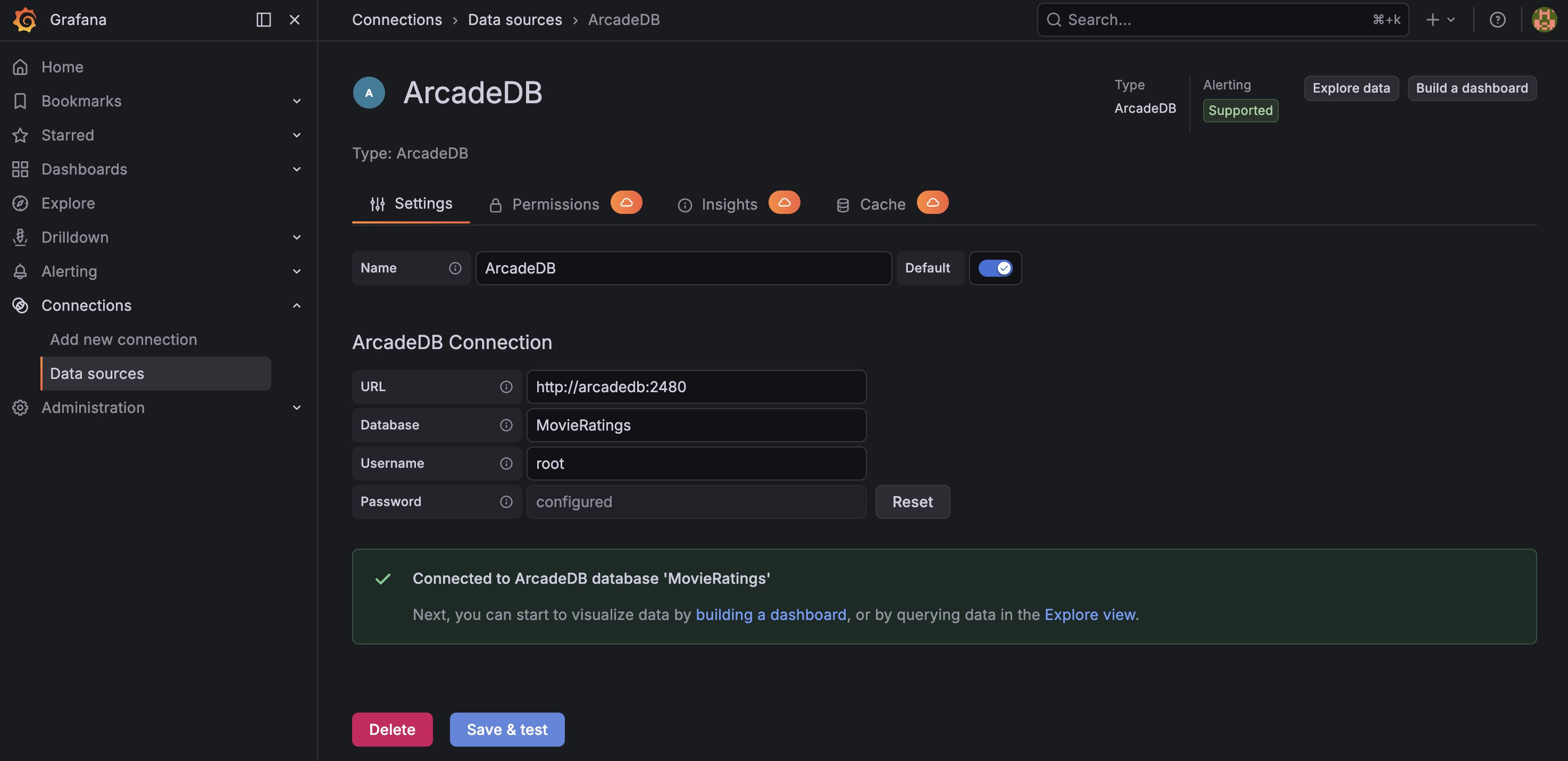
<p>Click <strong>Save &amp; Test</strong>. You should see a green success message.</p>

<p><img src="/assets/images/grafana-datasource-test-success.jpg" alt="Successful connection test" /></p>

<h3 id="step-3-load-the-demo-database">Step 3: Load the Demo Database</h3>

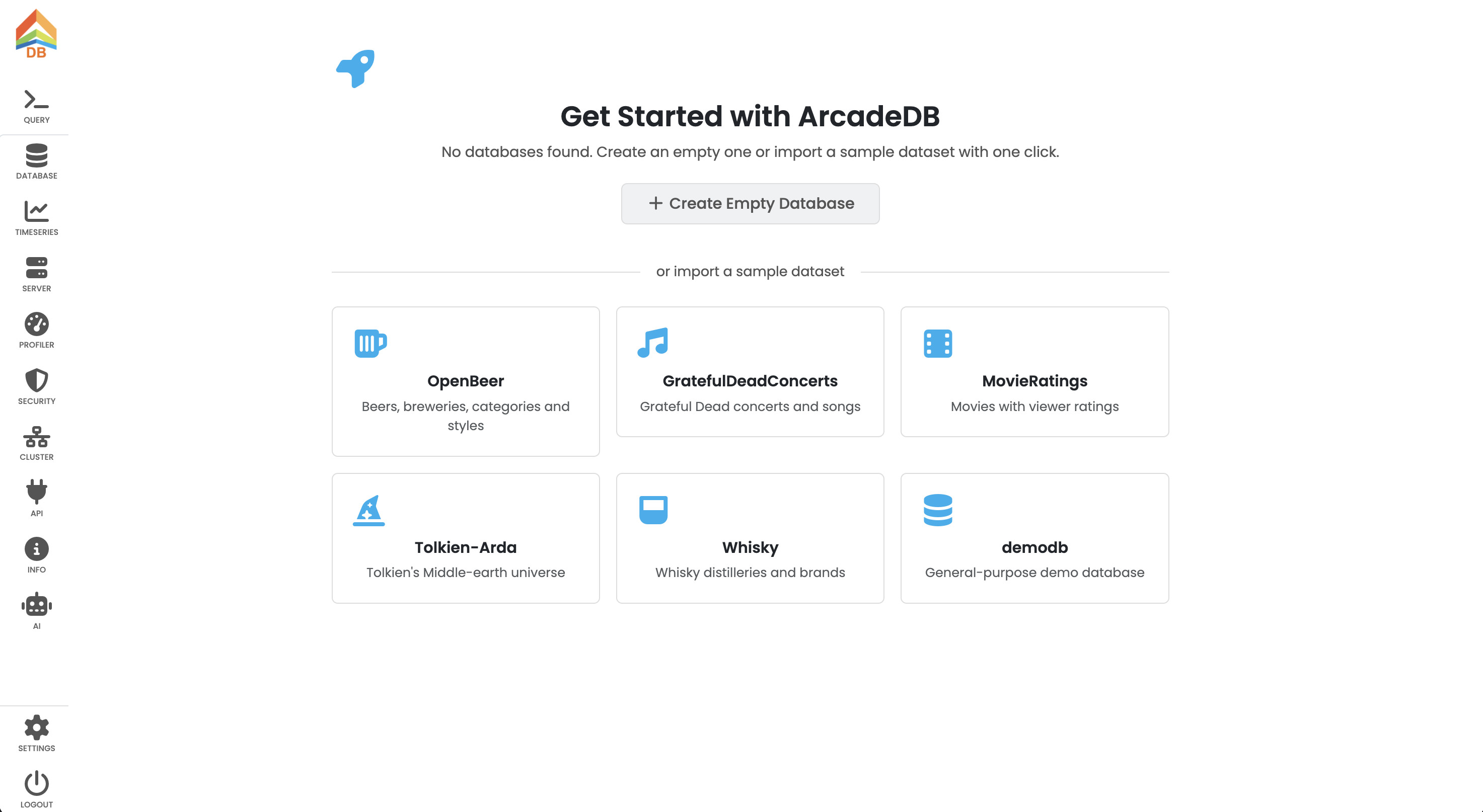
<p>Open ArcadeDB Studio at <code class="language-plaintext highlighter-rouge">http://localhost:2480</code> and create the <strong>MovieRatings</strong> database from the demo databases.</p>

<p><img src="/assets/images/arcadedb-download-db.jpg" alt="Download MovieRatings demo database from ArcadeDB Studio" /></p>

<p>This dataset contains 3,883 movies, 6,040 users, and over 1 million ratings - a real-world graph with vertices (Movies, Users, Genres, Occupations) connected by edges (rated, hasGenera, hasOccupation).</p>

<h3 id="step-4-sql-panel---bar-chart">Step 4: SQL Panel - Bar Chart</h3>

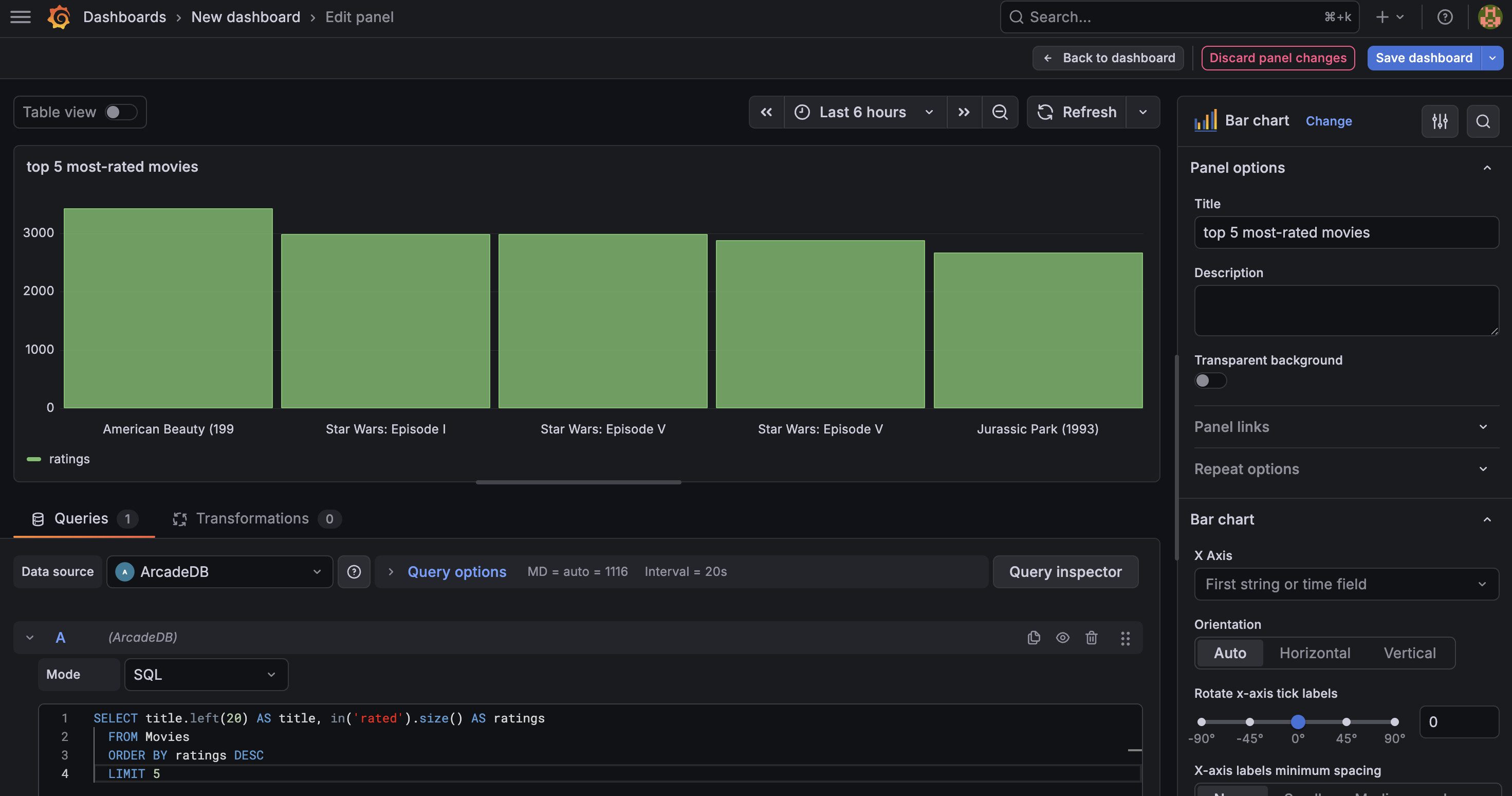
<p>Create a new dashboard and add a visualization. Select the <strong>ArcadeDB</strong> data source.</p>

<ol>
  <li>Set the mode to <strong>SQL</strong>.</li>
  <li>Enter this query to find the top 20 most-rated movies:</li>
</ol>

<div class="language-sql highlighter-rouge"><div class="highlight"><pre class="highlight"><code><span class="k">SELECT</span> <span class="n">title</span><span class="p">.</span><span class="k">left</span><span class="p">(</span><span class="mi">30</span><span class="p">)</span> <span class="k">AS</span> <span class="n">title</span><span class="p">,</span> <span class="k">in</span><span class="p">(</span><span class="s1">'rated'</span><span class="p">).</span><span class="k">size</span><span class="p">()</span> <span class="k">AS</span> <span class="n">ratings</span>
<span class="k">FROM</span> <span class="n">Movies</span>
<span class="k">ORDER</span> <span class="k">BY</span> <span class="n">ratings</span> <span class="k">DESC</span>
<span class="k">LIMIT</span> <span class="mi">5</span>
</code></pre></div></div>

<ol>
  <li>Change the visualization type (top right) to <strong>Bar chart</strong>.</li>
  <li>Run the query.</li>
</ol>

<p><img src="/assets/images/grafana-sql-bar-chart.jpg" alt="Bar chart of the most-rated movies" /></p>

<p>You should see a bar chart with the five most-rated movies. “American Beauty” and “Star Wars” should be at the top. This uses ArcadeDB’s <code class="language-plaintext highlighter-rouge">in()</code> graph traversal function directly in SQL - no joins needed.</p>

<h3 id="step-5-cypher-panel---table-with-average-ratings">Step 5: Cypher Panel - Table with Average Ratings</h3>

<p>Add another visualization for a detailed table view. This time we’ll use <strong>Cypher</strong>, which is ideal for traversing relationships and aggregating edge properties.</p>

<ol>
  <li>Set mode to <strong>Cypher</strong>.</li>
  <li>Enter this query to find the highest-rated movies (with at least 100 ratings):</li>
</ol>

<div class="language-cypher highlighter-rouge"><div class="highlight"><pre class="highlight"><code><span class="k">MATCH</span><span class="w"> </span><span class="ss">(</span><span class="py">m:</span><span class="n">Movies</span><span class="ss">)</span><span class="o">&lt;-</span><span class="ss">[</span><span class="py">r:</span><span class="n">rated</span><span class="ss">]</span><span class="o">-</span><span class="ss">(</span><span class="py">u:</span><span class="n">Users</span><span class="ss">)</span>
<span class="k">WITH</span> <span class="n">m</span><span class="ss">,</span> <span class="nf">count</span><span class="ss">(</span><span class="n">r</span><span class="ss">)</span> <span class="k">AS</span> <span class="n">totalRatings</span><span class="ss">,</span> <span class="nf">avg</span><span class="ss">(</span><span class="n">r.rating</span><span class="ss">)</span> <span class="k">AS</span> <span class="n">avgRating</span>
<span class="k">WHERE</span> <span class="n">totalRatings</span> <span class="o">&gt;=</span> <span class="mi">100</span>
<span class="k">RETURN</span> <span class="n">m.title</span> <span class="k">AS</span> <span class="n">title</span><span class="ss">,</span> <span class="n">totalRatings</span><span class="ss">,</span> <span class="nf">round</span><span class="ss">(</span><span class="n">avgRating</span> <span class="o">*</span> <span class="mi">100</span><span class="ss">)</span> <span class="err">/</span> <span class="mi">100</span> <span class="k">AS</span> <span class="n">avgRating</span>
<span class="k">ORDER</span> <span class="k">BY</span> <span class="n">avgRating</span> <span class="k">DESC</span>
<span class="k">LIMIT</span> <span class="mi">20</span>
</code></pre></div></div>

<ol>
  <li>Change the visualization type to <strong>Table</strong>.</li>
  <li>Run the query.</li>
</ol>

<p><img src="/assets/images/grafana-cypher-table-ratings.jpg" alt="Table of highest-rated movies with average ratings" /></p>

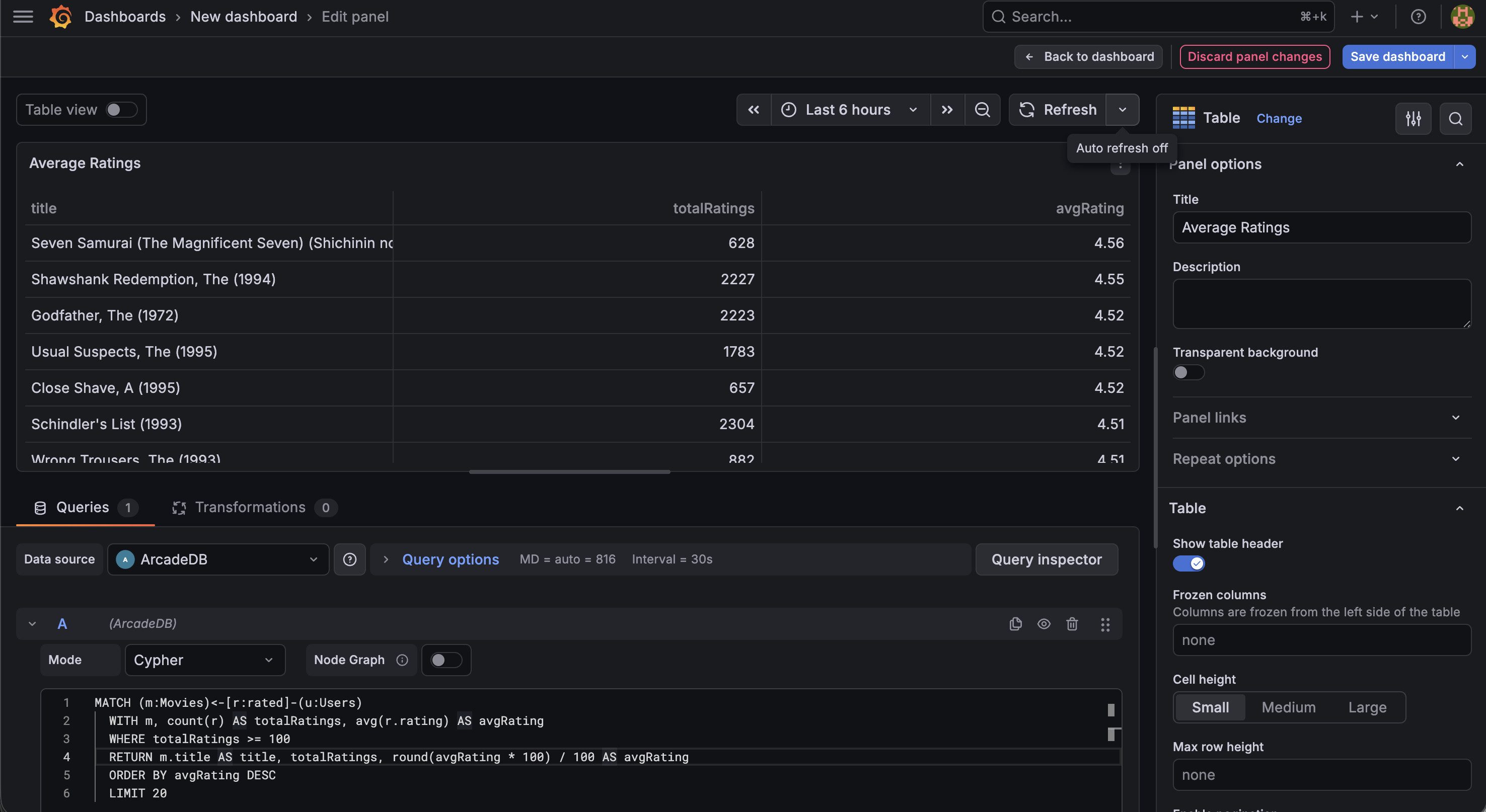
<p>This Cypher query matches the pattern <code class="language-plaintext highlighter-rouge">Movie &lt;-- rated -- User</code>, groups by movie, counts ratings, and computes the average. “Seven Samurai” and “The Shawshank Redemption” should top the list with averages above 4.5.</p>

<h3 id="step-6-cypher-panel---graph-visualization">Step 6: Cypher Panel - Graph Visualization</h3>

<p>Now the highlight - interactive graph visualization of movie-genre relationships.</p>

<ol>
  <li>Add another visualization.</li>
  <li>Switch mode to <strong>Cypher</strong>.</li>
  <li>Enable the <strong>Node Graph</strong> toggle.</li>
  <li>Change the visualization type to <strong>Node Graph</strong> (search for it in the visualization picker).</li>
  <li>Enter this query to explore how top movies connect to genres:</li>
</ol>

<div class="language-cypher highlighter-rouge"><div class="highlight"><pre class="highlight"><code><span class="k">MATCH</span><span class="w"> </span><span class="ss">(</span><span class="py">m:</span><span class="n">Movies</span><span class="ss">)</span><span class="o">-</span><span class="ss">[</span><span class="py">r:</span><span class="n">hasGenera</span><span class="ss">]</span><span class="o">-&gt;</span><span class="ss">(</span><span class="py">g:</span><span class="n">Genres</span><span class="ss">)</span>
<span class="k">WHERE</span> <span class="n">m.title</span> <span class="ow">IN</span> <span class="ss">[</span><span class="s1">'Toy Story (1995)'</span><span class="ss">,</span> <span class="s1">'Star Wars: Episode IV - A New Hope (1977)'</span><span class="ss">,</span> <span class="s1">'The Matrix (1999)'</span><span class="ss">,</span> <span class="s1">'Pulp Fiction (1994)'</span><span class="ss">,</span> <span class="s1">'Forrest Gump (1994)'</span><span class="ss">,</span> <span class="s1">'Jurassic Park (1993)'</span><span class="ss">,</span> <span class="s1">'The Silence of the Lambs (1991)'</span><span class="ss">,</span> <span class="s1">'Fargo (1996)'</span><span class="ss">]</span>
<span class="k">RETURN</span> <span class="n">m</span><span class="ss">,</span> <span class="n">r</span><span class="ss">,</span> <span class="n">g</span>
</code></pre></div></div>

<ol>
  <li>Run the query.</li>
</ol>

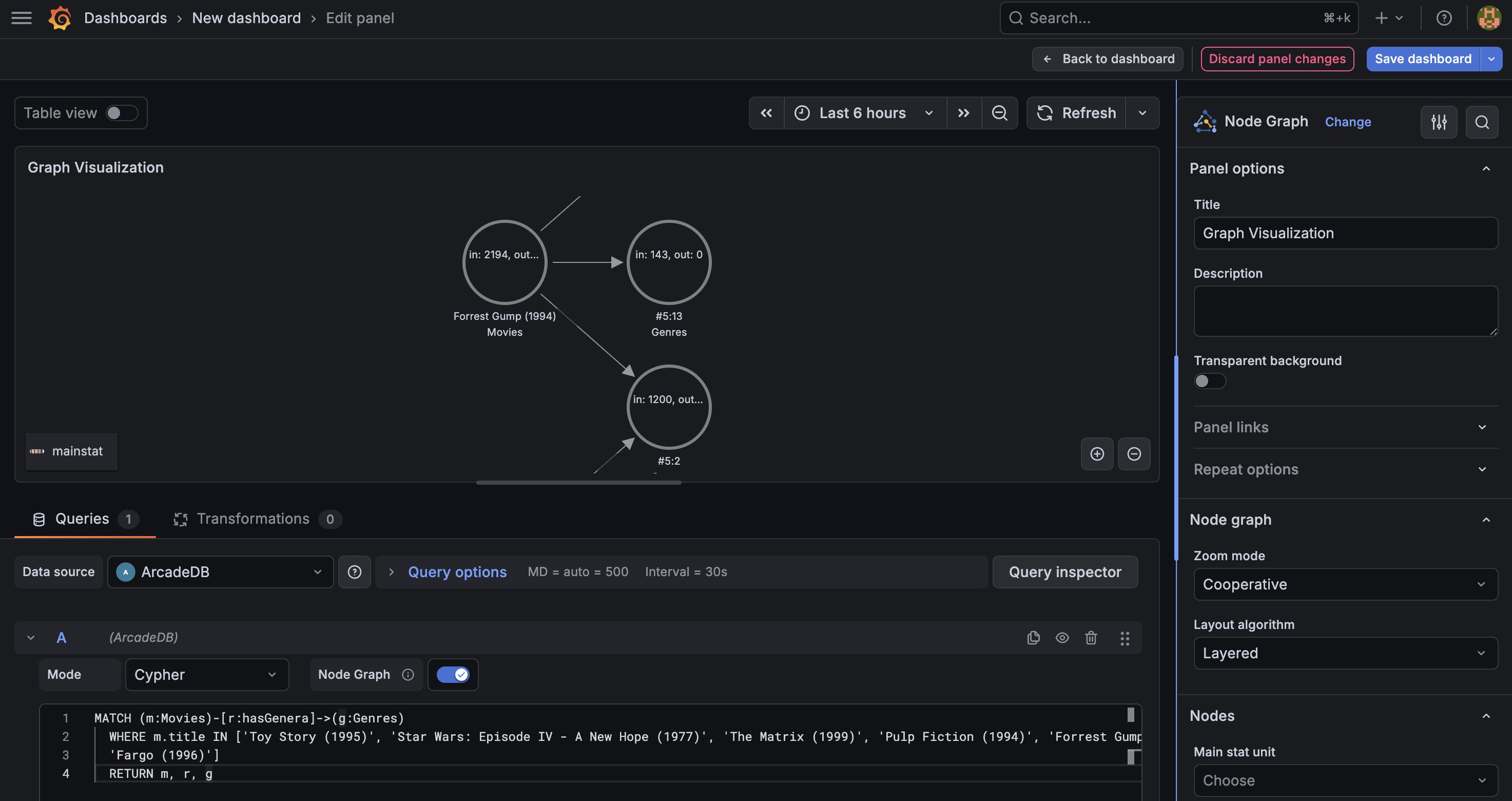
<p><img src="/assets/images/grafana-cypher-node-graph.jpg" alt="Interactive graph visualization of movies and their genres" /></p>

<p>You’ll see an interactive network graph with:</p>
<ul>
  <li><strong>Movie nodes</strong> showing film titles</li>
  <li><strong>Genre nodes</strong> showing categories like “Action”, “Comedy”, “Drama”</li>
  <li><strong>Edges</strong> representing the hasGenera relationship</li>
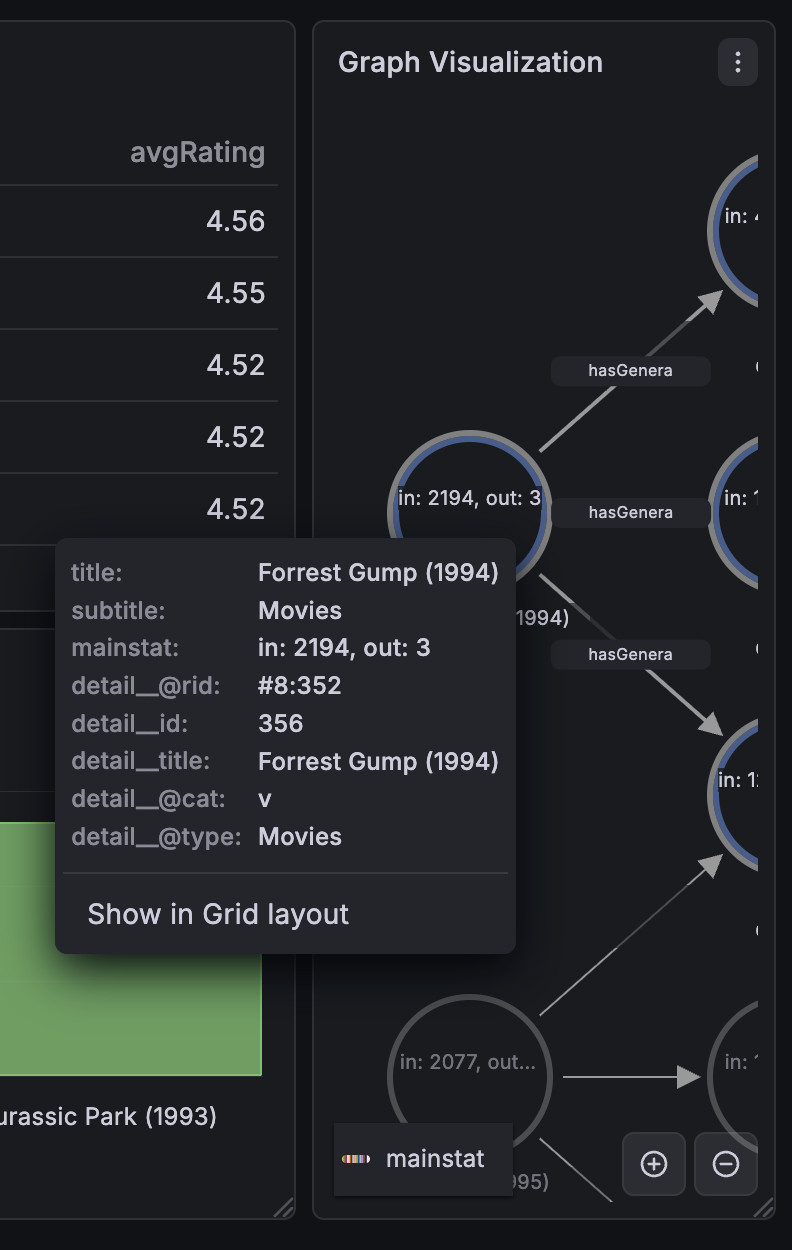
  <li><strong>Click any node</strong> to see all its properties in the detail panel</li>
  <li><strong>Drag nodes</strong> to rearrange the layout</li>
  <li><strong>Zoom and pan</strong> to explore the graph</li>
</ul>

<p><img src="/assets/images/grafana-node-detail.jpg" alt="Node detail view showing movie properties" /></p>

<h3 id="step-7-compose-your-dashboard">Step 7: Compose Your Dashboard</h3>

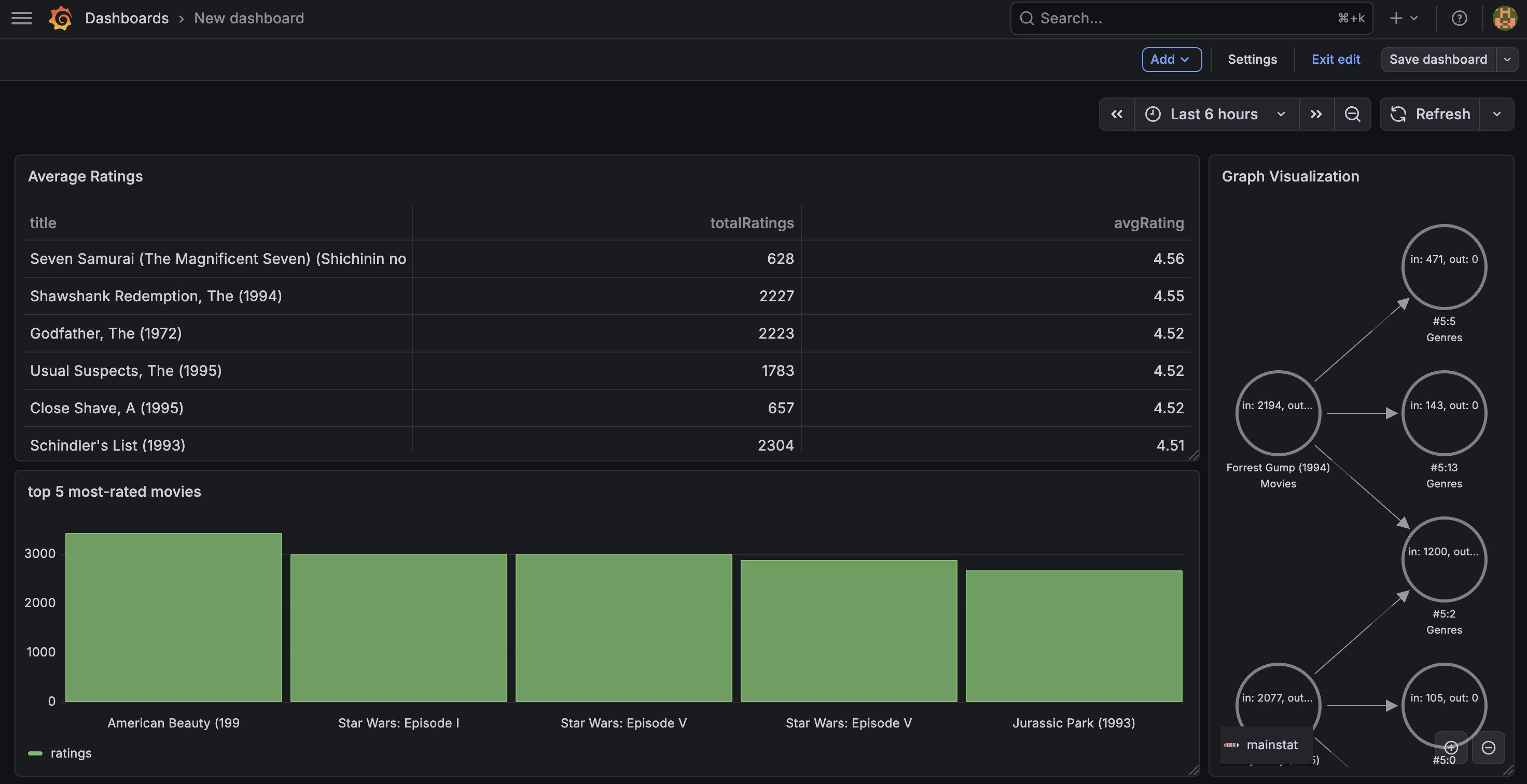
<p>Arrange all three panels on your dashboard: the bar chart at the top, the ratings table in the middle, and the genre graph at the bottom.</p>

<p><img src="/assets/images/grafana-complete-dashboard.jpg" alt="Complete dashboard with bar chart, ratings table, and Cypher graph" /></p>

<p>Save the dashboard. You now have a multi-model BI dashboard that combines chart visualization, tabular data with graph traversals, and interactive graph exploration in a single view - something no other BI tool can do natively.</p>

<h2 id="beyond-the-basics">Beyond the Basics</h2>

<h3 id="template-variables">Template Variables</h3>

<p>Create dynamic dashboards with template variables. Add a variable backed by an ArcadeDB query:</p>

<div class="language-sql highlighter-rouge"><div class="highlight"><pre class="highlight"><code><span class="k">SELECT</span> <span class="n">description</span> <span class="k">AS</span> <span class="n">__text</span><span class="p">,</span> <span class="n">description</span> <span class="k">AS</span> <span class="n">__value</span> <span class="k">FROM</span> <span class="n">Genres</span>
</code></pre></div></div>

<p>Then use it in your panels to filter movies by genre:</p>

<div class="language-sql highlighter-rouge"><div class="highlight"><pre class="highlight"><code><span class="k">SELECT</span> <span class="n">m</span><span class="p">.</span><span class="n">title</span><span class="p">,</span> <span class="k">in</span><span class="p">(</span><span class="s1">'rated'</span><span class="p">).</span><span class="k">size</span><span class="p">()</span> <span class="k">AS</span> <span class="n">ratings</span>
<span class="k">FROM</span> <span class="n">Movies</span> <span class="k">AS</span> <span class="n">m</span>
<span class="k">WHERE</span> <span class="n">m</span><span class="p">.</span><span class="k">out</span><span class="p">(</span><span class="s1">'hasGenera'</span><span class="p">).</span><span class="n">description</span> <span class="k">CONTAINS</span> <span class="s1">'$genre'</span>
<span class="k">ORDER</span> <span class="k">BY</span> <span class="n">ratings</span> <span class="k">DESC</span>
<span class="k">LIMIT</span> <span class="mi">20</span>
</code></pre></div></div>

<p>Users can switch genres from a dropdown at the top of the dashboard.</p>

<h3 id="alerting">Alerting</h3>

<p>Set up alerts on any query. For example, create an alert when the number of new ratings per hour drops below a threshold - useful for monitoring data pipeline health.</p>

<p>Because the plugin has a Go backend, alerts evaluate server-side - no browser needed.</p>

<h2 id="arcadedb--bi-the-full-picture">ArcadeDB + BI: The Full Picture</h2>

<p>The Grafana plugin is the centerpiece, but ArcadeDB also works with other BI tools through the <strong><a href="https://docs.arcadedb.com/arcadedb/how-to/connectivity/postgres.html">PostgreSQL wire protocol</a></strong>. Any tool that supports PostgreSQL can connect to ArcadeDB on port 5432:</p>

<table>
  <thead>
    <tr>
      <th>Tool</th>
      <th>Connection</th>
      <th>Best For</th>
    </tr>
  </thead>
  <tbody>
    <tr>
      <td><strong>Grafana</strong></td>
      <td>ArcadeDB plugin</td>
      <td>Time series, graphs, alerting</td>
    </tr>
    <tr>
      <td><strong>Apache Superset</strong></td>
      <td>PostgreSQL (SQLAlchemy)</td>
      <td>SQL Lab, charting</td>
    </tr>
    <tr>
      <td><strong>Metabase</strong></td>
      <td>PostgreSQL (JDBC)</td>
      <td>Self-service BI</td>
    </tr>
    <tr>
      <td><strong>Tableau</strong></td>
      <td>PostgreSQL connector</td>
      <td>Enterprise reporting</td>
    </tr>
    <tr>
      <td><strong>Power BI</strong></td>
      <td>PostgreSQL (ODBC)</td>
      <td>Microsoft ecosystem</td>
    </tr>
    <tr>
      <td><strong>DBeaver</strong></td>
      <td>PostgreSQL (JDBC)</td>
      <td>Database development</td>
    </tr>
  </tbody>
</table>

<p>The Grafana plugin provides the richest experience, especially for time series and graph visualization. The PostgreSQL wire protocol gives you breadth - connect any tool in your stack.</p>

<h2 id="getting-started">Getting Started</h2>

<p>The plugin is <a href="https://arcadedb.com/blog/open-source-forever-why-arcadedb-will-never-change-its-license/">open source</a> (Apache 2.0) and available on GitHub:</p>

<ul>
  <li><strong>Repository</strong>: <a href="https://github.com/ArcadeData/arcadedb-grafana-datasource">github.com/ArcadeData/arcadedb-grafana-datasource</a></li>
  <li><strong>Installation</strong>: <code class="language-plaintext highlighter-rouge">grafana-cli plugins install arcadedb-arcadedb-datasource</code></li>
  <li><strong>Documentation</strong>: See the <a href="https://github.com/ArcadeData/arcadedb-grafana-datasource/blob/main/README.md">README</a> for full configuration and usage details</li>
  <li><strong>BI Integration Guide</strong>: The <a href="https://docs.arcadedb.com">ArcadeDB documentation</a> includes guides for connecting Grafana, Superset, Metabase, Tableau, Power BI, and DBeaver</li>
</ul>

<p>Your data is more than rows and columns. Your dashboards should be too.</p>]]></content><author><name>Luca Garulli</name></author><category term="Grafana" /><category term="BI" /><category term="Dashboard" /><category term="Analytics" /><category term="Graph Database" /><category term="Time Series" /><category term="Cypher" /><category term="SQL" /><summary type="html"><![CDATA[The new ArcadeDB Grafana plugin brings native SQL, Cypher, and Gremlin query support, interactive graph visualization via Node Graph, time series dashboards, and Grafana alerting to ArcadeDB - all through a single Go-native backend plugin.]]></summary><media:thumbnail xmlns:media="http://search.yahoo.com/mrss/" url="https://arcadedb.com/assets/images/arcadedb-grafana-plugin.jpg" /><media:content medium="image" url="https://arcadedb.com/assets/images/arcadedb-grafana-plugin.jpg" xmlns:media="http://search.yahoo.com/mrss/" /></entry><entry><title type="html">GraphBatch: Up to 8x Faster Graph Ingestion in ArcadeDB</title><link href="https://arcadedb.com/blog/graphbatch-up-to-8x-faster-graph-ingestion/" rel="alternate" type="text/html" title="GraphBatch: Up to 8x Faster Graph Ingestion in ArcadeDB" /><published>2026-03-31T00:00:00+00:00</published><updated>2026-03-31T00:00:00+00:00</updated><id>https://arcadedb.com/blog/graphbatch-up-to-8x-faster-graph-ingestion</id><content type="html" xml:base="https://arcadedb.com/blog/graphbatch-up-to-8x-faster-graph-ingestion/"><![CDATA[<p>If you’ve ever loaded millions of edges into a graph database, you know the pain: what should be a straightforward bulk import can take minutes - or even hours - as the transactional overhead stacks up. Today we’re introducing <strong>GraphBatch</strong>, a new engine-level API in <a href="https://arcadedb.com/blog/arcadedb-26-3-2/">ArcadeDB v26.3.2</a> that makes large-scale graph ingestion dramatically faster. And with the new HTTP batch endpoint and streaming gRPC API, you can leverage that power from any language.</p>

<h2 id="why-a-new-importer">Why a New Importer?</h2>

<p>ArcadeDB has always offered two ways to load graph data: the <strong>standard transactional API</strong> (batching operations in explicit transactions) and the <strong>GraphImporter</strong> (an integration-level helper that manages batching for you). Both work well for moderate workloads, but at scale the transactional overhead becomes a bottleneck.</p>

<p>GraphBatch takes a fundamentally different approach. Instead of wrapping the standard API, it operates directly at the storage engine level, bypassing the transactional layer entirely during bulk import. The result: throughput that scales with your hardware, not your transaction size.</p>

<h2 id="the-benchmark">The Benchmark</h2>

<p>We ran a series of benchmarks loading graphs of increasing size on the same hardware, measuring edges ingested per second. Here are the results.</p>

<h3 id="1m-vertices-10m-edges--light-edges-no-properties">1M Vertices, 10M Edges — Light Edges (No Properties)</h3>

<table>
  <thead>
    <tr>
      <th>Method</th>
      <th>Time (ms)</th>
      <th>Edges/sec</th>
      <th>Speedup</th>
    </tr>
  </thead>
  <tbody>
    <tr>
      <td>Standard API (tx/1000)</td>
      <td>267,140</td>
      <td>37,434</td>
      <td>1.00x</td>
    </tr>
    <tr>
      <td>Old GraphImporter (integration)</td>
      <td>97,160</td>
      <td>102,923</td>
      <td>2.75x</td>
    </tr>
    <tr>
      <td><strong>New GraphBatch (engine)</strong></td>
      <td><strong>31,842</strong></td>
      <td><strong>314,047</strong></td>
      <td><strong>8.39x</strong></td>
    </tr>
  </tbody>
</table>

<p>The new importer is <strong>8.39x faster</strong> than the standard API and <strong>3.05x faster</strong> than the previous GraphImporter. What previously took nearly 4.5 minutes now completes in about 32 seconds.</p>

<h3 id="1m-vertices-10m-edges--edges-with-properties-int--long">1M Vertices, 10M Edges — Edges with Properties (int + long)</h3>

<table>
  <thead>
    <tr>
      <th>Method</th>
      <th>Time (ms)</th>
      <th>Edges/sec</th>
      <th>Speedup</th>
    </tr>
  </thead>
  <tbody>
    <tr>
      <td>Standard API + props (tx/1000)</td>
      <td>267,773</td>
      <td>37,345</td>
      <td>1.00x</td>
    </tr>
    <tr>
      <td><strong>New GraphBatch + props</strong></td>
      <td><strong>53,893</strong></td>
      <td><strong>185,554</strong></td>
      <td><strong>4.97x</strong></td>
    </tr>
  </tbody>
</table>

<p>Even with properties on every edge, GraphBatch delivers a <strong>4.97x speedup</strong>. The additional serialization cost is manageable because the engine-level approach avoids the per-transaction overhead that dominates at scale.</p>

<h3 id="scaling-behavior">Scaling Behavior</h3>

<p>This is where things get really interesting. We compared how each method behaves as the graph size increases:</p>

<table>
  <thead>
    <tr>
      <th>Scale</th>
      <th>Std API (edges/sec)</th>
      <th>GraphBatch (edges/sec)</th>
      <th>Speedup</th>
    </tr>
  </thead>
  <tbody>
    <tr>
      <td>10K vertices / 100K edges</td>
      <td>241,644</td>
      <td>1,025,019</td>
      <td>4.24x</td>
    </tr>
    <tr>
      <td>100K vertices / 1M edges</td>
      <td>103,027</td>
      <td>1,212,756</td>
      <td>11.77x</td>
    </tr>
    <tr>
      <td>1M vertices / 10M edges</td>
      <td>37,434</td>
      <td>314,047</td>
      <td>8.39x</td>
    </tr>
  </tbody>
</table>

<p>Two things stand out:</p>

<ol>
  <li>
    <p><strong>The standard API degrades significantly at scale</strong> — from 241K edges/sec at 100K edges down to just 37K edges/sec at 10M edges. This is expected: as the graph grows, transaction management, index maintenance, and page cache pressure all increase.</p>
  </li>
  <li>
    <p><strong>GraphBatch holds up far better</strong> — peaking at over <strong>1.2 million edges per second</strong> at the 1M-edge scale. At the largest scale (10M edges), memory pressure naturally reduces throughput, but it still maintains 314K edges/sec — a strong result for a single machine.</p>
  </li>
</ol>

<p>The sweet spot appears to be around the 100K–1M vertex range, where GraphBatch reaches <strong>11.77x</strong> the throughput of the standard API.</p>

<h2 id="when-to-use-graphbatch">When to Use GraphBatch</h2>

<p>GraphBatch is designed for <strong>bulk edge creation</strong> — whether that’s during initial data loading or at runtime on an existing database. It doesn’t require an empty database: as long as vertex and edge <a href="https://docs.arcadedb.com/arcadedb/reference/sql/sql-create-type.html">types</a> exist in the <a href="https://docs.arcadedb.com/arcadedb/concepts/schema.html">schema</a> and the source/destination vertices have valid RIDs, you’re good to go.</p>

<h3 id="initial-import-scenarios">Initial Import Scenarios</h3>

<ul>
  <li><strong>Data migration</strong> — moving graph data from <a href="https://docs.arcadedb.com/arcadedb/how-to/migration/neo4j-importer.html">another database</a> into ArcadeDB</li>
  <li><strong>ETL pipelines</strong> — loading large datasets from data warehouses or data lakes</li>
  <li><strong>Testing and benchmarking</strong> — quickly setting up large test graphs</li>
</ul>

<h3 id="runtime-scenarios">Runtime Scenarios</h3>

<p>GraphBatch works on live databases with existing data, making it the right tool whenever you need to create edges in bulk at runtime:</p>

<ul>
  <li><strong>Social networks</strong> — a user imports their contact list and you need to create thousands of KNOWS edges between existing Person vertices</li>
  <li><strong>IoT / time series</strong> — a periodic job links new sensor readings to their device vertices and chains them in a time series</li>
  <li><strong><a href="https://arcadedb.com/knowledge-graphs.html">Knowledge graphs</a></strong> — after an NLP pipeline extracts relationships from documents, you materialize thousands of typed edges between existing entity vertices</li>
  <li><strong><a href="https://arcadedb.com/recommendation-engine.html">Recommendation engines</a></strong> — nightly rebuild of ALSO_BOUGHT / SIMILAR_TO edges based on updated purchase data</li>
  <li><strong>Incremental ETL</strong> — periodically sync new relationships from an external system into an existing graph</li>
</ul>

<h3 id="when-not-to-use-it">When NOT to Use It</h3>

<ul>
  <li><strong>Small writes</strong> — for fewer than ~100 edges, the standard API is simpler and the importer overhead isn’t worth it</li>
  <li><strong>Concurrent reads on the same vertices</strong> — the importer disables read-your-writes and manages its own transactions, so concurrent readers may see inconsistent state until <code class="language-plaintext highlighter-rouge">close()</code></li>
  <li><strong>Immediate edge visibility required</strong> — in parallel mode, incoming edges aren’t fully connected until <code class="language-plaintext highlighter-rouge">close()</code></li>
</ul>

<p>For ongoing OLTP workloads with small, frequent writes, the standard transactional API remains the right choice — it provides full <a href="https://docs.arcadedb.com/arcadedb/concepts/transactions.html">ACID guarantees</a> with immediate visibility.</p>

<h2 id="runtime-usage-examples">Runtime Usage Examples</h2>

<h3 id="bulk-friend-import-light-edges">Bulk Friend Import (Light Edges)</h3>

<div class="language-java highlighter-rouge"><div class="highlight"><pre class="highlight"><code><span class="c1">// Vertices already exist in the database</span>
<span class="no">RID</span><span class="o">[]</span> <span class="n">personRIDs</span> <span class="o">=</span> <span class="n">lookupExistingPersons</span><span class="o">(</span><span class="n">contactIds</span><span class="o">);</span>

<span class="k">try</span> <span class="o">(</span><span class="nc">GraphBatch</span> <span class="n">batch</span> <span class="o">=</span> <span class="n">database</span><span class="o">.</span><span class="na">batch</span><span class="o">()</span>
    <span class="o">.</span><span class="na">withBatchSize</span><span class="o">(</span><span class="mi">50_000</span><span class="o">)</span>
    <span class="o">.</span><span class="na">withLightEdges</span><span class="o">(</span><span class="kc">true</span><span class="o">)</span>
    <span class="o">.</span><span class="na">build</span><span class="o">())</span> <span class="o">{</span>
  <span class="k">for</span> <span class="o">(</span><span class="kt">int</span><span class="o">[]</span> <span class="n">pair</span> <span class="o">:</span> <span class="n">contactPairs</span><span class="o">)</span>
    <span class="n">batch</span><span class="o">.</span><span class="na">newEdge</span><span class="o">(</span><span class="n">personRIDs</span><span class="o">[</span><span class="n">pair</span><span class="o">[</span><span class="mi">0</span><span class="o">]],</span> <span class="s">"KNOWS"</span><span class="o">,</span> <span class="n">personRIDs</span><span class="o">[</span><span class="n">pair</span><span class="o">[</span><span class="mi">1</span><span class="o">]]);</span>
<span class="o">}</span>
</code></pre></div></div>

<h3 id="iot-sensor-linkage-with-wal-for-crash-safety">IoT Sensor Linkage (with WAL for Crash Safety)</h3>

<div class="language-java highlighter-rouge"><div class="highlight"><pre class="highlight"><code><span class="k">try</span> <span class="o">(</span><span class="nc">GraphBatch</span> <span class="n">batch</span> <span class="o">=</span> <span class="n">database</span><span class="o">.</span><span class="na">batch</span><span class="o">()</span>
    <span class="o">.</span><span class="na">withBatchSize</span><span class="o">(</span><span class="mi">100_000</span><span class="o">)</span>
    <span class="o">.</span><span class="na">withWAL</span><span class="o">(</span><span class="kc">true</span><span class="o">)</span>
    <span class="o">.</span><span class="na">withCommitEvery</span><span class="o">(</span><span class="mi">10_000</span><span class="o">)</span>
    <span class="o">.</span><span class="na">build</span><span class="o">())</span> <span class="o">{</span>
  <span class="k">for</span> <span class="o">(</span><span class="nc">SensorReading</span> <span class="n">r</span> <span class="o">:</span> <span class="n">newReadings</span><span class="o">)</span> <span class="o">{</span>
    <span class="n">batch</span><span class="o">.</span><span class="na">newEdge</span><span class="o">(</span><span class="n">r</span><span class="o">.</span><span class="na">deviceRID</span><span class="o">,</span> <span class="s">"HAS_READING"</span><span class="o">,</span> <span class="n">r</span><span class="o">.</span><span class="na">rid</span><span class="o">,</span> <span class="s">"timestamp"</span><span class="o">,</span> <span class="n">r</span><span class="o">.</span><span class="na">ts</span><span class="o">);</span>
    <span class="k">if</span> <span class="o">(</span><span class="n">r</span><span class="o">.</span><span class="na">previousRID</span> <span class="o">!=</span> <span class="kc">null</span><span class="o">)</span>
      <span class="n">batch</span><span class="o">.</span><span class="na">newEdge</span><span class="o">(</span><span class="n">r</span><span class="o">.</span><span class="na">rid</span><span class="o">,</span> <span class="s">"NEXT"</span><span class="o">,</span> <span class="n">r</span><span class="o">.</span><span class="na">previousRID</span><span class="o">);</span>
  <span class="o">}</span>
<span class="o">}</span>
</code></pre></div></div>

<h3 id="knowledge-graph-entity-resolution-with-edge-properties">Knowledge Graph Entity Resolution (with Edge Properties)</h3>

<div class="language-java highlighter-rouge"><div class="highlight"><pre class="highlight"><code><span class="k">try</span> <span class="o">(</span><span class="nc">GraphBatch</span> <span class="n">batch</span> <span class="o">=</span> <span class="n">database</span><span class="o">.</span><span class="na">batch</span><span class="o">()</span>
    <span class="o">.</span><span class="na">withBatchSize</span><span class="o">(</span><span class="mi">200_000</span><span class="o">)</span>
    <span class="o">.</span><span class="na">withParallelFlush</span><span class="o">(</span><span class="kc">true</span><span class="o">)</span>
    <span class="o">.</span><span class="na">build</span><span class="o">())</span> <span class="o">{</span>
  <span class="k">for</span> <span class="o">(</span><span class="nc">ExtractedRelation</span> <span class="n">rel</span> <span class="o">:</span> <span class="n">relations</span><span class="o">)</span>
    <span class="n">batch</span><span class="o">.</span><span class="na">newEdge</span><span class="o">(</span><span class="n">rel</span><span class="o">.</span><span class="na">subjectRID</span><span class="o">,</span> <span class="n">rel</span><span class="o">.</span><span class="na">edgeType</span><span class="o">,</span> <span class="n">rel</span><span class="o">.</span><span class="na">objectRID</span><span class="o">,</span>
        <span class="s">"confidence"</span><span class="o">,</span> <span class="n">rel</span><span class="o">.</span><span class="na">score</span><span class="o">,</span> <span class="s">"source"</span><span class="o">,</span> <span class="n">rel</span><span class="o">.</span><span class="na">docId</span><span class="o">);</span>
<span class="o">}</span>
</code></pre></div></div>

<h3 id="nightly-recommendation-rebuild">Nightly Recommendation Rebuild</h3>

<div class="language-java highlighter-rouge"><div class="highlight"><pre class="highlight"><code><span class="c1">// Remove stale edges</span>
<span class="n">database</span><span class="o">.</span><span class="na">command</span><span class="o">(</span><span class="s">"sql"</span><span class="o">,</span> <span class="s">"DELETE EDGE ALSO_BOUGHT"</span><span class="o">);</span>

<span class="c1">// Rebuild from recommendation engine output</span>
<span class="k">try</span> <span class="o">(</span><span class="nc">GraphBatch</span> <span class="n">batch</span> <span class="o">=</span> <span class="n">database</span><span class="o">.</span><span class="na">batch</span><span class="o">()</span>
    <span class="o">.</span><span class="na">withBatchSize</span><span class="o">(</span><span class="mi">500_000</span><span class="o">)</span>
    <span class="o">.</span><span class="na">withLightEdges</span><span class="o">(</span><span class="kc">true</span><span class="o">)</span>
    <span class="o">.</span><span class="na">build</span><span class="o">())</span> <span class="o">{</span>
  <span class="k">for</span> <span class="o">(</span><span class="nc">Recommendation</span> <span class="n">rec</span> <span class="o">:</span> <span class="n">recommendations</span><span class="o">)</span>
    <span class="n">batch</span><span class="o">.</span><span class="na">newEdge</span><span class="o">(</span><span class="n">rec</span><span class="o">.</span><span class="na">productRID</span><span class="o">,</span> <span class="s">"ALSO_BOUGHT"</span><span class="o">,</span> <span class="n">rec</span><span class="o">.</span><span class="na">relatedRID</span><span class="o">);</span>
<span class="o">}</span>
</code></pre></div></div>

<h3 id="incremental-sync-from-external-database">Incremental Sync from External Database</h3>

<div class="language-java highlighter-rouge"><div class="highlight"><pre class="highlight"><code><span class="k">try</span> <span class="o">(</span><span class="nc">GraphBatch</span> <span class="n">batch</span> <span class="o">=</span> <span class="n">database</span><span class="o">.</span><span class="na">batch</span><span class="o">()</span>
    <span class="o">.</span><span class="na">withBatchSize</span><span class="o">(</span><span class="mi">100_000</span><span class="o">)</span>
    <span class="o">.</span><span class="na">withWAL</span><span class="o">(</span><span class="kc">true</span><span class="o">)</span>
    <span class="o">.</span><span class="na">build</span><span class="o">())</span> <span class="o">{</span>
  <span class="k">try</span> <span class="o">(</span><span class="nc">ResultSet</span> <span class="n">rs</span> <span class="o">=</span> <span class="n">externalDB</span><span class="o">.</span><span class="na">executeQuery</span><span class="o">(</span><span class="n">deltaQuery</span><span class="o">))</span> <span class="o">{</span>
    <span class="k">while</span> <span class="o">(</span><span class="n">rs</span><span class="o">.</span><span class="na">next</span><span class="o">())</span>
      <span class="n">batch</span><span class="o">.</span><span class="na">newEdge</span><span class="o">(</span>
          <span class="n">lookupRID</span><span class="o">(</span><span class="n">rs</span><span class="o">.</span><span class="na">getString</span><span class="o">(</span><span class="s">"from_id"</span><span class="o">)),</span>
          <span class="s">"REPORTS_TO"</span><span class="o">,</span>
          <span class="n">lookupRID</span><span class="o">(</span><span class="n">rs</span><span class="o">.</span><span class="na">getString</span><span class="o">(</span><span class="s">"to_id"</span><span class="o">)),</span>
          <span class="s">"since"</span><span class="o">,</span> <span class="n">rs</span><span class="o">.</span><span class="na">getDate</span><span class="o">(</span><span class="s">"start_date"</span><span class="o">));</span>
  <span class="o">}</span>
<span class="o">}</span>
</code></pre></div></div>

<blockquote>
  <p><strong>Tip</strong>: For runtime usage on production databases, enable WAL with <code class="language-plaintext highlighter-rouge">withWAL(true)</code> for crash safety. For initial imports where you can re-run on failure, leaving WAL off maximizes throughput.</p>
</blockquote>

<h2 id="http-batch-endpoint--graphbatch-for-every-language">HTTP Batch Endpoint — GraphBatch for Every Language</h2>

<p>GraphBatch is a Java API, but not everyone embeds ArcadeDB in a JVM application. That’s why v26.3.2 also ships a new <strong>HTTP batch endpoint</strong> that exposes the full power of GraphBatch over the <a href="https://docs.arcadedb.com/arcadedb/reference/http-api/http.html">HTTP API</a> — no Java required.</p>

<div class="language-plaintext highlighter-rouge"><div class="highlight"><pre class="highlight"><code>POST /api/v1/batch/{database}
</code></pre></div></div>

<p>It supports two input formats: <strong>JSONL</strong> (newline-delimited JSON) and <strong>CSV</strong>. Both are streamed — the server never loads the entire payload into memory, so you can push millions of records in a single request.</p>

<h3 id="jsonl-format">JSONL Format</h3>

<pre><code class="language-jsonl">{"@type":"vertex","@class":"Person","@id":"t1","name":"Alice","age":30}
{"@type":"vertex","@class":"Person","@id":"t2","name":"Bob","age":25}
{"@type":"edge","@class":"KNOWS","@from":"t1","@to":"t2","since":2020}
</code></pre>

<h3 id="csv-format">CSV Format</h3>

<pre><code class="language-csv">@type,@class,@id,name,age
vertex,Person,t1,Alice,30
vertex,Person,t2,Bob,25
---
@type,@class,@from,@to,since
edge,KNOWS,t1,t2,2020
</code></pre>

<p>In both formats, vertices come first, then edges. Vertices can have temporary IDs (<code class="language-plaintext highlighter-rouge">@id</code>) that edges reference via <code class="language-plaintext highlighter-rouge">@from</code>/<code class="language-plaintext highlighter-rouge">@to</code>. Edges can also reference existing database RIDs directly (e.g., <code class="language-plaintext highlighter-rouge">#12:0</code>).</p>

<h3 id="temporary-id-mapping">Temporary ID Mapping</h3>

<p>The response includes an <code class="language-plaintext highlighter-rouge">idMapping</code> object so you know what RIDs were assigned:</p>

<div class="language-json highlighter-rouge"><div class="highlight"><pre class="highlight"><code><span class="p">{</span><span class="w">
  </span><span class="nl">"verticesCreated"</span><span class="p">:</span><span class="w"> </span><span class="mi">2</span><span class="p">,</span><span class="w">
  </span><span class="nl">"edgesCreated"</span><span class="p">:</span><span class="w"> </span><span class="mi">1</span><span class="p">,</span><span class="w">
  </span><span class="nl">"elapsedMs"</span><span class="p">:</span><span class="w"> </span><span class="mi">42</span><span class="p">,</span><span class="w">
  </span><span class="nl">"idMapping"</span><span class="p">:</span><span class="w"> </span><span class="p">{</span><span class="nl">"t1"</span><span class="p">:</span><span class="w"> </span><span class="s2">"#9:0"</span><span class="p">,</span><span class="w"> </span><span class="nl">"t2"</span><span class="p">:</span><span class="w"> </span><span class="s2">"#9:1"</span><span class="p">}</span><span class="w">
</span><span class="p">}</span><span class="w">
</span></code></pre></div></div>

<h3 id="tuning-via-query-parameters">Tuning via Query Parameters</h3>

<p>All GraphBatch configuration options are exposed as query parameters:</p>

<table>
  <thead>
    <tr>
      <th>Parameter</th>
      <th>Default</th>
      <th>Description</th>
    </tr>
  </thead>
  <tbody>
    <tr>
      <td><code class="language-plaintext highlighter-rouge">batchSize</code></td>
      <td>100000</td>
      <td>Max edges buffered before auto-flush</td>
    </tr>
    <tr>
      <td><code class="language-plaintext highlighter-rouge">lightEdges</code></td>
      <td>false</td>
      <td>Property-less edges stored as connectivity only (saves ~33% I/O)</td>
    </tr>
    <tr>
      <td><code class="language-plaintext highlighter-rouge">wal</code></td>
      <td>false</td>
      <td>Enable Write-Ahead Logging for crash safety</td>
    </tr>
    <tr>
      <td><code class="language-plaintext highlighter-rouge">parallelFlush</code></td>
      <td>true</td>
      <td>Parallelize edge connection across async threads</td>
    </tr>
    <tr>
      <td><code class="language-plaintext highlighter-rouge">preAllocateEdgeChunks</code></td>
      <td>true</td>
      <td>Pre-allocate edge segments on vertex creation</td>
    </tr>
    <tr>
      <td><code class="language-plaintext highlighter-rouge">edgeListInitialSize</code></td>
      <td>2048</td>
      <td>Initial segment size in bytes (64–8192)</td>
    </tr>
    <tr>
      <td><code class="language-plaintext highlighter-rouge">bidirectional</code></td>
      <td>true</td>
      <td>Connect both outgoing and incoming edges</td>
    </tr>
    <tr>
      <td><code class="language-plaintext highlighter-rouge">commitEvery</code></td>
      <td>50000</td>
      <td>Edges per sub-transaction within a flush</td>
    </tr>
    <tr>
      <td><code class="language-plaintext highlighter-rouge">expectedEdgeCount</code></td>
      <td>0</td>
      <td>Hint for auto-tuning batch size</td>
    </tr>
  </tbody>
</table>

<h3 id="examples">Examples</h3>

<p><strong>curl (JSONL):</strong></p>

<div class="language-bash highlighter-rouge"><div class="highlight"><pre class="highlight"><code>curl <span class="nt">-X</span> POST <span class="s2">"http://localhost:2480/api/v1/batch/mydb?lightEdges=true"</span> <span class="se">\</span>
  <span class="nt">-u</span> root:password <span class="se">\</span>
  <span class="nt">-H</span> <span class="s2">"Content-Type: application/x-ndjson"</span> <span class="se">\</span>
  <span class="nt">--data-binary</span> @graph-data.jsonl
</code></pre></div></div>

<p><strong>curl (CSV):</strong></p>

<div class="language-bash highlighter-rouge"><div class="highlight"><pre class="highlight"><code>curl <span class="nt">-X</span> POST <span class="s2">"http://localhost:2480/api/v1/batch/mydb"</span> <span class="se">\</span>
  <span class="nt">-u</span> root:password <span class="se">\</span>
  <span class="nt">-H</span> <span class="s2">"Content-Type: text/csv"</span> <span class="se">\</span>
  <span class="nt">--data-binary</span> @graph-data.csv
</code></pre></div></div>

<p><strong>Python:</strong></p>

<div class="language-python highlighter-rouge"><div class="highlight"><pre class="highlight"><code><span class="kn">import</span> <span class="n">requests</span>

<span class="n">data</span> <span class="o">=</span> <span class="p">(</span>
    <span class="sh">'</span><span class="s">{</span><span class="sh">"</span><span class="s">@type</span><span class="sh">"</span><span class="s">:</span><span class="sh">"</span><span class="s">vertex</span><span class="sh">"</span><span class="s">,</span><span class="sh">"</span><span class="s">@class</span><span class="sh">"</span><span class="s">:</span><span class="sh">"</span><span class="s">Person</span><span class="sh">"</span><span class="s">,</span><span class="sh">"</span><span class="s">@id</span><span class="sh">"</span><span class="s">:</span><span class="sh">"</span><span class="s">p1</span><span class="sh">"</span><span class="s">,</span><span class="sh">"</span><span class="s">name</span><span class="sh">"</span><span class="s">:</span><span class="sh">"</span><span class="s">Alice</span><span class="sh">"</span><span class="s">}</span><span class="se">\n</span><span class="sh">'</span>
    <span class="sh">'</span><span class="s">{</span><span class="sh">"</span><span class="s">@type</span><span class="sh">"</span><span class="s">:</span><span class="sh">"</span><span class="s">vertex</span><span class="sh">"</span><span class="s">,</span><span class="sh">"</span><span class="s">@class</span><span class="sh">"</span><span class="s">:</span><span class="sh">"</span><span class="s">Person</span><span class="sh">"</span><span class="s">,</span><span class="sh">"</span><span class="s">@id</span><span class="sh">"</span><span class="s">:</span><span class="sh">"</span><span class="s">p2</span><span class="sh">"</span><span class="s">,</span><span class="sh">"</span><span class="s">name</span><span class="sh">"</span><span class="s">:</span><span class="sh">"</span><span class="s">Bob</span><span class="sh">"</span><span class="s">}</span><span class="se">\n</span><span class="sh">'</span>
    <span class="sh">'</span><span class="s">{</span><span class="sh">"</span><span class="s">@type</span><span class="sh">"</span><span class="s">:</span><span class="sh">"</span><span class="s">edge</span><span class="sh">"</span><span class="s">,</span><span class="sh">"</span><span class="s">@class</span><span class="sh">"</span><span class="s">:</span><span class="sh">"</span><span class="s">KNOWS</span><span class="sh">"</span><span class="s">,</span><span class="sh">"</span><span class="s">@from</span><span class="sh">"</span><span class="s">:</span><span class="sh">"</span><span class="s">p1</span><span class="sh">"</span><span class="s">,</span><span class="sh">"</span><span class="s">@to</span><span class="sh">"</span><span class="s">:</span><span class="sh">"</span><span class="s">p2</span><span class="sh">"</span><span class="s">}</span><span class="se">\n</span><span class="sh">'</span>
<span class="p">)</span>

<span class="n">resp</span> <span class="o">=</span> <span class="n">requests</span><span class="p">.</span><span class="nf">post</span><span class="p">(</span>
    <span class="sh">"</span><span class="s">http://localhost:2480/api/v1/batch/mydb?lightEdges=true</span><span class="sh">"</span><span class="p">,</span>
    <span class="n">auth</span><span class="o">=</span><span class="p">(</span><span class="sh">"</span><span class="s">root</span><span class="sh">"</span><span class="p">,</span> <span class="sh">"</span><span class="s">password</span><span class="sh">"</span><span class="p">),</span>
    <span class="n">headers</span><span class="o">=</span><span class="p">{</span><span class="sh">"</span><span class="s">Content-Type</span><span class="sh">"</span><span class="p">:</span> <span class="sh">"</span><span class="s">application/x-ndjson</span><span class="sh">"</span><span class="p">},</span>
    <span class="n">data</span><span class="o">=</span><span class="n">data</span><span class="p">,</span>
<span class="p">)</span>
<span class="nf">print</span><span class="p">(</span><span class="n">resp</span><span class="p">.</span><span class="nf">json</span><span class="p">())</span>
<span class="c1"># {'verticesCreated': 2, 'edgesCreated': 1, 'elapsedMs': 15, 'idMapping': {'p1': '#9:0', 'p2': '#9:1'}}
</span></code></pre></div></div>

<p><strong>JavaScript (Node.js):</strong></p>

<div class="language-javascript highlighter-rouge"><div class="highlight"><pre class="highlight"><code><span class="kd">const</span> <span class="nx">resp</span> <span class="o">=</span> <span class="k">await</span> <span class="nf">fetch</span><span class="p">(</span><span class="dl">"</span><span class="s2">http://localhost:2480/api/v1/batch/mydb</span><span class="dl">"</span><span class="p">,</span> <span class="p">{</span>
  <span class="na">method</span><span class="p">:</span> <span class="dl">"</span><span class="s2">POST</span><span class="dl">"</span><span class="p">,</span>
  <span class="na">headers</span><span class="p">:</span> <span class="p">{</span>
    <span class="dl">"</span><span class="s2">Content-Type</span><span class="dl">"</span><span class="p">:</span> <span class="dl">"</span><span class="s2">application/x-ndjson</span><span class="dl">"</span><span class="p">,</span>
    <span class="na">Authorization</span><span class="p">:</span> <span class="dl">"</span><span class="s2">Basic </span><span class="dl">"</span> <span class="o">+</span> <span class="nf">btoa</span><span class="p">(</span><span class="dl">"</span><span class="s2">root:password</span><span class="dl">"</span><span class="p">),</span>
  <span class="p">},</span>
  <span class="na">body</span><span class="p">:</span> <span class="p">[</span>
    <span class="dl">'</span><span class="s1">{"@type":"vertex","@class":"Person","@id":"p1","name":"Alice"}</span><span class="dl">'</span><span class="p">,</span>
    <span class="dl">'</span><span class="s1">{"@type":"vertex","@class":"Person","@id":"p2","name":"Bob"}</span><span class="dl">'</span><span class="p">,</span>
    <span class="dl">'</span><span class="s1">{"@type":"edge","@class":"KNOWS","@from":"p1","@to":"p2"}</span><span class="dl">'</span><span class="p">,</span>
  <span class="p">].</span><span class="nf">join</span><span class="p">(</span><span class="dl">"</span><span class="se">\n</span><span class="dl">"</span><span class="p">),</span>
<span class="p">});</span>
<span class="nx">console</span><span class="p">.</span><span class="nf">log</span><span class="p">(</span><span class="k">await</span> <span class="nx">resp</span><span class="p">.</span><span class="nf">json</span><span class="p">());</span>
</code></pre></div></div>

<blockquote>
  <p><strong>Tip</strong>: For maximum throughput, group vertices by type in the input. The endpoint batches consecutive same-type vertices into a single <code class="language-plaintext highlighter-rouge">createVertices()</code> call. Interleaving types forces smaller batches.</p>
</blockquote>

<blockquote>
  <p><strong>Tip</strong>: The endpoint is NOT atomic by design - GraphBatch commits internally in chunks for maximum throughput. Treat it as a bulk-loading operation, not a transactional one. The response tells you exactly how many records were committed.</p>
</blockquote>

<h2 id="grpc-streaming-api---graphbatch-with-backpressure">gRPC Streaming API - GraphBatch with Backpressure</h2>

<p>For high-throughput pipelines where HTTP overhead matters, v26.3.2 also ships a <strong>streaming gRPC endpoint</strong> that wraps GraphBatch. It uses client-streaming RPC with built-in flow control, so the server applies backpressure when it’s flushing to disk - your producer never overwhelms the database.</p>

<div class="language-protobuf highlighter-rouge"><div class="highlight"><pre class="highlight"><code><span class="k">rpc</span> <span class="n">GraphBatchLoad</span> <span class="p">(</span><span class="n">stream</span> <span class="n">GraphBatchChunk</span><span class="p">)</span> <span class="k">returns</span> <span class="p">(</span><span class="n">GraphBatchResult</span><span class="p">);</span>
</code></pre></div></div>

<p>The client sends a stream of <code class="language-plaintext highlighter-rouge">GraphBatchChunk</code> messages, each containing a batch of vertex or edge records. The first chunk must include the database name and any configuration options. When the stream closes, the server returns a single <code class="language-plaintext highlighter-rouge">GraphBatchResult</code> with counts and the temporary ID-to-RID mapping.</p>

<h3 id="why-grpc">Why gRPC?</h3>

<table>
  <thead>
    <tr>
      <th> </th>
      <th>HTTP Batch</th>
      <th>gRPC Streaming</th>
    </tr>
  </thead>
  <tbody>
    <tr>
      <td><strong>Protocol</strong></td>
      <td>Single HTTP request, streamed body</td>
      <td>Client-streaming RPC with backpressure</td>
    </tr>
    <tr>
      <td><strong>Backpressure</strong></td>
      <td>None (server buffers or drops)</td>
      <td>Built-in flow control per chunk</td>
    </tr>
    <tr>
      <td><strong>Format</strong></td>
      <td>JSONL or CSV (text)</td>
      <td>Protobuf (binary, typed)</td>
    </tr>
    <tr>
      <td><strong>Best for</strong></td>
      <td>Scripts, one-off imports, simple integrations</td>
      <td>High-throughput pipelines, microservices, polyglot stacks</td>
    </tr>
    <tr>
      <td><strong>Language support</strong></td>
      <td>Any HTTP client</td>
      <td>Go, Python, Java, C++, Rust, Node.js, and more</td>
    </tr>
  </tbody>
</table>

<p>Both endpoints expose the same GraphBatch options and deliver the same engine-level performance. Choose gRPC when you need backpressure, binary efficiency, or native code generation from the proto file.</p>

<h3 id="message-structure">Message Structure</h3>

<p>Each <code class="language-plaintext highlighter-rouge">GraphBatchChunk</code> contains:</p>
<ul>
  <li><code class="language-plaintext highlighter-rouge">database</code> - the target database name (required on the first chunk)</li>
  <li><code class="language-plaintext highlighter-rouge">credentials</code> - optional authentication</li>
  <li><code class="language-plaintext highlighter-rouge">options</code> - GraphBatch configuration (same parameters as the HTTP endpoint)</li>
  <li><code class="language-plaintext highlighter-rouge">records</code> - a list of vertex or edge records</li>
</ul>

<p>Records use the <code class="language-plaintext highlighter-rouge">GraphBatchRecord</code> message:</p>

<div class="language-protobuf highlighter-rouge"><div class="highlight"><pre class="highlight"><code><span class="kd">message</span> <span class="nc">GraphBatchRecord</span> <span class="p">{</span>
  <span class="kd">enum</span> <span class="n">Kind</span> <span class="p">{</span> <span class="na">VERTEX</span> <span class="o">=</span> <span class="mi">0</span><span class="p">;</span> <span class="na">EDGE</span> <span class="o">=</span> <span class="mi">1</span><span class="p">;</span> <span class="p">}</span>
  <span class="n">Kind</span>   <span class="na">kind</span>      <span class="o">=</span> <span class="mi">1</span><span class="p">;</span>
  <span class="kt">string</span> <span class="na">type_name</span> <span class="o">=</span> <span class="mi">2</span><span class="p">;</span>  <span class="c1">// vertex or edge type name</span>
  <span class="kt">string</span> <span class="na">temp_id</span>   <span class="o">=</span> <span class="mi">3</span><span class="p">;</span>  <span class="c1">// vertex temp ID (for edge references)</span>
  <span class="kt">string</span> <span class="na">from_ref</span>  <span class="o">=</span> <span class="mi">4</span><span class="p">;</span>  <span class="c1">// edge source: temp ID or "#bucket:pos"</span>
  <span class="kt">string</span> <span class="na">to_ref</span>    <span class="o">=</span> <span class="mi">5</span><span class="p">;</span>  <span class="c1">// edge target: temp ID or "#bucket:pos"</span>
  <span class="n">map</span><span class="o">&lt;</span><span class="kt">string</span><span class="p">,</span> <span class="n">GrpcValue</span><span class="err">&gt;</span> <span class="na">properties</span> <span class="o">=</span> <span class="mi">6</span><span class="p">;</span>
<span class="p">}</span>
</code></pre></div></div>

<p><strong>Important</strong>: all vertex records must appear before any edge records across all chunks. Interleaving is not supported and will result in an error.</p>

<h3 id="python-example-grpcio">Python Example (grpcio)</h3>

<div class="language-python highlighter-rouge"><div class="highlight"><pre class="highlight"><code><span class="kn">import</span> <span class="n">grpc</span>
<span class="kn">from</span> <span class="n">arcadedb_pb2</span> <span class="kn">import</span> <span class="o">*</span>
<span class="kn">from</span> <span class="n">arcadedb_pb2_grpc</span> <span class="kn">import</span> <span class="n">ArcadeDbServiceStub</span>

<span class="n">channel</span> <span class="o">=</span> <span class="n">grpc</span><span class="p">.</span><span class="nf">insecure_channel</span><span class="p">(</span><span class="sh">"</span><span class="s">localhost:2424</span><span class="sh">"</span><span class="p">)</span>
<span class="n">stub</span> <span class="o">=</span> <span class="nc">ArcadeDbServiceStub</span><span class="p">(</span><span class="n">channel</span><span class="p">)</span>

<span class="k">def</span> <span class="nf">generate_chunks</span><span class="p">():</span>
    <span class="c1"># First chunk: database, options, and initial vertices
</span>    <span class="k">yield</span> <span class="nc">GraphBatchChunk</span><span class="p">(</span>
        <span class="n">database</span><span class="o">=</span><span class="sh">"</span><span class="s">mydb</span><span class="sh">"</span><span class="p">,</span>
        <span class="n">credentials</span><span class="o">=</span><span class="nc">DatabaseCredentials</span><span class="p">(</span><span class="n">username</span><span class="o">=</span><span class="sh">"</span><span class="s">root</span><span class="sh">"</span><span class="p">,</span> <span class="n">password</span><span class="o">=</span><span class="sh">"</span><span class="s">password</span><span class="sh">"</span><span class="p">),</span>
        <span class="n">options</span><span class="o">=</span><span class="nc">GraphBatchOptions</span><span class="p">(</span><span class="n">light_edges</span><span class="o">=</span><span class="bp">True</span><span class="p">,</span> <span class="n">batch_size</span><span class="o">=</span><span class="mi">100000</span><span class="p">),</span>
        <span class="n">records</span><span class="o">=</span><span class="p">[</span>
            <span class="nc">GraphBatchRecord</span><span class="p">(</span><span class="n">kind</span><span class="o">=</span><span class="n">GraphBatchRecord</span><span class="p">.</span><span class="n">VERTEX</span><span class="p">,</span>
                             <span class="n">type_name</span><span class="o">=</span><span class="sh">"</span><span class="s">Person</span><span class="sh">"</span><span class="p">,</span> <span class="n">temp_id</span><span class="o">=</span><span class="sh">"</span><span class="s">p1</span><span class="sh">"</span><span class="p">,</span>
                             <span class="n">properties</span><span class="o">=</span><span class="p">{</span><span class="sh">"</span><span class="s">name</span><span class="sh">"</span><span class="p">:</span> <span class="nc">GrpcValue</span><span class="p">(</span><span class="n">string_value</span><span class="o">=</span><span class="sh">"</span><span class="s">Alice</span><span class="sh">"</span><span class="p">)}),</span>
            <span class="nc">GraphBatchRecord</span><span class="p">(</span><span class="n">kind</span><span class="o">=</span><span class="n">GraphBatchRecord</span><span class="p">.</span><span class="n">VERTEX</span><span class="p">,</span>
                             <span class="n">type_name</span><span class="o">=</span><span class="sh">"</span><span class="s">Person</span><span class="sh">"</span><span class="p">,</span> <span class="n">temp_id</span><span class="o">=</span><span class="sh">"</span><span class="s">p2</span><span class="sh">"</span><span class="p">,</span>
                             <span class="n">properties</span><span class="o">=</span><span class="p">{</span><span class="sh">"</span><span class="s">name</span><span class="sh">"</span><span class="p">:</span> <span class="nc">GrpcValue</span><span class="p">(</span><span class="n">string_value</span><span class="o">=</span><span class="sh">"</span><span class="s">Bob</span><span class="sh">"</span><span class="p">)}),</span>
        <span class="p">],</span>
    <span class="p">)</span>
    <span class="c1"># Second chunk: edges referencing temp IDs
</span>    <span class="k">yield</span> <span class="nc">GraphBatchChunk</span><span class="p">(</span>
        <span class="n">records</span><span class="o">=</span><span class="p">[</span>
            <span class="nc">GraphBatchRecord</span><span class="p">(</span><span class="n">kind</span><span class="o">=</span><span class="n">GraphBatchRecord</span><span class="p">.</span><span class="n">EDGE</span><span class="p">,</span>
                             <span class="n">type_name</span><span class="o">=</span><span class="sh">"</span><span class="s">KNOWS</span><span class="sh">"</span><span class="p">,</span>
                             <span class="n">from_ref</span><span class="o">=</span><span class="sh">"</span><span class="s">p1</span><span class="sh">"</span><span class="p">,</span> <span class="n">to_ref</span><span class="o">=</span><span class="sh">"</span><span class="s">p2</span><span class="sh">"</span><span class="p">),</span>
        <span class="p">],</span>
    <span class="p">)</span>

<span class="n">result</span> <span class="o">=</span> <span class="n">stub</span><span class="p">.</span><span class="nc">GraphBatchLoad</span><span class="p">(</span><span class="nf">generate_chunks</span><span class="p">())</span>
<span class="nf">print</span><span class="p">(</span><span class="sa">f</span><span class="sh">"</span><span class="s">Created </span><span class="si">{</span><span class="n">result</span><span class="p">.</span><span class="n">vertices_created</span><span class="si">}</span><span class="s"> vertices, </span><span class="si">{</span><span class="n">result</span><span class="p">.</span><span class="n">edges_created</span><span class="si">}</span><span class="s"> edges </span><span class="sh">"</span>
      <span class="sa">f</span><span class="sh">"</span><span class="s">in </span><span class="si">{</span><span class="n">result</span><span class="p">.</span><span class="n">elapsed_ms</span><span class="si">}</span><span class="s">ms</span><span class="sh">"</span><span class="p">)</span>
<span class="nf">print</span><span class="p">(</span><span class="sa">f</span><span class="sh">"</span><span class="s">ID mapping: </span><span class="si">{</span><span class="nf">dict</span><span class="p">(</span><span class="n">result</span><span class="p">.</span><span class="n">id_mapping</span><span class="p">)</span><span class="si">}</span><span class="sh">"</span><span class="p">)</span>
<span class="c1"># Created 2 vertices, 1 edges in 12ms
# ID mapping: {'p1': '#9:0', 'p2': '#9:1'}
</span></code></pre></div></div>

<h3 id="go-example">Go Example</h3>

<div class="language-go highlighter-rouge"><div class="highlight"><pre class="highlight"><code><span class="n">stream</span><span class="p">,</span> <span class="n">err</span> <span class="o">:=</span> <span class="n">client</span><span class="o">.</span><span class="n">GraphBatchLoad</span><span class="p">(</span><span class="n">ctx</span><span class="p">)</span>
<span class="k">if</span> <span class="n">err</span> <span class="o">!=</span> <span class="no">nil</span> <span class="p">{</span>
    <span class="n">log</span><span class="o">.</span><span class="n">Fatal</span><span class="p">(</span><span class="n">err</span><span class="p">)</span>
<span class="p">}</span>

<span class="c">// First chunk with vertices</span>
<span class="n">stream</span><span class="o">.</span><span class="n">Send</span><span class="p">(</span><span class="o">&amp;</span><span class="n">pb</span><span class="o">.</span><span class="n">GraphBatchChunk</span><span class="p">{</span>
    <span class="n">Database</span><span class="o">:</span>    <span class="s">"mydb"</span><span class="p">,</span>
    <span class="n">Credentials</span><span class="o">:</span> <span class="o">&amp;</span><span class="n">pb</span><span class="o">.</span><span class="n">DatabaseCredentials</span><span class="p">{</span><span class="n">Username</span><span class="o">:</span> <span class="s">"root"</span><span class="p">,</span> <span class="n">Password</span><span class="o">:</span> <span class="s">"password"</span><span class="p">},</span>
    <span class="n">Options</span><span class="o">:</span>     <span class="o">&amp;</span><span class="n">pb</span><span class="o">.</span><span class="n">GraphBatchOptions</span><span class="p">{</span><span class="n">LightEdges</span><span class="o">:</span> <span class="no">true</span><span class="p">},</span>
    <span class="n">Records</span><span class="o">:</span> <span class="p">[]</span><span class="o">*</span><span class="n">pb</span><span class="o">.</span><span class="n">GraphBatchRecord</span><span class="p">{</span>
        <span class="p">{</span><span class="n">Kind</span><span class="o">:</span> <span class="n">pb</span><span class="o">.</span><span class="n">GraphBatchRecord_VERTEX</span><span class="p">,</span> <span class="n">TypeName</span><span class="o">:</span> <span class="s">"Person"</span><span class="p">,</span>
         <span class="n">TempId</span><span class="o">:</span> <span class="s">"p1"</span><span class="p">,</span> <span class="n">Properties</span><span class="o">:</span> <span class="k">map</span><span class="p">[</span><span class="kt">string</span><span class="p">]</span><span class="o">*</span><span class="n">pb</span><span class="o">.</span><span class="n">GrpcValue</span><span class="p">{</span>
            <span class="s">"name"</span><span class="o">:</span> <span class="p">{</span><span class="n">Value</span><span class="o">:</span> <span class="o">&amp;</span><span class="n">pb</span><span class="o">.</span><span class="n">GrpcValue_StringValue</span><span class="p">{</span><span class="n">StringValue</span><span class="o">:</span> <span class="s">"Alice"</span><span class="p">}},</span>
        <span class="p">}},</span>
        <span class="p">{</span><span class="n">Kind</span><span class="o">:</span> <span class="n">pb</span><span class="o">.</span><span class="n">GraphBatchRecord_VERTEX</span><span class="p">,</span> <span class="n">TypeName</span><span class="o">:</span> <span class="s">"Person"</span><span class="p">,</span>
         <span class="n">TempId</span><span class="o">:</span> <span class="s">"p2"</span><span class="p">,</span> <span class="n">Properties</span><span class="o">:</span> <span class="k">map</span><span class="p">[</span><span class="kt">string</span><span class="p">]</span><span class="o">*</span><span class="n">pb</span><span class="o">.</span><span class="n">GrpcValue</span><span class="p">{</span>
            <span class="s">"name"</span><span class="o">:</span> <span class="p">{</span><span class="n">Value</span><span class="o">:</span> <span class="o">&amp;</span><span class="n">pb</span><span class="o">.</span><span class="n">GrpcValue_StringValue</span><span class="p">{</span><span class="n">StringValue</span><span class="o">:</span> <span class="s">"Bob"</span><span class="p">}},</span>
        <span class="p">}},</span>
    <span class="p">},</span>
<span class="p">})</span>

<span class="c">// Second chunk with edges</span>
<span class="n">stream</span><span class="o">.</span><span class="n">Send</span><span class="p">(</span><span class="o">&amp;</span><span class="n">pb</span><span class="o">.</span><span class="n">GraphBatchChunk</span><span class="p">{</span>
    <span class="n">Records</span><span class="o">:</span> <span class="p">[]</span><span class="o">*</span><span class="n">pb</span><span class="o">.</span><span class="n">GraphBatchRecord</span><span class="p">{</span>
        <span class="p">{</span><span class="n">Kind</span><span class="o">:</span> <span class="n">pb</span><span class="o">.</span><span class="n">GraphBatchRecord_EDGE</span><span class="p">,</span> <span class="n">TypeName</span><span class="o">:</span> <span class="s">"KNOWS"</span><span class="p">,</span>
         <span class="n">FromRef</span><span class="o">:</span> <span class="s">"p1"</span><span class="p">,</span> <span class="n">ToRef</span><span class="o">:</span> <span class="s">"p2"</span><span class="p">},</span>
    <span class="p">},</span>
<span class="p">})</span>

<span class="n">result</span><span class="p">,</span> <span class="n">err</span> <span class="o">:=</span> <span class="n">stream</span><span class="o">.</span><span class="n">CloseAndRecv</span><span class="p">()</span>
<span class="n">fmt</span><span class="o">.</span><span class="n">Printf</span><span class="p">(</span><span class="s">"Created %d vertices, %d edges in %dms</span><span class="se">\n</span><span class="s">"</span><span class="p">,</span>
    <span class="n">result</span><span class="o">.</span><span class="n">VerticesCreated</span><span class="p">,</span> <span class="n">result</span><span class="o">.</span><span class="n">EdgesCreated</span><span class="p">,</span> <span class="n">result</span><span class="o">.</span><span class="n">ElapsedMs</span><span class="p">)</span>
</code></pre></div></div>

<h3 id="java-example-generated-stubs">Java Example (generated stubs)</h3>

<div class="language-java highlighter-rouge"><div class="highlight"><pre class="highlight"><code><span class="nc">StreamObserver</span><span class="o">&lt;</span><span class="nc">GraphBatchResult</span><span class="o">&gt;</span> <span class="n">responseObserver</span> <span class="o">=</span> <span class="k">new</span> <span class="nc">StreamObserver</span><span class="o">&lt;&gt;()</span> <span class="o">{</span>
    <span class="nd">@Override</span>
    <span class="kd">public</span> <span class="kt">void</span> <span class="nf">onNext</span><span class="o">(</span><span class="nc">GraphBatchResult</span> <span class="n">result</span><span class="o">)</span> <span class="o">{</span>
        <span class="nc">System</span><span class="o">.</span><span class="na">out</span><span class="o">.</span><span class="na">printf</span><span class="o">(</span><span class="s">"Created %d vertices, %d edges in %dms%n"</span><span class="o">,</span>
            <span class="n">result</span><span class="o">.</span><span class="na">getVerticesCreated</span><span class="o">(),</span> <span class="n">result</span><span class="o">.</span><span class="na">getEdgesCreated</span><span class="o">(),</span> <span class="n">result</span><span class="o">.</span><span class="na">getElapsedMs</span><span class="o">());</span>
    <span class="o">}</span>
    <span class="nd">@Override</span> <span class="kd">public</span> <span class="kt">void</span> <span class="nf">onError</span><span class="o">(</span><span class="nc">Throwable</span> <span class="n">t</span><span class="o">)</span> <span class="o">{</span> <span class="n">t</span><span class="o">.</span><span class="na">printStackTrace</span><span class="o">();</span> <span class="o">}</span>
    <span class="nd">@Override</span> <span class="kd">public</span> <span class="kt">void</span> <span class="nf">onCompleted</span><span class="o">()</span> <span class="o">{</span> <span class="o">}</span>
<span class="o">};</span>

<span class="nc">StreamObserver</span><span class="o">&lt;</span><span class="nc">GraphBatchChunk</span><span class="o">&gt;</span> <span class="n">requestStream</span> <span class="o">=</span> <span class="n">stub</span><span class="o">.</span><span class="na">graphBatchLoad</span><span class="o">(</span><span class="n">responseObserver</span><span class="o">);</span>

<span class="c1">// Send vertices</span>
<span class="n">requestStream</span><span class="o">.</span><span class="na">onNext</span><span class="o">(</span><span class="nc">GraphBatchChunk</span><span class="o">.</span><span class="na">newBuilder</span><span class="o">()</span>
    <span class="o">.</span><span class="na">setDatabase</span><span class="o">(</span><span class="s">"mydb"</span><span class="o">)</span>
    <span class="o">.</span><span class="na">setCredentials</span><span class="o">(</span><span class="nc">DatabaseCredentials</span><span class="o">.</span><span class="na">newBuilder</span><span class="o">()</span>
        <span class="o">.</span><span class="na">setUsername</span><span class="o">(</span><span class="s">"root"</span><span class="o">).</span><span class="na">setPassword</span><span class="o">(</span><span class="s">"password"</span><span class="o">))</span>
    <span class="o">.</span><span class="na">setOptions</span><span class="o">(</span><span class="nc">GraphBatchOptions</span><span class="o">.</span><span class="na">newBuilder</span><span class="o">().</span><span class="na">setLightEdges</span><span class="o">(</span><span class="kc">true</span><span class="o">))</span>
    <span class="o">.</span><span class="na">addRecords</span><span class="o">(</span><span class="nc">GraphBatchRecord</span><span class="o">.</span><span class="na">newBuilder</span><span class="o">()</span>
        <span class="o">.</span><span class="na">setKind</span><span class="o">(</span><span class="nc">GraphBatchRecord</span><span class="o">.</span><span class="na">Kind</span><span class="o">.</span><span class="na">VERTEX</span><span class="o">)</span>
        <span class="o">.</span><span class="na">setTypeName</span><span class="o">(</span><span class="s">"Person"</span><span class="o">).</span><span class="na">setTempId</span><span class="o">(</span><span class="s">"p1"</span><span class="o">)</span>
        <span class="o">.</span><span class="na">putProperties</span><span class="o">(</span><span class="s">"name"</span><span class="o">,</span> <span class="nc">GrpcValue</span><span class="o">.</span><span class="na">newBuilder</span><span class="o">().</span><span class="na">setStringValue</span><span class="o">(</span><span class="s">"Alice"</span><span class="o">).</span><span class="na">build</span><span class="o">()))</span>
    <span class="o">.</span><span class="na">addRecords</span><span class="o">(</span><span class="nc">GraphBatchRecord</span><span class="o">.</span><span class="na">newBuilder</span><span class="o">()</span>
        <span class="o">.</span><span class="na">setKind</span><span class="o">(</span><span class="nc">GraphBatchRecord</span><span class="o">.</span><span class="na">Kind</span><span class="o">.</span><span class="na">VERTEX</span><span class="o">)</span>
        <span class="o">.</span><span class="na">setTypeName</span><span class="o">(</span><span class="s">"Person"</span><span class="o">).</span><span class="na">setTempId</span><span class="o">(</span><span class="s">"p2"</span><span class="o">)</span>
        <span class="o">.</span><span class="na">putProperties</span><span class="o">(</span><span class="s">"name"</span><span class="o">,</span> <span class="nc">GrpcValue</span><span class="o">.</span><span class="na">newBuilder</span><span class="o">().</span><span class="na">setStringValue</span><span class="o">(</span><span class="s">"Bob"</span><span class="o">).</span><span class="na">build</span><span class="o">()))</span>
    <span class="o">.</span><span class="na">build</span><span class="o">());</span>

<span class="c1">// Send edges</span>
<span class="n">requestStream</span><span class="o">.</span><span class="na">onNext</span><span class="o">(</span><span class="nc">GraphBatchChunk</span><span class="o">.</span><span class="na">newBuilder</span><span class="o">()</span>
    <span class="o">.</span><span class="na">addRecords</span><span class="o">(</span><span class="nc">GraphBatchRecord</span><span class="o">.</span><span class="na">newBuilder</span><span class="o">()</span>
        <span class="o">.</span><span class="na">setKind</span><span class="o">(</span><span class="nc">GraphBatchRecord</span><span class="o">.</span><span class="na">Kind</span><span class="o">.</span><span class="na">EDGE</span><span class="o">)</span>
        <span class="o">.</span><span class="na">setTypeName</span><span class="o">(</span><span class="s">"KNOWS"</span><span class="o">).</span><span class="na">setFromRef</span><span class="o">(</span><span class="s">"p1"</span><span class="o">).</span><span class="na">setToRef</span><span class="o">(</span><span class="s">"p2"</span><span class="o">))</span>
    <span class="o">.</span><span class="na">build</span><span class="o">());</span>

<span class="n">requestStream</span><span class="o">.</span><span class="na">onCompleted</span><span class="o">();</span>
</code></pre></div></div>

<blockquote>
  <p><strong>Tip</strong>: For very large imports with millions of vertices using temp IDs, the <code class="language-plaintext highlighter-rouge">id_mapping</code> in the response may exceed the default gRPC message size limit (4 MB). In that case, increase <code class="language-plaintext highlighter-rouge">maxInboundMessageSize</code> on the client, or skip temp IDs when you don’t need the RID mapping back.</p>
</blockquote>

<blockquote>
  <p><strong>Tip</strong>: Like the HTTP endpoint, the gRPC streaming API is NOT atomic - GraphBatch commits internally in chunks. If the stream is interrupted mid-flight, records already flushed are committed. Design your pipeline for idempotent re-runs.</p>
</blockquote>

<h2 id="get-started">Get Started</h2>

<p>GraphBatch is available starting from <strong>ArcadeDB v26.3.2</strong>. Check out the <a href="https://docs.arcadedb.com">documentation</a> for API details and usage examples.</p>

<p><strong>Download ArcadeDB v26.3.2</strong>: <a href="https://github.com/ArcadeData/arcadedb/releases">GitHub Releases</a></p>

<p>If you have questions or feedback, join us on <a href="https://discord.gg/arcadedb">Discord</a> or open an issue on <a href="https://github.com/ArcadeData/arcadedb/issues">GitHub</a>.</p>]]></content><author><name>Luca Garulli</name></author><category term="Graph Database" /><category term="Performance" /><category term="Import" /><category term="Benchmark" /><summary type="html"><![CDATA[ArcadeDB's new GraphBatch delivers up to 8.39x faster graph ingestion than the standard API and 3x faster than the previous GraphImporter, reaching over 1.2 million edges per second at medium scale. Now accessible from any language via the new HTTP batch endpoint (JSONL/CSV) and a streaming gRPC API with backpressure support.]]></summary><media:thumbnail xmlns:media="http://search.yahoo.com/mrss/" url="https://arcadedb.com/assets/images/arcadedb-graphbatch.jpg" /><media:content medium="image" url="https://arcadedb.com/assets/images/arcadedb-graphbatch.jpg" xmlns:media="http://search.yahoo.com/mrss/" /></entry><entry><title type="html">Cognee + ArcadeDB: AI Memory Meets Multi-Model</title><link href="https://arcadedb.com/blog/cognee-arcadedb-ai-memory-meets-multi-model/" rel="alternate" type="text/html" title="Cognee + ArcadeDB: AI Memory Meets Multi-Model" /><published>2026-03-30T00:00:00+00:00</published><updated>2026-03-30T00:00:00+00:00</updated><id>https://arcadedb.com/blog/cognee-arcadedb-ai-memory-meets-multi-model</id><content type="html" xml:base="https://arcadedb.com/blog/cognee-arcadedb-ai-memory-meets-multi-model/"><![CDATA[<p>AI agents need memory. Not just a conversation buffer that disappears after each session — real, persistent memory that learns from every interaction, connects facts across documents, and retrieves exactly the right context when the agent needs it.</p>

<p>That’s what <a href="https://github.com/topoteretes/cognee">Cognee</a> does. It’s an open-source AI memory engine with 14,600+ GitHub stars, $7.5M in seed funding, and 70+ companies using it in production. Cognee ingests data in any format, builds a knowledge graph using cognitive science approaches, and gives AI agents the ability to search across both vector embeddings and graph relationships.</p>

<p>ArcadeDB is now available as a graph database backend for Cognee — and its multi-model architecture makes it uniquely suited for the job.</p>

<hr />

<h2 id="what-cognee-does">What Cognee Does</h2>

<p>Cognee’s API is intentionally minimal. Three functions cover the entire pipeline:</p>

<div class="language-python highlighter-rouge"><div class="highlight"><pre class="highlight"><code><span class="kn">import</span> <span class="n">cognee</span>

<span class="k">await</span> <span class="n">cognee</span><span class="p">.</span><span class="nf">add</span><span class="p">(</span><span class="sh">"</span><span class="s">your data here</span><span class="sh">"</span><span class="p">)</span>   <span class="c1"># Ingest documents, text, or URLs
</span><span class="k">await</span> <span class="n">cognee</span><span class="p">.</span><span class="nf">cognify</span><span class="p">()</span>                <span class="c1"># Build the knowledge graph
</span><span class="k">await</span> <span class="n">cognee</span><span class="p">.</span><span class="nf">search</span><span class="p">(</span><span class="sh">"</span><span class="s">your query</span><span class="sh">"</span><span class="p">)</span>     <span class="c1"># Search across graph + vectors
</span></code></pre></div></div>

<p>Under the hood, Cognee extracts entities and relationships from your data, builds a knowledge graph, generates vector embeddings, and stores everything for retrieval. When an agent searches, Cognee combines graph traversal with vector similarity to return contextually rich results — not just the closest embedding match, but the connected facts around it.</p>

<p>This architecture requires two database backends: a <strong>graph database</strong> for entities and relationships, and a <strong>vector store</strong> for embeddings. Most Cognee deployments use separate databases for each — for example, <a href="https://arcadedb.com/neo4j.html">Neo4j</a> for graphs and Qdrant for vectors.</p>

<p>ArcadeDB handles both in a single engine.</p>

<hr />

<h2 id="why-arcadedb">Why ArcadeDB</h2>

<p>ArcadeDB is a <a href="https://docs.arcadedb.com/arcadedb/concepts/multi-model.html">multi-model database</a> that natively supports graphs, documents, key/value, <a href="https://docs.arcadedb.com/arcadedb/concepts/timeseries.html">time series</a>, <a href="https://docs.arcadedb.com/arcadedb/how-to/data-modeling/full-text-index.html">full-text search</a>, and <a href="https://docs.arcadedb.com/arcadedb/concepts/vector-search.html#vector-search-concepts">vector embeddings</a>. For Cognee, this means:</p>

<p><strong>One database instead of two (or three).</strong> ArcadeDB stores your <a href="https://arcadedb.com/knowledge-graphs.html">knowledge graph</a> <em>and</em> your <a href="https://docs.arcadedb.com/arcadedb/tutorials/vector-search-tutorial.html">vector embeddings</a> in the same engine. No need to synchronize data between a graph database and a separate vector store. No additional infrastructure to deploy, monitor, and maintain.</p>

<p><strong>Native graph performance.</strong> ArcadeDB isn’t a graph layer on top of a relational engine. It uses a native graph storage model with direct record links — no index lookups for traversals. On the <a href="/blog/graph-olap-engine-the-fastest-graph-analytics-with-zero-compromises/">LDBC Graphalytics benchmark</a>, ArcadeDB is up to 9x faster than KuzuDB (Cognee’s previous default) on algorithms like PageRank and BFS.</p>

<p><img src="/assets/images/arcadedb-vs-kuzu-benchmark.svg" alt="ArcadeDB vs KuzuDB — LDBC Graphalytics Benchmark" /></p>

<p>ArcadeDB is faster on every LDBC Graphalytics algorithm and up to 25x faster on LSQB subgraph pattern matching queries. Full benchmark results are <a href="https://github.com/ArcadeData/ldbc_graphalytics_platforms_arcadedb">available on GitHub</a>.</p>

<p><strong><a href="https://arcadedb.com/blog/native-opencypher/">OpenCypher</a> compatibility.</strong> ArcadeDB passes 97.8% of the official Cypher Technology Compatibility Kit. The Cognee adapter uses standard <a href="https://docs.arcadedb.com/arcadedb/reference/cypher/chapter.html">Cypher queries</a> over the <a href="https://docs.arcadedb.com/arcadedb/how-to/connectivity/bolt.html">Bolt protocol</a> — the same protocol and query language used by Neo4j. No proprietary APIs.</p>

<p><strong>Apache 2.0, forever.</strong> ArcadeDB is fully open source under the Apache 2.0 license, with a <a href="/blog/open-source-forever-why-arcadedb-will-never-change-its-license/">public commitment to never change it</a>. After <a href="https://arcadedb.com/blog/from-kuzudb-to-arcadedb-migration-guide/">KuzuDB’s acquisition</a> by Apple and subsequent archival, licensing stability matters more than ever.</p>

<hr />

<h2 id="setting-up-arcadedb-with-cognee">Setting Up ArcadeDB with Cognee</h2>

<h3 id="1-start-arcadedb-with-bolt-enabled">1. Start ArcadeDB with Bolt enabled</h3>

<div class="language-bash highlighter-rouge"><div class="highlight"><pre class="highlight"><code>docker run <span class="nt">-d</span> <span class="nt">--name</span> arcadedb <span class="nt">-p</span> 2480:2480 <span class="nt">-p</span> 7687:7687 <span class="se">\</span>
  <span class="nt">-e</span> <span class="nv">JAVA_OPTS</span><span class="o">=</span><span class="s2">"-Darcadedb.server.rootPassword=arcadedb </span><span class="se">\</span><span class="s2">
  -Darcadedb.server.defaultDatabases=cognee[root]{} </span><span class="se">\</span><span class="s2">
  -Darcadedb.server.plugins=Bolt:com.arcadedb.bolt.BoltProtocolPlugin"</span> <span class="se">\</span>
  arcadedata/arcadedb:latest
</code></pre></div></div>

<p>This starts ArcadeDB with the Bolt protocol on port 7687 and automatically creates a <code class="language-plaintext highlighter-rouge">cognee</code> database.</p>

<h3 id="2-install-the-cognee-arcadedb-adapter">2. Install the Cognee ArcadeDB adapter</h3>

<div class="language-bash highlighter-rouge"><div class="highlight"><pre class="highlight"><code>pip <span class="nb">install </span>cognee cognee-community-graph-adapter-arcadedb
</code></pre></div></div>

<h3 id="3-configure-cognee-to-use-arcadedb">3. Configure Cognee to use ArcadeDB</h3>

<p>Set your environment variables:</p>

<div class="language-bash highlighter-rouge"><div class="highlight"><pre class="highlight"><code><span class="nv">GRAPH_DATABASE_PROVIDER</span><span class="o">=</span><span class="s2">"arcadedb"</span>
<span class="nv">GRAPH_DATABASE_URL</span><span class="o">=</span><span class="s2">"bolt://localhost:7687"</span>
<span class="nv">GRAPH_DATABASE_USERNAME</span><span class="o">=</span><span class="s2">"root"</span>
<span class="nv">GRAPH_DATABASE_PASSWORD</span><span class="o">=</span><span class="s2">"arcadedb"</span>
</code></pre></div></div>

<p>Or configure programmatically:</p>

<div class="language-python highlighter-rouge"><div class="highlight"><pre class="highlight"><code><span class="kn">import</span> <span class="n">cognee</span>

<span class="n">cognee</span><span class="p">.</span><span class="n">config</span><span class="p">.</span><span class="nf">set_graph_database_provider</span><span class="p">(</span><span class="sh">"</span><span class="s">arcadedb</span><span class="sh">"</span><span class="p">)</span>
<span class="n">cognee</span><span class="p">.</span><span class="n">config</span><span class="p">.</span><span class="nf">set_graph_db_config</span><span class="p">({</span>
    <span class="sh">"</span><span class="s">graph_database_url</span><span class="sh">"</span><span class="p">:</span> <span class="sh">"</span><span class="s">bolt://localhost:7687</span><span class="sh">"</span><span class="p">,</span>
    <span class="sh">"</span><span class="s">graph_database_username</span><span class="sh">"</span><span class="p">:</span> <span class="sh">"</span><span class="s">root</span><span class="sh">"</span><span class="p">,</span>
    <span class="sh">"</span><span class="s">graph_database_password</span><span class="sh">"</span><span class="p">:</span> <span class="sh">"</span><span class="s">arcadedb</span><span class="sh">"</span><span class="p">,</span>
<span class="p">})</span>
</code></pre></div></div>

<p>That’s it. From this point, every <code class="language-plaintext highlighter-rouge">cognee.add()</code>, <code class="language-plaintext highlighter-rouge">cognee.cognify()</code>, and <code class="language-plaintext highlighter-rouge">cognee.search()</code> call uses ArcadeDB as the graph backend.</p>

<h3 id="4-build-and-query-a-knowledge-graph">4. Build and query a knowledge graph</h3>

<div class="language-python highlighter-rouge"><div class="highlight"><pre class="highlight"><code><span class="kn">import</span> <span class="n">cognee</span>

<span class="c1"># Ingest some data
</span><span class="k">await</span> <span class="n">cognee</span><span class="p">.</span><span class="nf">add</span><span class="p">(</span><span class="sh">"</span><span class="s">ArcadeDB is a multi-model database that supports graph, </span><span class="sh">"</span>
                 <span class="sh">"</span><span class="s">document, key/value, time series, and vector data models. </span><span class="sh">"</span>
                 <span class="sh">"</span><span class="s">It is open source under the Apache 2.0 license.</span><span class="sh">"</span><span class="p">)</span>

<span class="c1"># Build the knowledge graph
</span><span class="k">await</span> <span class="n">cognee</span><span class="p">.</span><span class="nf">cognify</span><span class="p">()</span>

<span class="c1"># Search with combined graph + vector retrieval
</span><span class="n">results</span> <span class="o">=</span> <span class="k">await</span> <span class="n">cognee</span><span class="p">.</span><span class="nf">search</span><span class="p">(</span><span class="sh">"</span><span class="s">What data models does ArcadeDB support?</span><span class="sh">"</span><span class="p">)</span>
<span class="k">for</span> <span class="n">result</span> <span class="ow">in</span> <span class="n">results</span><span class="p">:</span>
    <span class="nf">print</span><span class="p">(</span><span class="n">result</span><span class="p">)</span>
</code></pre></div></div>

<p>Cognee extracts entities (ArcadeDB, Apache 2.0, graph, document, etc.), builds relationships between them, generates embeddings, and stores everything in ArcadeDB. When you search, Cognee traverses the graph <em>and</em> runs vector similarity — returning results that understand both semantic meaning and structural relationships.</p>

<hr />

<h2 id="the-multi-model-advantage">The Multi-Model Advantage</h2>

<p>Most AI memory systems treat graphs and vectors as separate concerns with separate databases. This creates real problems:</p>

<ul>
  <li><strong>Data synchronization.</strong> Entities in the graph must stay in sync with their vector representations. Two databases means two sources of truth.</li>
  <li><strong>Operational complexity.</strong> Two databases to deploy, scale, back up, and monitor. Two sets of connection pools, credentials, and failure modes.</li>
  <li><strong>Query-time overhead.</strong> A search that needs both graph context and vector similarity requires two round-trips to two different systems.</li>
</ul>

<p>ArcadeDB eliminates this split. A single node in ArcadeDB can be a graph vertex with edges to other entities <em>and</em> carry a vector embedding for similarity search <em>and</em> store document properties — all queryable in a single query. This is what multi-model means in practice: not just supporting multiple APIs, but storing and querying multiple data representations in a single, consistent engine.</p>

<p>For Cognee’s architecture specifically, this means the knowledge graph and the vector index live in the same database, on the same data. No synchronization layer. No eventual consistency between two systems. One transactional engine.</p>

<hr />

<h2 id="whats-next">What’s Next</h2>

<p>The ArcadeDB adapter for Cognee is available today as a <a href="https://github.com/topoteretes/cognee-community">community package</a>. We’re working with the Cognee team to:</p>

<ul>
  <li>Expand the integration to cover ArcadeDB’s vector search capabilities directly within the Cognee pipeline</li>
  <li>Optimize graph construction queries for ArcadeDB’s native traversal performance</li>
  <li>Make ArcadeDB a first-class backend option in Cognee’s documentation and getting started guides</li>
</ul>

<p>If you’re building AI agents that need structured, persistent memory — or if you’re looking for a single database to replace a graph DB + vector store combination for <a href="https://arcadedb.com/graph-rag.html">GraphRAG</a> — give ArcadeDB + Cognee a try.</p>

<p><strong>Get started:</strong></p>
<ul>
  <li><a href="https://docs.arcadedb.com">ArcadeDB documentation</a></li>
  <li><a href="https://docs.cognee.ai">Cognee documentation</a></li>
  <li><a href="https://github.com/topoteretes/cognee-community">ArcadeDB adapter source code</a></li>
  <li><a href="https://hub.docker.com/r/arcadedata/arcadedb">ArcadeDB Docker Hub</a></li>
</ul>]]></content><author><name>Luca Garulli</name></author><category term="Cognee" /><category term="AI" /><category term="Memory Engine" /><category term="Graph Database" /><category term="Multi-Model" /><category term="Knowledge Graph" /><category term="RAG" /><category term="Integration" /><category term="Python" /><summary type="html"><![CDATA[How Cognee's AI memory engine and ArcadeDB's multi-model database work together to give AI agents persistent, structured memory — with a single backend for graphs, documents, and vectors.]]></summary><media:thumbnail xmlns:media="http://search.yahoo.com/mrss/" url="https://arcadedb.com/assets/images/cognee-arcadedb.jpg" /><media:content medium="image" url="https://arcadedb.com/assets/images/cognee-arcadedb.jpg" xmlns:media="http://search.yahoo.com/mrss/" /></entry><entry><title type="html">Declarative Graph Importer: Import StackOverflow into a Graph with a Single JSON File</title><link href="https://arcadedb.com/blog/declarative-graph-importer/" rel="alternate" type="text/html" title="Declarative Graph Importer: Import StackOverflow into a Graph with a Single JSON File" /><published>2026-03-28T00:00:00+00:00</published><updated>2026-03-28T00:00:00+00:00</updated><id>https://arcadedb.com/blog/declarative-graph-importer</id><content type="html" xml:base="https://arcadedb.com/blog/declarative-graph-importer/"><![CDATA[<p>Importing a real-world dataset into a graph database usually means writing a custom ETL script: parse the files, resolve foreign keys, batch your transactions, handle edge cases. It works, but it’s tedious, error-prone, and you end up throwing away the script once the import is done.</p>

<p><a href="https://arcadedb.com/blog/arcadedb-26-3-2/">ArcadeDB v26.3.2</a> introduces the <strong>GraphImporter</strong> — a declarative tool that turns CSV, XML, and JSONL files into a fully connected graph using nothing but a JSON configuration file. No code, no custom scripts. Under the hood it uses the <a href="https://arcadedb.com/blog/graphbatch-up-to-8x-faster-graph-ingestion/">GraphBatch engine</a> for maximum throughput.</p>

<p>Let’s see how it works by importing a real dataset: the <strong>StackOverflow data dump</strong>.</p>

<h2 id="the-stackoverflow-graph-model">The StackOverflow Graph Model</h2>

<p>The <a href="https://archive.org/details/stackexchange">StackOverflow data dump</a> is a classic dataset for benchmarking and graph analysis. It ships as a set of XML files, each representing a table in the original relational schema. Here’s the graph model we’ll build:</p>

<div class="language-plaintext highlighter-rouge"><div class="highlight"><pre class="highlight"><code>            ASKED                    TAGGED_WITH
  User ──────────────&gt; Question ──────────────&gt; Tag
    │                   │    ^
    │ ANSWERED           │    │ HAS_ANSWER
    v                   │    │
  Answer &lt;──────────────┘    │
    ^                        │
    │ ACCEPTED_ANSWER        │
    └────────────────────────┘

  User ──WROTE_COMMENT──&gt; Comment ──COMMENTED_ON──&gt; Question/Answer
  User ──EARNED──&gt; Badge
  Question ──LINKED_TO──&gt; Question
</code></pre></div></div>

<p>Six vertex types, eight edge types, all derived from six XML files. Let’s see how to express this as a single JSON configuration.</p>

<h2 id="the-import-configuration">The Import Configuration</h2>

<p>Here’s the complete JSON file that defines the entire import:</p>

<div class="language-json highlighter-rouge"><div class="highlight"><pre class="highlight"><code><span class="p">{</span><span class="w">
  </span><span class="nl">"vertices"</span><span class="p">:</span><span class="w"> </span><span class="p">[</span><span class="w">
    </span><span class="p">{</span><span class="w">
      </span><span class="nl">"type"</span><span class="p">:</span><span class="w"> </span><span class="s2">"Tag"</span><span class="p">,</span><span class="w"> </span><span class="nl">"file"</span><span class="p">:</span><span class="w"> </span><span class="s2">"Tags.xml"</span><span class="p">,</span><span class="w"> </span><span class="nl">"id"</span><span class="p">:</span><span class="w"> </span><span class="s2">"Id"</span><span class="p">,</span><span class="w"> </span><span class="nl">"nameId"</span><span class="p">:</span><span class="w"> </span><span class="s2">"TagName"</span><span class="p">,</span><span class="w">
      </span><span class="nl">"properties"</span><span class="p">:</span><span class="w"> </span><span class="p">{</span><span class="w"> </span><span class="nl">"Id"</span><span class="p">:</span><span class="w"> </span><span class="s2">"int:Id"</span><span class="p">,</span><span class="w"> </span><span class="nl">"TagName"</span><span class="p">:</span><span class="w"> </span><span class="s2">"TagName"</span><span class="p">,</span><span class="w"> </span><span class="nl">"Count"</span><span class="p">:</span><span class="w"> </span><span class="s2">"int:Count"</span><span class="w"> </span><span class="p">}</span><span class="w">
    </span><span class="p">},</span><span class="w">
    </span><span class="p">{</span><span class="w">
      </span><span class="nl">"type"</span><span class="p">:</span><span class="w"> </span><span class="s2">"User"</span><span class="p">,</span><span class="w"> </span><span class="nl">"file"</span><span class="p">:</span><span class="w"> </span><span class="s2">"Users.xml"</span><span class="p">,</span><span class="w"> </span><span class="nl">"id"</span><span class="p">:</span><span class="w"> </span><span class="s2">"Id"</span><span class="p">,</span><span class="w">
      </span><span class="nl">"properties"</span><span class="p">:</span><span class="w"> </span><span class="p">{</span><span class="w">
        </span><span class="nl">"Id"</span><span class="p">:</span><span class="w"> </span><span class="s2">"int:Id"</span><span class="p">,</span><span class="w"> </span><span class="nl">"DisplayName"</span><span class="p">:</span><span class="w"> </span><span class="s2">"DisplayName"</span><span class="p">,</span><span class="w"> </span><span class="nl">"Reputation"</span><span class="p">:</span><span class="w"> </span><span class="s2">"int:Reputation"</span><span class="p">,</span><span class="w">
        </span><span class="nl">"CreationDate"</span><span class="p">:</span><span class="w"> </span><span class="s2">"CreationDate"</span><span class="p">,</span><span class="w"> </span><span class="nl">"Views"</span><span class="p">:</span><span class="w"> </span><span class="s2">"int:Views"</span><span class="p">,</span><span class="w">
        </span><span class="nl">"UpVotes"</span><span class="p">:</span><span class="w"> </span><span class="s2">"int:UpVotes"</span><span class="p">,</span><span class="w"> </span><span class="nl">"DownVotes"</span><span class="p">:</span><span class="w"> </span><span class="s2">"int:DownVotes"</span><span class="w">
      </span><span class="p">}</span><span class="w">
    </span><span class="p">},</span><span class="w">
    </span><span class="p">{</span><span class="w">
      </span><span class="nl">"type"</span><span class="p">:</span><span class="w"> </span><span class="s2">"Question"</span><span class="p">,</span><span class="w"> </span><span class="nl">"file"</span><span class="p">:</span><span class="w"> </span><span class="s2">"Posts.xml"</span><span class="p">,</span><span class="w"> </span><span class="nl">"id"</span><span class="p">:</span><span class="w"> </span><span class="s2">"Id"</span><span class="p">,</span><span class="w"> </span><span class="nl">"filter"</span><span class="p">:</span><span class="w"> </span><span class="s2">"PostTypeId=1"</span><span class="p">,</span><span class="w">
      </span><span class="nl">"properties"</span><span class="p">:</span><span class="w"> </span><span class="p">{</span><span class="w">
        </span><span class="nl">"Id"</span><span class="p">:</span><span class="w"> </span><span class="s2">"int:Id"</span><span class="p">,</span><span class="w"> </span><span class="nl">"Title"</span><span class="p">:</span><span class="w"> </span><span class="s2">"Title"</span><span class="p">,</span><span class="w"> </span><span class="nl">"Body"</span><span class="p">:</span><span class="w"> </span><span class="s2">"Body"</span><span class="p">,</span><span class="w"> </span><span class="nl">"Score"</span><span class="p">:</span><span class="w"> </span><span class="s2">"int:Score"</span><span class="p">,</span><span class="w">
        </span><span class="nl">"ViewCount"</span><span class="p">:</span><span class="w"> </span><span class="s2">"int:ViewCount"</span><span class="p">,</span><span class="w"> </span><span class="nl">"CreationDate"</span><span class="p">:</span><span class="w"> </span><span class="s2">"CreationDate"</span><span class="p">,</span><span class="w">
        </span><span class="nl">"AnswerCount"</span><span class="p">:</span><span class="w"> </span><span class="s2">"int:AnswerCount"</span><span class="p">,</span><span class="w"> </span><span class="nl">"CommentCount"</span><span class="p">:</span><span class="w"> </span><span class="s2">"int:CommentCount"</span><span class="p">,</span><span class="w"> </span><span class="nl">"Tags"</span><span class="p">:</span><span class="w"> </span><span class="s2">"Tags"</span><span class="w">
      </span><span class="p">},</span><span class="w">
      </span><span class="nl">"edges"</span><span class="p">:</span><span class="w"> </span><span class="p">[</span><span class="w">
        </span><span class="p">{</span><span class="w"> </span><span class="nl">"attribute"</span><span class="p">:</span><span class="w"> </span><span class="s2">"OwnerUserId"</span><span class="p">,</span><span class="w"> </span><span class="nl">"edge"</span><span class="p">:</span><span class="w"> </span><span class="s2">"ASKED"</span><span class="p">,</span><span class="w"> </span><span class="nl">"target"</span><span class="p">:</span><span class="w"> </span><span class="s2">"User"</span><span class="p">,</span><span class="w"> </span><span class="nl">"direction"</span><span class="p">:</span><span class="w"> </span><span class="s2">"in"</span><span class="w"> </span><span class="p">},</span><span class="w">
        </span><span class="p">{</span><span class="w"> </span><span class="nl">"attribute"</span><span class="p">:</span><span class="w"> </span><span class="s2">"Tags"</span><span class="p">,</span><span class="w"> </span><span class="nl">"edge"</span><span class="p">:</span><span class="w"> </span><span class="s2">"TAGGED_WITH"</span><span class="p">,</span><span class="w"> </span><span class="nl">"target"</span><span class="p">:</span><span class="w"> </span><span class="s2">"Tag"</span><span class="p">,</span><span class="w"> </span><span class="nl">"split"</span><span class="p">:</span><span class="w"> </span><span class="s2">"|"</span><span class="w"> </span><span class="p">}</span><span class="w">
      </span><span class="p">]</span><span class="w">
    </span><span class="p">},</span><span class="w">
    </span><span class="p">{</span><span class="w">
      </span><span class="nl">"type"</span><span class="p">:</span><span class="w"> </span><span class="s2">"Answer"</span><span class="p">,</span><span class="w"> </span><span class="nl">"file"</span><span class="p">:</span><span class="w"> </span><span class="s2">"Posts.xml"</span><span class="p">,</span><span class="w"> </span><span class="nl">"id"</span><span class="p">:</span><span class="w"> </span><span class="s2">"Id"</span><span class="p">,</span><span class="w"> </span><span class="nl">"filter"</span><span class="p">:</span><span class="w"> </span><span class="s2">"PostTypeId=2"</span><span class="p">,</span><span class="w">
      </span><span class="nl">"properties"</span><span class="p">:</span><span class="w"> </span><span class="p">{</span><span class="w">
        </span><span class="nl">"Id"</span><span class="p">:</span><span class="w"> </span><span class="s2">"int:Id"</span><span class="p">,</span><span class="w"> </span><span class="nl">"Body"</span><span class="p">:</span><span class="w"> </span><span class="s2">"Body"</span><span class="p">,</span><span class="w"> </span><span class="nl">"Score"</span><span class="p">:</span><span class="w"> </span><span class="s2">"int:Score"</span><span class="p">,</span><span class="w">
        </span><span class="nl">"CreationDate"</span><span class="p">:</span><span class="w"> </span><span class="s2">"CreationDate"</span><span class="p">,</span><span class="w"> </span><span class="nl">"CommentCount"</span><span class="p">:</span><span class="w"> </span><span class="s2">"int:CommentCount"</span><span class="w">
      </span><span class="p">},</span><span class="w">
      </span><span class="nl">"edges"</span><span class="p">:</span><span class="w"> </span><span class="p">[</span><span class="w">
        </span><span class="p">{</span><span class="w"> </span><span class="nl">"attribute"</span><span class="p">:</span><span class="w"> </span><span class="s2">"OwnerUserId"</span><span class="p">,</span><span class="w"> </span><span class="nl">"edge"</span><span class="p">:</span><span class="w"> </span><span class="s2">"ANSWERED"</span><span class="p">,</span><span class="w"> </span><span class="nl">"target"</span><span class="p">:</span><span class="w"> </span><span class="s2">"User"</span><span class="p">,</span><span class="w"> </span><span class="nl">"direction"</span><span class="p">:</span><span class="w"> </span><span class="s2">"in"</span><span class="w"> </span><span class="p">},</span><span class="w">
        </span><span class="p">{</span><span class="w"> </span><span class="nl">"attribute"</span><span class="p">:</span><span class="w"> </span><span class="s2">"ParentId"</span><span class="p">,</span><span class="w"> </span><span class="nl">"edge"</span><span class="p">:</span><span class="w"> </span><span class="s2">"HAS_ANSWER"</span><span class="p">,</span><span class="w"> </span><span class="nl">"target"</span><span class="p">:</span><span class="w"> </span><span class="s2">"Question"</span><span class="p">,</span><span class="w"> </span><span class="nl">"direction"</span><span class="p">:</span><span class="w"> </span><span class="s2">"in"</span><span class="w"> </span><span class="p">}</span><span class="w">
      </span><span class="p">]</span><span class="w">
    </span><span class="p">},</span><span class="w">
    </span><span class="p">{</span><span class="w">
      </span><span class="nl">"type"</span><span class="p">:</span><span class="w"> </span><span class="s2">"Comment"</span><span class="p">,</span><span class="w"> </span><span class="nl">"file"</span><span class="p">:</span><span class="w"> </span><span class="s2">"Comments.xml"</span><span class="p">,</span><span class="w"> </span><span class="nl">"id"</span><span class="p">:</span><span class="w"> </span><span class="s2">"Id"</span><span class="p">,</span><span class="w">
      </span><span class="nl">"properties"</span><span class="p">:</span><span class="w"> </span><span class="p">{</span><span class="w">
        </span><span class="nl">"Id"</span><span class="p">:</span><span class="w"> </span><span class="s2">"int:Id"</span><span class="p">,</span><span class="w"> </span><span class="nl">"Score"</span><span class="p">:</span><span class="w"> </span><span class="s2">"int:Score"</span><span class="p">,</span><span class="w"> </span><span class="nl">"CreationDate"</span><span class="p">:</span><span class="w"> </span><span class="s2">"CreationDate"</span><span class="p">,</span><span class="w"> </span><span class="nl">"Text"</span><span class="p">:</span><span class="w"> </span><span class="s2">"Text"</span><span class="w">
      </span><span class="p">},</span><span class="w">
      </span><span class="nl">"edges"</span><span class="p">:</span><span class="w"> </span><span class="p">[</span><span class="w">
        </span><span class="p">{</span><span class="w"> </span><span class="nl">"attribute"</span><span class="p">:</span><span class="w"> </span><span class="s2">"PostId"</span><span class="p">,</span><span class="w"> </span><span class="nl">"edge"</span><span class="p">:</span><span class="w"> </span><span class="s2">"COMMENTED_ON"</span><span class="p">,</span><span class="w"> </span><span class="nl">"target"</span><span class="p">:</span><span class="w"> </span><span class="s2">"Question"</span><span class="w"> </span><span class="p">},</span><span class="w">
        </span><span class="p">{</span><span class="w"> </span><span class="nl">"attribute"</span><span class="p">:</span><span class="w"> </span><span class="s2">"PostId"</span><span class="p">,</span><span class="w"> </span><span class="nl">"edge"</span><span class="p">:</span><span class="w"> </span><span class="s2">"COMMENTED_ON_ANSWER"</span><span class="p">,</span><span class="w"> </span><span class="nl">"target"</span><span class="p">:</span><span class="w"> </span><span class="s2">"Answer"</span><span class="w"> </span><span class="p">},</span><span class="w">
        </span><span class="p">{</span><span class="w"> </span><span class="nl">"attribute"</span><span class="p">:</span><span class="w"> </span><span class="s2">"UserId"</span><span class="p">,</span><span class="w"> </span><span class="nl">"edge"</span><span class="p">:</span><span class="w"> </span><span class="s2">"WROTE_COMMENT"</span><span class="p">,</span><span class="w"> </span><span class="nl">"target"</span><span class="p">:</span><span class="w"> </span><span class="s2">"User"</span><span class="p">,</span><span class="w"> </span><span class="nl">"direction"</span><span class="p">:</span><span class="w"> </span><span class="s2">"in"</span><span class="w"> </span><span class="p">}</span><span class="w">
      </span><span class="p">]</span><span class="w">
    </span><span class="p">},</span><span class="w">
    </span><span class="p">{</span><span class="w">
      </span><span class="nl">"type"</span><span class="p">:</span><span class="w"> </span><span class="s2">"Badge"</span><span class="p">,</span><span class="w"> </span><span class="nl">"file"</span><span class="p">:</span><span class="w"> </span><span class="s2">"Badges.xml"</span><span class="p">,</span><span class="w"> </span><span class="nl">"id"</span><span class="p">:</span><span class="w"> </span><span class="s2">"Id"</span><span class="p">,</span><span class="w">
      </span><span class="nl">"properties"</span><span class="p">:</span><span class="w"> </span><span class="p">{</span><span class="w">
        </span><span class="nl">"Id"</span><span class="p">:</span><span class="w"> </span><span class="s2">"int:Id"</span><span class="p">,</span><span class="w"> </span><span class="nl">"Name"</span><span class="p">:</span><span class="w"> </span><span class="s2">"Name"</span><span class="p">,</span><span class="w"> </span><span class="nl">"Date"</span><span class="p">:</span><span class="w"> </span><span class="s2">"Date"</span><span class="p">,</span><span class="w">
        </span><span class="nl">"BadgeClass"</span><span class="p">:</span><span class="w"> </span><span class="s2">"int:Class"</span><span class="p">,</span><span class="w"> </span><span class="nl">"TagBased"</span><span class="p">:</span><span class="w"> </span><span class="s2">"bool:TagBased"</span><span class="w">
      </span><span class="p">},</span><span class="w">
      </span><span class="nl">"edges"</span><span class="p">:</span><span class="w"> </span><span class="p">[</span><span class="w">
        </span><span class="p">{</span><span class="w"> </span><span class="nl">"attribute"</span><span class="p">:</span><span class="w"> </span><span class="s2">"UserId"</span><span class="p">,</span><span class="w"> </span><span class="nl">"edge"</span><span class="p">:</span><span class="w"> </span><span class="s2">"EARNED"</span><span class="p">,</span><span class="w"> </span><span class="nl">"target"</span><span class="p">:</span><span class="w"> </span><span class="s2">"User"</span><span class="p">,</span><span class="w"> </span><span class="nl">"direction"</span><span class="p">:</span><span class="w"> </span><span class="s2">"in"</span><span class="w"> </span><span class="p">}</span><span class="w">
      </span><span class="p">]</span><span class="w">
    </span><span class="p">}</span><span class="w">
  </span><span class="p">],</span><span class="w">

  </span><span class="nl">"edgeSources"</span><span class="p">:</span><span class="w"> </span><span class="p">[</span><span class="w">
    </span><span class="p">{</span><span class="w">
      </span><span class="nl">"edge"</span><span class="p">:</span><span class="w"> </span><span class="s2">"ACCEPTED_ANSWER"</span><span class="p">,</span><span class="w"> </span><span class="nl">"file"</span><span class="p">:</span><span class="w"> </span><span class="s2">"Posts.xml"</span><span class="p">,</span><span class="w">
      </span><span class="nl">"from"</span><span class="p">:</span><span class="w"> </span><span class="s2">"Id:Question"</span><span class="p">,</span><span class="w"> </span><span class="nl">"to"</span><span class="p">:</span><span class="w"> </span><span class="s2">"AcceptedAnswerId:Answer"</span><span class="w">
    </span><span class="p">},</span><span class="w">
    </span><span class="p">{</span><span class="w">
      </span><span class="nl">"edge"</span><span class="p">:</span><span class="w"> </span><span class="s2">"LINKED_TO"</span><span class="p">,</span><span class="w"> </span><span class="nl">"file"</span><span class="p">:</span><span class="w"> </span><span class="s2">"PostLinks.xml"</span><span class="p">,</span><span class="w">
      </span><span class="nl">"from"</span><span class="p">:</span><span class="w"> </span><span class="s2">"PostId:Question"</span><span class="p">,</span><span class="w"> </span><span class="nl">"to"</span><span class="p">:</span><span class="w"> </span><span class="s2">"RelatedPostId:Question"</span><span class="p">,</span><span class="w">
      </span><span class="nl">"properties"</span><span class="p">:</span><span class="w"> </span><span class="p">{</span><span class="w"> </span><span class="nl">"LinkType"</span><span class="p">:</span><span class="w"> </span><span class="s2">"int:LinkTypeId"</span><span class="w"> </span><span class="p">}</span><span class="w">
    </span><span class="p">}</span><span class="w">
  </span><span class="p">],</span><span class="w">

  </span><span class="nl">"postImportCommands"</span><span class="p">:</span><span class="w"> </span><span class="p">[</span><span class="w">
    </span><span class="p">{</span><span class="w">
      </span><span class="nl">"language"</span><span class="p">:</span><span class="w"> </span><span class="s2">"sql"</span><span class="p">,</span><span class="w">
      </span><span class="nl">"command"</span><span class="p">:</span><span class="w"> </span><span class="s2">"CREATE GRAPH ANALYTICAL VIEW IF NOT EXISTS stackoverflow PROPERTIES (`!Body`, `!Text`) UPDATE MODE SYNCHRONOUS"</span><span class="w">
    </span><span class="p">}</span><span class="w">
  </span><span class="p">]</span><span class="w">
</span><span class="p">}</span><span class="w">
</span></code></pre></div></div>

<p>That’s it. Six vertex types, eight edge types, post-import Graph Analytical View — all in one file. Let’s break down the key patterns.</p>

<h2 id="key-patterns-explained">Key Patterns Explained</h2>

<h3 id="splitting-one-file-into-multiple-vertex-types">Splitting One File into Multiple Vertex Types</h3>

<p>StackOverflow stores both questions and answers in the same <code class="language-plaintext highlighter-rouge">Posts.xml</code> file, distinguished by <code class="language-plaintext highlighter-rouge">PostTypeId</code>. The <code class="language-plaintext highlighter-rouge">filter</code> option lets you import them as separate vertex types:</p>

<div class="language-json highlighter-rouge"><div class="highlight"><pre class="highlight"><code><span class="p">{</span><span class="w"> </span><span class="nl">"type"</span><span class="p">:</span><span class="w"> </span><span class="s2">"Question"</span><span class="p">,</span><span class="w"> </span><span class="nl">"file"</span><span class="p">:</span><span class="w"> </span><span class="s2">"Posts.xml"</span><span class="p">,</span><span class="w"> </span><span class="nl">"filter"</span><span class="p">:</span><span class="w"> </span><span class="s2">"PostTypeId=1"</span><span class="p">,</span><span class="w"> </span><span class="err">...</span><span class="w"> </span><span class="p">}</span><span class="w">
</span><span class="p">{</span><span class="w"> </span><span class="nl">"type"</span><span class="p">:</span><span class="w"> </span><span class="s2">"Answer"</span><span class="p">,</span><span class="w">   </span><span class="nl">"file"</span><span class="p">:</span><span class="w"> </span><span class="s2">"Posts.xml"</span><span class="p">,</span><span class="w"> </span><span class="nl">"filter"</span><span class="p">:</span><span class="w"> </span><span class="s2">"PostTypeId=2"</span><span class="p">,</span><span class="w"> </span><span class="err">...</span><span class="w"> </span><span class="p">}</span><span class="w">
</span></code></pre></div></div>

<p>The importer reads <code class="language-plaintext highlighter-rouge">Posts.xml</code> once per definition, but only creates vertices for rows matching the filter. This is a common pattern when a single source table contains multiple logical entity types.</p>

<h3 id="foreign-key-resolution">Foreign Key Resolution</h3>

<p>Most edges are derived from foreign key attributes in the source data. The importer needs to know two things: which attribute holds the foreign key, and which vertex type it references.</p>

<p><strong>Outgoing edges</strong> — the foreign key is in <em>this</em> vertex’s source, pointing to the target:</p>

<div class="language-json highlighter-rouge"><div class="highlight"><pre class="highlight"><code><span class="p">{</span><span class="w"> </span><span class="nl">"attribute"</span><span class="p">:</span><span class="w"> </span><span class="s2">"ParentId"</span><span class="p">,</span><span class="w"> </span><span class="nl">"edge"</span><span class="p">:</span><span class="w"> </span><span class="s2">"HAS_ANSWER"</span><span class="p">,</span><span class="w"> </span><span class="nl">"target"</span><span class="p">:</span><span class="w"> </span><span class="s2">"Question"</span><span class="p">,</span><span class="w"> </span><span class="nl">"direction"</span><span class="p">:</span><span class="w"> </span><span class="s2">"in"</span><span class="w"> </span><span class="p">}</span><span class="w">
</span></code></pre></div></div>

<p>This means: “read <code class="language-plaintext highlighter-rouge">ParentId</code> from each Answer row, find the Question with that ID, and create a <code class="language-plaintext highlighter-rouge">HAS_ANSWER</code> edge from the Question to this Answer”. The <code class="language-plaintext highlighter-rouge">"direction": "in"</code> flips the edge so the Question is the source (the question <em>has</em> an answer, not the other way around).</p>

<p><strong>Default direction is <code class="language-plaintext highlighter-rouge">"out"</code></strong> — the current vertex is the edge source:</p>

<div class="language-json highlighter-rouge"><div class="highlight"><pre class="highlight"><code><span class="p">{</span><span class="w"> </span><span class="nl">"attribute"</span><span class="p">:</span><span class="w"> </span><span class="s2">"PostId"</span><span class="p">,</span><span class="w"> </span><span class="nl">"edge"</span><span class="p">:</span><span class="w"> </span><span class="s2">"COMMENTED_ON"</span><span class="p">,</span><span class="w"> </span><span class="nl">"target"</span><span class="p">:</span><span class="w"> </span><span class="s2">"Question"</span><span class="w"> </span><span class="p">}</span><span class="w">
</span></code></pre></div></div>

<p>This creates an edge from Comment to Question.</p>

<h3 id="split-field-edges-multi-value-attributes">Split-Field Edges (Multi-Value Attributes)</h3>

<p>StackOverflow stores tags as a single delimited string like <code class="language-plaintext highlighter-rouge">&lt;java&gt;&lt;python&gt;&lt;sql&gt;</code>. The <code class="language-plaintext highlighter-rouge">split</code> option expands this into multiple edges:</p>

<div class="language-json highlighter-rouge"><div class="highlight"><pre class="highlight"><code><span class="p">{</span><span class="w"> </span><span class="nl">"attribute"</span><span class="p">:</span><span class="w"> </span><span class="s2">"Tags"</span><span class="p">,</span><span class="w"> </span><span class="nl">"edge"</span><span class="p">:</span><span class="w"> </span><span class="s2">"TAGGED_WITH"</span><span class="p">,</span><span class="w"> </span><span class="nl">"target"</span><span class="p">:</span><span class="w"> </span><span class="s2">"Tag"</span><span class="p">,</span><span class="w"> </span><span class="nl">"split"</span><span class="p">:</span><span class="w"> </span><span class="s2">"|"</span><span class="w"> </span><span class="p">}</span><span class="w">
</span></code></pre></div></div>

<p>For a question tagged <code class="language-plaintext highlighter-rouge">|java|python|sql|</code>, this creates three <code class="language-plaintext highlighter-rouge">TAGGED_WITH</code> edges — one to each Tag vertex. The split values are resolved using the target’s <code class="language-plaintext highlighter-rouge">nameId</code> attribute (in this case, <code class="language-plaintext highlighter-rouge">TagName</code>), not the integer <code class="language-plaintext highlighter-rouge">id</code>.</p>

<h3 id="edge-only-sources">Edge-Only Sources</h3>

<p>Some relationships live in their own source file rather than as foreign keys in a vertex file. The <code class="language-plaintext highlighter-rouge">edgeSources</code> section handles these:</p>

<div class="language-json highlighter-rouge"><div class="highlight"><pre class="highlight"><code><span class="p">{</span><span class="w">
  </span><span class="nl">"edge"</span><span class="p">:</span><span class="w"> </span><span class="s2">"LINKED_TO"</span><span class="p">,</span><span class="w"> </span><span class="nl">"file"</span><span class="p">:</span><span class="w"> </span><span class="s2">"PostLinks.xml"</span><span class="p">,</span><span class="w">
  </span><span class="nl">"from"</span><span class="p">:</span><span class="w"> </span><span class="s2">"PostId:Question"</span><span class="p">,</span><span class="w"> </span><span class="nl">"to"</span><span class="p">:</span><span class="w"> </span><span class="s2">"RelatedPostId:Question"</span><span class="p">,</span><span class="w">
  </span><span class="nl">"properties"</span><span class="p">:</span><span class="w"> </span><span class="p">{</span><span class="w"> </span><span class="nl">"LinkType"</span><span class="p">:</span><span class="w"> </span><span class="s2">"int:LinkTypeId"</span><span class="w"> </span><span class="p">}</span><span class="w">
</span><span class="p">}</span><span class="w">
</span></code></pre></div></div>

<p>The compact <code class="language-plaintext highlighter-rouge">"attribute:vertexType"</code> syntax tells the importer which attribute to read and which vertex type to resolve against. Both endpoints must already exist (vertex sources are processed first).</p>

<h3 id="property-type-mapping">Property Type Mapping</h3>

<p>Properties are strings by default. Prefix the source attribute with a type hint for automatic conversion:</p>

<table>
  <thead>
    <tr>
      <th>Syntax</th>
      <th>Type</th>
      <th>Example</th>
    </tr>
  </thead>
  <tbody>
    <tr>
      <td><code class="language-plaintext highlighter-rouge">"DisplayName"</code></td>
      <td>String</td>
      <td><code class="language-plaintext highlighter-rouge">"name": "DisplayName"</code></td>
    </tr>
    <tr>
      <td><code class="language-plaintext highlighter-rouge">"int:Score"</code></td>
      <td>Integer</td>
      <td><code class="language-plaintext highlighter-rouge">"score": "int:Score"</code></td>
    </tr>
    <tr>
      <td><code class="language-plaintext highlighter-rouge">"bool:TagBased"</code></td>
      <td>Boolean</td>
      <td><code class="language-plaintext highlighter-rouge">"tagBased": "bool:TagBased"</code></td>
    </tr>
  </tbody>
</table>

<h3 id="post-import-commands">Post-Import Commands</h3>

<p>The <code class="language-plaintext highlighter-rouge">postImportCommands</code> array runs SQL (or any supported language) after the import completes. In this example, we create a <a href="https://arcadedb.com/blog/graph-olap-engine-the-fastest-graph-analytics-with-zero-compromises/">Graph Analytical View</a> that pre-computes the graph structure for fast OLAP queries, excluding large text properties (<code class="language-plaintext highlighter-rouge">Body</code>, <code class="language-plaintext highlighter-rouge">Text</code>) to keep the view compact:</p>

<div class="language-json highlighter-rouge"><div class="highlight"><pre class="highlight"><code><span class="p">{</span><span class="w">
  </span><span class="nl">"language"</span><span class="p">:</span><span class="w"> </span><span class="s2">"sql"</span><span class="p">,</span><span class="w">
  </span><span class="nl">"command"</span><span class="p">:</span><span class="w"> </span><span class="s2">"CREATE GRAPH ANALYTICAL VIEW IF NOT EXISTS stackoverflow PROPERTIES (`!Body`, `!Text`) UPDATE MODE SYNCHRONOUS"</span><span class="w">
</span><span class="p">}</span><span class="w">
</span></code></pre></div></div>

<h2 id="running-the-import">Running the Import</h2>

<h3 id="from-the-command-line">From the Command Line</h3>

<div class="language-bash highlighter-rouge"><div class="highlight"><pre class="highlight"><code>java com.arcadedb.integration.importer.graph.GraphImporter <span class="se">\</span>
    stackoverflow-import.json <span class="se">\</span>
    /path/to/database <span class="se">\</span>
    /path/to/stackoverflow-data
</code></pre></div></div>

<p>The importer auto-creates the schema (vertex and edge types) from the JSON config, runs the two-pass import, and executes post-import commands. File paths in the JSON are resolved relative to the data directory (third argument).</p>

<h3 id="from-java">From Java</h3>

<div class="language-java highlighter-rouge"><div class="highlight"><pre class="highlight"><code><span class="nc">Database</span> <span class="n">database</span> <span class="o">=</span> <span class="k">new</span> <span class="nc">DatabaseFactory</span><span class="o">(</span><span class="s">"/path/to/database"</span><span class="o">).</span><span class="na">create</span><span class="o">();</span>

<span class="nc">String</span> <span class="n">json</span> <span class="o">=</span> <span class="nc">Files</span><span class="o">.</span><span class="na">readString</span><span class="o">(</span><span class="nc">Path</span><span class="o">.</span><span class="na">of</span><span class="o">(</span><span class="s">"stackoverflow-import.json"</span><span class="o">));</span>
<span class="nc">GraphImporter</span><span class="o">.</span><span class="na">createSchemaFromConfig</span><span class="o">(</span><span class="n">database</span><span class="o">,</span> <span class="k">new</span> <span class="nc">JSONObject</span><span class="o">(</span><span class="n">json</span><span class="o">));</span>

<span class="k">try</span> <span class="o">(</span><span class="nc">GraphImporter</span> <span class="n">importer</span> <span class="o">=</span> <span class="nc">GraphImporter</span><span class="o">.</span><span class="na">fromJSON</span><span class="o">(</span><span class="n">database</span><span class="o">,</span> <span class="n">json</span><span class="o">,</span> <span class="s">"/path/to/data"</span><span class="o">))</span> <span class="o">{</span>
    <span class="n">importer</span><span class="o">.</span><span class="na">run</span><span class="o">();</span>
    <span class="nc">System</span><span class="o">.</span><span class="na">out</span><span class="o">.</span><span class="na">printf</span><span class="o">(</span><span class="s">"Vertices: %,d  Edges: %,d%n"</span><span class="o">,</span>
        <span class="n">importer</span><span class="o">.</span><span class="na">getVertexCount</span><span class="o">(),</span> <span class="n">importer</span><span class="o">.</span><span class="na">getEdgeCount</span><span class="o">());</span>
<span class="o">}</span>

<span class="nc">GraphImporter</span><span class="o">.</span><span class="na">executePostImportCommands</span><span class="o">(</span><span class="n">database</span><span class="o">,</span> <span class="k">new</span> <span class="nc">JSONObject</span><span class="o">(</span><span class="n">json</span><span class="o">));</span>
</code></pre></div></div>

<h3 id="programmatic-builder-api">Programmatic Builder API</h3>

<p>If you prefer code over JSON, the same import can be expressed with the builder:</p>

<div class="language-java highlighter-rouge"><div class="highlight"><pre class="highlight"><code><span class="nc">GraphImporter</span><span class="o">.</span><span class="na">builder</span><span class="o">(</span><span class="n">database</span><span class="o">)</span>
    <span class="o">.</span><span class="na">vertex</span><span class="o">(</span><span class="s">"Tag"</span><span class="o">,</span> <span class="nc">XmlRowSource</span><span class="o">.</span><span class="na">from</span><span class="o">(</span><span class="n">dataDir</span><span class="o">,</span> <span class="s">"Tags.xml"</span><span class="o">),</span> <span class="n">v</span> <span class="o">-&gt;</span> <span class="o">{</span>
        <span class="n">v</span><span class="o">.</span><span class="na">id</span><span class="o">(</span><span class="s">"Id"</span><span class="o">);</span>
        <span class="n">v</span><span class="o">.</span><span class="na">idByName</span><span class="o">(</span><span class="s">"TagName"</span><span class="o">);</span>
        <span class="n">v</span><span class="o">.</span><span class="na">property</span><span class="o">(</span><span class="s">"TagName"</span><span class="o">,</span> <span class="s">"TagName"</span><span class="o">);</span>
        <span class="n">v</span><span class="o">.</span><span class="na">intProperty</span><span class="o">(</span><span class="s">"Count"</span><span class="o">,</span> <span class="s">"Count"</span><span class="o">);</span>
    <span class="o">})</span>
    <span class="o">.</span><span class="na">vertex</span><span class="o">(</span><span class="s">"User"</span><span class="o">,</span> <span class="nc">XmlRowSource</span><span class="o">.</span><span class="na">from</span><span class="o">(</span><span class="n">dataDir</span><span class="o">,</span> <span class="s">"Users.xml"</span><span class="o">),</span> <span class="n">v</span> <span class="o">-&gt;</span> <span class="o">{</span>
        <span class="n">v</span><span class="o">.</span><span class="na">id</span><span class="o">(</span><span class="s">"Id"</span><span class="o">);</span>
        <span class="n">v</span><span class="o">.</span><span class="na">property</span><span class="o">(</span><span class="s">"DisplayName"</span><span class="o">,</span> <span class="s">"DisplayName"</span><span class="o">);</span>
        <span class="n">v</span><span class="o">.</span><span class="na">intProperty</span><span class="o">(</span><span class="s">"Reputation"</span><span class="o">,</span> <span class="s">"Reputation"</span><span class="o">);</span>
    <span class="o">})</span>
    <span class="o">.</span><span class="na">vertex</span><span class="o">(</span><span class="s">"Question"</span><span class="o">,</span> <span class="nc">XmlRowSource</span><span class="o">.</span><span class="na">from</span><span class="o">(</span><span class="n">dataDir</span><span class="o">,</span> <span class="s">"Posts.xml"</span><span class="o">),</span> <span class="n">v</span> <span class="o">-&gt;</span> <span class="o">{</span>
        <span class="n">v</span><span class="o">.</span><span class="na">filter</span><span class="o">(</span><span class="s">"PostTypeId"</span><span class="o">,</span> <span class="s">"1"</span><span class="o">);</span>
        <span class="n">v</span><span class="o">.</span><span class="na">id</span><span class="o">(</span><span class="s">"Id"</span><span class="o">);</span>
        <span class="n">v</span><span class="o">.</span><span class="na">property</span><span class="o">(</span><span class="s">"Title"</span><span class="o">,</span> <span class="s">"Title"</span><span class="o">);</span>
        <span class="n">v</span><span class="o">.</span><span class="na">intProperty</span><span class="o">(</span><span class="s">"Score"</span><span class="o">,</span> <span class="s">"Score"</span><span class="o">);</span>
        <span class="n">v</span><span class="o">.</span><span class="na">edgeIn</span><span class="o">(</span><span class="s">"OwnerUserId"</span><span class="o">,</span> <span class="s">"ASKED"</span><span class="o">,</span> <span class="s">"User"</span><span class="o">);</span>
        <span class="n">v</span><span class="o">.</span><span class="na">splitEdge</span><span class="o">(</span><span class="s">"Tags"</span><span class="o">,</span> <span class="s">"TAGGED_WITH"</span><span class="o">,</span> <span class="s">"Tag"</span><span class="o">,</span> <span class="s">"|"</span><span class="o">);</span>
    <span class="o">})</span>
    <span class="c1">// ... remaining vertex and edge sources</span>
    <span class="o">.</span><span class="na">build</span><span class="o">()</span>
    <span class="o">.</span><span class="na">run</span><span class="o">();</span>
</code></pre></div></div>

<h2 id="how-it-works-under-the-hood">How It Works Under the Hood</h2>

<p>The GraphImporter uses a <strong>two-pass, CSR-first</strong> (Compressed Sparse Row) architecture:</p>

<p><strong>Pass 1 — Vertices and topology collection.</strong> Each data source is read once. Vertices are created with full properties and flushed to disk immediately. Foreign key values are collected as compressed primitive arrays (int arrays for IDs, bucket/position pairs for RIDs) — no objects, no boxing, minimal GC pressure.</p>

<p><strong>Pass 2 — Edge creation.</strong> The collected topology is fed into <a href="https://arcadedb.com/blog/graphbatch-up-to-8x-faster-graph-ingestion/">GraphBatch</a>, which creates all edges with bidirectional traversal support. Each edge type is processed as a single batch for maximum sequential I/O.</p>

<p>This design means vertex data doesn’t stay in memory — only the graph topology does. For a dataset with 8 million vertices and 15 million edges, the in-memory topology is roughly <strong>300 MB</strong>.</p>

<h2 id="supported-data-sources">Supported Data Sources</h2>

<table>
  <thead>
    <tr>
      <th>Format</th>
      <th>Auto-detected</th>
      <th>Notes</th>
    </tr>
  </thead>
  <tbody>
    <tr>
      <td>CSV</td>
      <td><code class="language-plaintext highlighter-rouge">.csv</code></td>
      <td>Configurable delimiter (<code class="language-plaintext highlighter-rouge">"delimiter": ","</code>) and skip lines (<code class="language-plaintext highlighter-rouge">"skipLines": 1</code>)</td>
    </tr>
    <tr>
      <td>JSONL</td>
      <td><code class="language-plaintext highlighter-rouge">.jsonl</code>, <code class="language-plaintext highlighter-rouge">.ndjson</code></td>
      <td>One JSON object per line</td>
    </tr>
    <tr>
      <td>XML</td>
      <td><code class="language-plaintext highlighter-rouge">.xml</code></td>
      <td>Attribute-based by default (StackOverflow-style <code class="language-plaintext highlighter-rouge">&lt;row .../&gt;</code>). Set <code class="language-plaintext highlighter-rouge">"element": "book"</code> for child-element parsing</td>
    </tr>
  </tbody>
</table>

<p>All sources are streamed — the importer never loads an entire file into memory.</p>

<h2 id="configuration-reference">Configuration Reference</h2>

<h3 id="vertex-source">Vertex Source</h3>

<table>
  <thead>
    <tr>
      <th>Field</th>
      <th>Required</th>
      <th>Description</th>
    </tr>
  </thead>
  <tbody>
    <tr>
      <td><code class="language-plaintext highlighter-rouge">type</code></td>
      <td>Yes</td>
      <td>ArcadeDB vertex type name (auto-created if missing)</td>
    </tr>
    <tr>
      <td><code class="language-plaintext highlighter-rouge">file</code></td>
      <td>Yes</td>
      <td>Source file path, relative to the data directory</td>
    </tr>
    <tr>
      <td><code class="language-plaintext highlighter-rouge">id</code></td>
      <td>No</td>
      <td>Integer primary key attribute for edge resolution</td>
    </tr>
    <tr>
      <td><code class="language-plaintext highlighter-rouge">nameId</code></td>
      <td>No</td>
      <td>String-based secondary key (for split-field edge resolution)</td>
    </tr>
    <tr>
      <td><code class="language-plaintext highlighter-rouge">filter</code></td>
      <td>No</td>
      <td>Row filter: <code class="language-plaintext highlighter-rouge">"attribute=value"</code> — only matching rows are imported</td>
    </tr>
    <tr>
      <td><code class="language-plaintext highlighter-rouge">properties</code></td>
      <td>No</td>
      <td>Map of <code class="language-plaintext highlighter-rouge">"dbPropertyName": "SourceAttr"</code> (or <code class="language-plaintext highlighter-rouge">"int:Attr"</code>, <code class="language-plaintext highlighter-rouge">"bool:Attr"</code>)</td>
    </tr>
    <tr>
      <td><code class="language-plaintext highlighter-rouge">edges</code></td>
      <td>No</td>
      <td>Array of edge definitions derived from foreign keys in this source</td>
    </tr>
  </tbody>
</table>

<h3 id="edge-definition-inside-a-vertex-source">Edge Definition (inside a vertex source)</h3>

<table>
  <thead>
    <tr>
      <th>Field</th>
      <th>Required</th>
      <th>Description</th>
    </tr>
  </thead>
  <tbody>
    <tr>
      <td><code class="language-plaintext highlighter-rouge">attribute</code></td>
      <td>Yes</td>
      <td>Source attribute containing the foreign key value</td>
    </tr>
    <tr>
      <td><code class="language-plaintext highlighter-rouge">edge</code></td>
      <td>Yes</td>
      <td>ArcadeDB edge type name (auto-created if missing)</td>
    </tr>
    <tr>
      <td><code class="language-plaintext highlighter-rouge">target</code></td>
      <td>Yes</td>
      <td>Target vertex type the foreign key references</td>
    </tr>
    <tr>
      <td><code class="language-plaintext highlighter-rouge">direction</code></td>
      <td>No</td>
      <td><code class="language-plaintext highlighter-rouge">"out"</code> (default) or <code class="language-plaintext highlighter-rouge">"in"</code> — controls edge direction</td>
    </tr>
    <tr>
      <td><code class="language-plaintext highlighter-rouge">split</code></td>
      <td>No</td>
      <td>Delimiter for multi-value fields (creates one edge per value)</td>
    </tr>
  </tbody>
</table>

<h3 id="edge-only-source">Edge-Only Source</h3>

<table>
  <thead>
    <tr>
      <th>Field</th>
      <th>Required</th>
      <th>Description</th>
    </tr>
  </thead>
  <tbody>
    <tr>
      <td><code class="language-plaintext highlighter-rouge">edge</code></td>
      <td>Yes</td>
      <td>ArcadeDB edge type name</td>
    </tr>
    <tr>
      <td><code class="language-plaintext highlighter-rouge">file</code></td>
      <td>Yes</td>
      <td>Source file path</td>
    </tr>
    <tr>
      <td><code class="language-plaintext highlighter-rouge">from</code></td>
      <td>Yes</td>
      <td><code class="language-plaintext highlighter-rouge">"attribute:vertexType"</code> — source vertex reference</td>
    </tr>
    <tr>
      <td><code class="language-plaintext highlighter-rouge">to</code></td>
      <td>Yes</td>
      <td><code class="language-plaintext highlighter-rouge">"attribute:vertexType"</code> — target vertex reference</td>
    </tr>
    <tr>
      <td><code class="language-plaintext highlighter-rouge">properties</code></td>
      <td>No</td>
      <td>Map of <code class="language-plaintext highlighter-rouge">"dbPropertyName": "int:SourceAttr"</code></td>
    </tr>
  </tbody>
</table>

<h2 id="get-started">Get Started</h2>

<p>The GraphImporter is available starting from <strong><a href="https://arcadedb.com/blog/arcadedb-26-3-2/">ArcadeDB v26.3.2</a></strong>. Download the <a href="https://archive.org/details/stackexchange">StackOverflow data dump</a>, grab the JSON config above, and you’ll have a fully connected graph in minutes.</p>

<p><strong>Download ArcadeDB v26.3.2</strong>: <a href="https://github.com/ArcadeData/arcadedb/releases">GitHub Releases</a></p>

<p>If you have questions or feedback, join us on <a href="https://discord.gg/arcadedb">Discord</a> or open an issue on <a href="https://github.com/ArcadeData/arcadedb/issues">GitHub</a>.</p>]]></content><author><name>Luca Garulli</name></author><category term="Graph Database" /><category term="Import" /><category term="ETL" /><category term="StackOverflow" /><summary type="html"><![CDATA[ArcadeDB's new declarative GraphImporter turns CSV, XML, and JSONL files into a fully connected graph database with a single JSON configuration. Built on the high-performance GraphBatch engine, it handles millions of vertices and edges with minimal memory usage. Walk through a complete StackOverflow data dump import as a practical example.]]></summary></entry><entry><title type="html">Graph OLAP Engine: The Fastest Graph Analytics with Zero Compromises</title><link href="https://arcadedb.com/blog/graph-olap-engine-the-fastest-graph-analytics-with-zero-compromises/" rel="alternate" type="text/html" title="Graph OLAP Engine: The Fastest Graph Analytics with Zero Compromises" /><published>2026-03-25T00:00:00+00:00</published><updated>2026-03-25T00:00:00+00:00</updated><id>https://arcadedb.com/blog/graph-olap-engine-the-fastest-graph-analytics-with-zero-compromises</id><content type="html" xml:base="https://arcadedb.com/blog/graph-olap-engine-the-fastest-graph-analytics-with-zero-compromises/"><![CDATA[<p>ArcadeDB has always been the fastest OLTP graph database. But we asked ourselves: what if we could make analytical queries — PageRank, connected components, multi-hop traversals — <strong>up to 462x faster</strong>, without giving up a single byte of transactional performance?</p>

<p>With <a href="https://arcadedb.com/blog/arcadedb-26-3-2/">ArcadeDB v26.3.2</a>, we’re introducing the <strong>Graph OLAP Engine</strong> — and the answer is yes. Zero compromises.</p>

<h2 id="the-problem-with-oltp-for-analytics">The Problem with OLTP for Analytics</h2>

<p>ArcadeDB’s OLTP engine is built for speed: point lookups, single-record mutations, <a href="https://docs.arcadedb.com/arcadedb/concepts/transactions.html">ACID transactions</a> — it handles all of this faster than any other graph database. But analytical workloads are a different beast. When you run PageRank or community detection, you’re accessing <strong>millions of edges in tight loops</strong>. The row-oriented, pointer-chasing nature of OLTP storage hits three walls:</p>

<ul>
  <li><strong>Cache misses</strong>: every edge lookup follows a RID pointer to a different page in memory</li>
  <li><strong>Object overhead</strong>: every vertex and edge is a Java object with ~48 bytes of overhead</li>
  <li><strong>GC pressure</strong>: traversals create millions of short-lived objects that hammer the garbage collector</li>
</ul>

<p>These are fundamental limitations of any OLTP storage engine, not just ours. The traditional answer has been to export your data to a separate analytics system. We think that’s unacceptable.</p>

<h2 id="graph-analytical-views-olap-that-lives-inside-your-database">Graph Analytical Views: OLAP That Lives Inside Your Database</h2>

<p>The Graph OLAP Engine introduces <strong>Graph Analytical Views (GAV)</strong> — a read-optimized, columnar representation of your graph that lives alongside your live OLTP data. You create a view, and the engine keeps it synchronized with every write.</p>

<p>Here’s how simple it is:</p>

<div class="language-sql highlighter-rouge"><div class="highlight"><pre class="highlight"><code><span class="k">CREATE</span> <span class="n">GRAPH</span> <span class="n">ANALYTICAL</span> <span class="k">VIEW</span> <span class="n">social</span>
  <span class="n">VERTEX</span> <span class="n">TYPES</span> <span class="p">(</span><span class="n">Person</span><span class="p">,</span> <span class="n">Company</span><span class="p">)</span>
  <span class="n">EDGE</span> <span class="n">TYPES</span> <span class="p">(</span><span class="n">FOLLOWS</span><span class="p">,</span> <span class="n">WORKS_AT</span><span class="p">)</span>
  <span class="n">PROPERTIES</span> <span class="p">(</span><span class="n">name</span><span class="p">,</span> <span class="n">age</span><span class="p">,</span> <span class="n">status</span><span class="p">)</span>
  <span class="k">UPDATE</span> <span class="k">MODE</span> <span class="n">SYNCHRONOUS</span>
</code></pre></div></div>

<p>Or if you want a view over your entire graph:</p>

<div class="language-sql highlighter-rouge"><div class="highlight"><pre class="highlight"><code><span class="k">CREATE</span> <span class="n">GRAPH</span> <span class="n">ANALYTICAL</span> <span class="k">VIEW</span> <span class="n">fullGraph</span>
</code></pre></div></div>

<p>That’s it. From this moment on, your <a href="https://docs.arcadedb.com/arcadedb/reference/cypher/chapter.html">Cypher</a> and <a href="https://docs.arcadedb.com/arcadedb/reference/sql/chapter.html">SQL</a> queries are automatically accelerated by the OLAP engine. <strong>No query changes needed</strong> — the optimizer detects the GAV and transparently substitutes OLTP traversal operators with CSR-based ones.</p>

<h2 id="how-it-works-under-the-hood">How It Works Under the Hood</h2>

<h3 id="compressed-sparse-row-csr-encoding">Compressed Sparse Row (CSR) Encoding</h3>

<p>Instead of pointer-chasing through pages, the OLAP engine encodes your entire graph topology as flat <code class="language-plaintext highlighter-rouge">int[]</code> arrays using CSR encoding:</p>

<div class="language-plaintext highlighter-rouge"><div class="highlight"><pre class="highlight"><code>Forward CSR (outgoing edges):
  offsets:   [0, 3, 5, 8, ...]     ← one entry per vertex + sentinel
  neighbors: [1, 5, 7, 2, 6, ...]  ← dense neighbor IDs, contiguous per source

  Neighbors of vertex v = neighbors[offsets[v] .. offsets[v+1])
  Out-degree of vertex v = offsets[v+1] - offsets[v]   ← O(1)
</code></pre></div></div>

<p>Both forward (OUT) and backward (IN) CSR indexes are maintained for bidirectional traversal. This layout is <strong>cache-line friendly</strong> — sequential memory access means the CPU prefetcher does the work for you. Zero object allocation during traversal. SIMD-friendly vectorized operations.</p>

<h3 id="columnar-property-storage">Columnar Property Storage</h3>

<p>Properties are stored as typed flat arrays — <code class="language-plaintext highlighter-rouge">int[]</code>, <code class="language-plaintext highlighter-rouge">long[]</code>, <code class="language-plaintext highlighter-rouge">double[]</code>, or dictionary-encoded <code class="language-plaintext highlighter-rouge">int[]</code> for strings. Each column has a compact null bitmap using just 1 bit per vertex. Dictionary encoding achieves near-100% compression for low-cardinality fields like status, category, or tag.</p>

<h3 id="three-synchronization-modes">Three Synchronization Modes</h3>

<p>The key design decision was making the OLAP engine <strong>coexist</strong> with OLTP, not replace it. You choose how writes propagate:</p>

<table>
  <thead>
    <tr>
      <th>Mode</th>
      <th>Behavior</th>
      <th>Staleness</th>
      <th>Best For</th>
    </tr>
  </thead>
  <tbody>
    <tr>
      <td><strong>SYNCHRONOUS</strong></td>
      <td>Applies overlay on each commit</td>
      <td>Zero — writes reflected immediately</td>
      <td>Real-time analytics</td>
    </tr>
    <tr>
      <td><strong>ASYNCHRONOUS</strong></td>
      <td>Background rebuild on commit</td>
      <td>Brief window during rebuild</td>
      <td>Large graphs, eventual consistency</td>
    </tr>
    <tr>
      <td><strong>OFF</strong></td>
      <td>Manual rebuild only</td>
      <td>Until you rebuild</td>
      <td>Batch analytics, static snapshots</td>
    </tr>
  </tbody>
</table>

<p>In <strong>SYNCHRONOUS</strong> mode, the engine captures transaction deltas and merges them into an immutable overlay on top of the base CSR. Readers always see a consistent snapshot via volatile reference swap. When the overlay grows past a configurable threshold (default: 10,000 edges), a background compaction rebuilds the full CSR — transparently, with no downtime.</p>

<h2 id="the-benchmarks">The Benchmarks</h2>

<h3 id="internal-benchmark-oltp-vs-olap">Internal Benchmark: OLTP vs OLAP</h3>

<p>Graph: <strong>500K vertices, ~8M edges</strong></p>

<table>
  <thead>
    <tr>
      <th>Benchmark</th>
      <th>ArcadeDB OLTP</th>
      <th>ArcadeDB OLAP</th>
      <th>Speedup</th>
    </tr>
  </thead>
  <tbody>
    <tr>
      <td>1-hop count</td>
      <td>3.0 µs</td>
      <td>0.8 µs</td>
      <td><strong>3.8x</strong></td>
    </tr>
    <tr>
      <td>1-hop IDs</td>
      <td>5.0 µs</td>
      <td>1.0 µs</td>
      <td><strong>5.1x</strong></td>
    </tr>
    <tr>
      <td>2-hop</td>
      <td>31.3 µs</td>
      <td>3.3 µs</td>
      <td><strong>9.4x</strong></td>
    </tr>
    <tr>
      <td>3-hop</td>
      <td>418.3 µs</td>
      <td>35.1 µs</td>
      <td><strong>11.9x</strong></td>
    </tr>
    <tr>
      <td>4-hop</td>
      <td>6,089 µs</td>
      <td>390.1 µs</td>
      <td><strong>15.6x</strong></td>
    </tr>
    <tr>
      <td>5-hop</td>
      <td>92,497 µs</td>
      <td>2,765 µs</td>
      <td><strong>33.5x</strong></td>
    </tr>
    <tr>
      <td>Shortest Path</td>
      <td>165 ms/pair</td>
      <td>3.1 ms/pair</td>
      <td><strong>54.0x</strong></td>
    </tr>
    <tr>
      <td>PageRank (20 iter)</td>
      <td>54,094 ms</td>
      <td>117 ms</td>
      <td><strong>462.3x</strong></td>
    </tr>
    <tr>
      <td>Connected Components</td>
      <td>2,238 ms</td>
      <td>60 ms</td>
      <td><strong>37.3x</strong></td>
    </tr>
    <tr>
      <td>Label Propagation</td>
      <td>33,450 ms</td>
      <td>142 ms</td>
      <td><strong>235.6x</strong></td>
    </tr>
  </tbody>
</table>

<p><em>Benchmarked on a MacBook Pro M5 Pro (2026), 48 GB RAM, 1 TB disk.</em></p>

<p>The OLAP engine dominates across the board, especially on full-graph algorithms. PageRank goes from nearly a minute to <strong>117 milliseconds</strong> — a <strong>462.3x speedup</strong>. Connected Components is <strong>37.3x faster</strong>, and Label Propagation <strong>235.6x faster</strong>. The deeper the traversal, the bigger the advantage.</p>

<h3 id="ldbc-graphalytics-arcadedb-vs-the-competition">LDBC Graphalytics: ArcadeDB vs the Competition</h3>

<p>We ran the standard LDBC Graphalytics benchmark framework against other graph databases. Results include both embedded mode (in-process Java) and Docker container (same conditions as Neo4j, Memgraph, FalkorDB, and HugeGraph). The results speak for themselves:</p>

<table>
  <thead>
    <tr>
      <th>Algorithm</th>
      <th>ArcadeDB Embedded</th>
      <th>ArcadeDB Docker</th>
      <th>Neo4j 2026</th>
      <th>Kuzu</th>
      <th>DuckPGQ</th>
      <th>ArangoDB</th>
      <th>FalkorDB</th>
      <th>HugeGraph</th>
      <th>Winner</th>
    </tr>
  </thead>
  <tbody>
    <tr>
      <td><strong>Load</strong></td>
      <td>55.34s</td>
      <td>35.30s</td>
      <td>653.41s</td>
      <td>3.56s</td>
      <td>0.35s</td>
      <td>352.47s</td>
      <td>1568.36s</td>
      <td>15.27s</td>
      <td>DuckPGQ</td>
    </tr>
    <tr>
      <td><strong>PageRank</strong></td>
      <td><strong>0.10s</strong></td>
      <td>0.40s</td>
      <td>3.50s</td>
      <td>0.97s</td>
      <td>0.83s</td>
      <td>47.58s</td>
      <td>0.70s</td>
      <td>1.23s</td>
      <td><strong>ArcadeDB</strong></td>
    </tr>
    <tr>
      <td><strong>WCC</strong></td>
      <td><strong>0.08s</strong></td>
      <td>0.17s</td>
      <td>0.32s</td>
      <td>0.10s</td>
      <td>1.95s</td>
      <td>25.83s</td>
      <td>0.58s</td>
      <td>2.00s</td>
      <td><strong>ArcadeDB</strong></td>
    </tr>
    <tr>
      <td><strong>BFS</strong></td>
      <td>0.09s</td>
      <td>0.30s</td>
      <td>0.58s</td>
      <td>0.29s</td>
      <td>N/A</td>
      <td>N/A</td>
      <td><strong>0.05s</strong></td>
      <td>0.17s</td>
      <td>FalkorDB</td>
    </tr>
    <tr>
      <td><strong>LCC</strong></td>
      <td><strong>2.35s</strong></td>
      <td>2.51s</td>
      <td>15.47s</td>
      <td>N/A</td>
      <td>10.79s</td>
      <td>N/A</td>
      <td>N/A</td>
      <td>122.44s</td>
      <td><strong>ArcadeDB</strong></td>
    </tr>
    <tr>
      <td><strong>SSSP</strong></td>
      <td>0.92s</td>
      <td><strong>0.41s</strong></td>
      <td>N/A</td>
      <td>N/A</td>
      <td>N/A</td>
      <td>33.36s</td>
      <td>N/A</td>
      <td>N/A</td>
      <td><strong>ArcadeDB</strong></td>
    </tr>
    <tr>
      <td><strong>CDLP</strong></td>
      <td><strong>1.11s</strong></td>
      <td>1.35s</td>
      <td>N/A</td>
      <td>N/A</td>
      <td>N/A</td>
      <td>126.63s</td>
      <td>1.58s</td>
      <td>23.88s</td>
      <td><strong>ArcadeDB</strong></td>
    </tr>
  </tbody>
</table>

<p>ArcadeDB leads on <strong>5 out of 6 algorithms</strong> — both in embedded mode and as a Docker container. The only exception is BFS, where FalkorDB edges ahead (0.05s vs 0.09s). Even running as a Docker container — with network serialization overhead, HTTP API, and Docker Desktop’s VM layer — ArcadeDB remains the fastest on every other algorithm. The Docker results are measured warm (JIT-compiled), matching how production servers run. Results are fully reproducible — <a href="https://github.com/ArcadeData/ldbc_graphalytics_platforms_arcadedb?tab=readme-ov-file#native-comparison-load-once-run-all-algorithms">see the benchmark project on GitHub</a>.</p>

<p>Memgraph crashed on connected components. Investigating further, we found <a href="https://github.com/memgraph/memgraph/issues?q=is%3Aissue%20state%3Aopen%20crash">50 open issues on their GitHub</a> reporting random crashes triggered even by simple queries, some of which have remained unaddressed for over 3 years.</p>

<h3 id="lsqb-subgraph-pattern-matching">LSQB: Subgraph Pattern Matching</h3>

<p>We also ran the <a href="https://github.com/ldbc/lsqb">LSQB (Labelled Subgraph Query Benchmark)</a> — a microbenchmark from the LDBC council that focuses on <strong>subgraph pattern matching</strong>: counting how many times a given labelled graph pattern appears in a dataset. It tests multi-way joins, anti-patterns (NOT EXISTS), and complex multi-hop chains using 9 Cypher queries on the LDBC SNB social network (SF1: ~3.9M vertices, ~17.9M edges).</p>

<p>We compared ArcadeDB against 7 other systems — graph databases (Kuzu, Neo4j, Memgraph, Dgraph), relational engines (DuckDB, PostgreSQL), and ArcadeDB itself as a Docker container. All Docker-based systems run under the same conditions (Docker Desktop for macOS):</p>

<table>
  <thead>
    <tr>
      <th>Query</th>
      <th>Pattern</th>
      <th>Expected Count</th>
      <th>ArcadeDB Embedded</th>
      <th>ArcadeDB Docker</th>
      <th>DuckDB</th>
      <th>Kuzu</th>
      <th>Neo4j</th>
      <th>PostgreSQL</th>
      <th>Memgraph</th>
      <th>Dgraph</th>
      <th>Winner</th>
    </tr>
  </thead>
  <tbody>
    <tr>
      <td><strong>Q1</strong></td>
      <td>8-hop chain</td>
      <td>221,636,419</td>
      <td>0.23s</td>
      <td>0.25s</td>
      <td><strong>0.15s</strong></td>
      <td>5.83s</td>
      <td>8.25s</td>
      <td>6.56s</td>
      <td>60.45s</td>
      <td>2.52s</td>
      <td>DuckDB</td>
    </tr>
    <tr>
      <td><strong>Q2</strong></td>
      <td>Diamond</td>
      <td>1,085,627</td>
      <td>0.18s</td>
      <td>0.19s</td>
      <td><strong>0.02s</strong></td>
      <td>0.14s</td>
      <td>2.06s</td>
      <td>0.34s</td>
      <td>timeout</td>
      <td>N/A</td>
      <td>DuckDB</td>
    </tr>
    <tr>
      <td><strong>Q3</strong></td>
      <td>Triangle</td>
      <td>753,570</td>
      <td>0.10s</td>
      <td>0.13s</td>
      <td><strong>0.05s</strong></td>
      <td>2.44s</td>
      <td>14.31s</td>
      <td>2.12s</td>
      <td>timeout</td>
      <td>N/A</td>
      <td>DuckDB</td>
    </tr>
    <tr>
      <td><strong>Q4</strong></td>
      <td>Star join</td>
      <td>14,836,038</td>
      <td>0.03s</td>
      <td><strong>0.03s</strong></td>
      <td>0.08s</td>
      <td>N/A</td>
      <td>7.82s</td>
      <td>6.86s</td>
      <td>4.50s</td>
      <td>8.13s</td>
      <td>ArcadeDB</td>
    </tr>
    <tr>
      <td><strong>Q5</strong></td>
      <td>Fork</td>
      <td>13,824,510</td>
      <td>0.29s</td>
      <td>0.23s</td>
      <td><strong>0.04s</strong></td>
      <td>N/A</td>
      <td>6.72s</td>
      <td>0.69s</td>
      <td>3.86s</td>
      <td>N/A</td>
      <td>DuckDB</td>
    </tr>
    <tr>
      <td><strong>Q6</strong></td>
      <td>2-hop traversal</td>
      <td>1,668,134,320</td>
      <td><strong>0.11s</strong></td>
      <td>0.11s</td>
      <td>2.18s</td>
      <td>1.41s</td>
      <td>52.06s</td>
      <td>17.72s</td>
      <td>148.14s</td>
      <td>N/A</td>
      <td>ArcadeDB</td>
    </tr>
    <tr>
      <td><strong>Q7</strong></td>
      <td>Star (optional)</td>
      <td>26,190,133</td>
      <td>0.09s</td>
      <td><strong>0.02s</strong></td>
      <td>0.08s</td>
      <td>N/A</td>
      <td>10.45s</td>
      <td>11.22s</td>
      <td>5.59s</td>
      <td>5.97s</td>
      <td>ArcadeDB</td>
    </tr>
    <tr>
      <td><strong>Q8</strong></td>
      <td>Anti-pattern</td>
      <td>6,907,213</td>
      <td>0.19s</td>
      <td>0.19s</td>
      <td><strong>0.07s</strong></td>
      <td>N/A</td>
      <td>12.91s</td>
      <td>1.31s</td>
      <td>3.37s</td>
      <td>N/A</td>
      <td>DuckDB</td>
    </tr>
    <tr>
      <td><strong>Q9</strong></td>
      <td>Anti-pattern + traversal</td>
      <td>1,596,153,418</td>
      <td>1.18s</td>
      <td><strong>1.06s</strong></td>
      <td>7.77s</td>
      <td>6.15s</td>
      <td>59.09s</td>
      <td>22.25s</td>
      <td>timeout</td>
      <td>N/A</td>
      <td>ArcadeDB</td>
    </tr>
  </tbody>
</table>

<p>All 9 queries produce correct results matching the <a href="https://github.com/ldbc/lsqb/blob/main/expected-output/expected-output.csv">official LSQB expected output</a>. Kuzu skips Q4/Q5/Q7/Q8 (no <code class="language-plaintext highlighter-rouge">:Message</code> supertype support). Memgraph times out on Q2/Q3/Q9 (600s limit).</p>

<p><strong>ArcadeDB is the fastest system on 4 out of 9 queries</strong> (Q4, Q6, Q7, Q9). Q4 and Q7 are star-shaped joins centered on a Message node — with the GAV’s CSR acceleration, ArcadeDB completes these in 10–30ms, <strong>3–8x faster than DuckDB</strong> and <strong>261–1045x faster than Neo4j</strong>. Q6 and Q9 are multi-hop path traversals where ArcadeDB is <strong>7–20x faster than DuckDB</strong>, <strong>55–473x faster than Neo4j</strong>, and <strong>21–161x faster than PostgreSQL</strong>. Q6 in particular showcases the edge-scan algebraic optimization: ArcadeDB computes the 1.67-billion-row count in just 110ms — <strong>20x faster than DuckDB</strong>.</p>

<p><strong>Where DuckDB wins:</strong> The remaining queries (Q1, Q2, Q3, Q5, Q8) are join-intensive patterns — long chains, diamonds, forks, and anti-patterns — where DuckDB’s columnar vectorized execution excels. However, the gap has narrowed significantly: Q8 is now only <strong>2.7x slower</strong> than DuckDB (down from 7.7x), thanks to the edge-scan anti-join optimization.</p>

<p><strong>ArcadeDB Docker vs other Docker systems (apples-to-apples):</strong> Even with HTTP + network + Docker VM overhead, ArcadeDB Docker is <strong>10–1045x faster than Neo4j</strong>, <strong>2–24x faster than PostgreSQL</strong>, and <strong>5–559x faster than Memgraph</strong> on the queries Memgraph completes. The Docker overhead is minimal (0.01–1.08s) because the GAV/CSR does the heavy lifting, not the transport.</p>

<p><strong>The other graph databases:</strong> Neo4j is 10–1045x slower than ArcadeDB on every query. Memgraph times out on 3 queries and is 5–559x slower on the ones it completes. Kuzu can’t run 4 of 9 queries due to missing type hierarchy support, and is 2–28x slower than ArcadeDB on most of the rest (though Kuzu edges ahead on Q2 at 0.14s vs 0.18s). PostgreSQL is faster than all other graph databases but still 2–161x slower than ArcadeDB.</p>

<p><strong>Dgraph</strong> v25.3.0 has no native pattern matching language (DQL is a hierarchical traversal language, not Cypher/SQL). Through creative use of DQL value-variable propagation and <code class="language-plaintext highlighter-rouge">math()</code>, we managed to express 3 of 9 queries — but Dgraph is <strong>11x slower</strong> than ArcadeDB on Q1 (2.52s vs 0.23s), <strong>271x slower</strong> on Q4 (8.13s vs 0.03s), and <strong>597x slower</strong> on Q7 (5.97s vs 0.01s). The remaining 6 queries are fundamentally impossible in DQL (no JOINs, no self-joins, no anti-joins).</p>

<p><strong>SurrealDB</strong> v2.6.4 fares even worse: queries are written for 5 of 9 patterns using nested subqueries with <code class="language-plaintext highlighter-rouge">$parent</code> dereferencing, but <strong>every single one times out</strong> at 120 seconds. The O(n*m) nested loop execution without index acceleration is simply too slow for 3.9M vertices. The remaining 4 queries cannot be expressed in SurrealQL at all (no table aliases for self-joins).</p>

<p><strong>The takeaway:</strong> ArcadeDB’s CSR engine beats every other graph database on <strong>every single query except Q2 where Kuzu is marginally faster</strong> — both embedded and as a Docker container — and beats DuckDB on the graph-shaped queries. Databases that claim “graph capabilities” (Dgraph, SurrealDB) can barely express these patterns, let alone execute them competitively. And unlike DuckDB, ArcadeDB gives you ACID transactions, persistence, concurrent access, and a full graph query language on top.</p>

<h2 id="memory-compact-by-design">Memory: Compact by Design</h2>

<p>You might expect an OLAP layer to be a memory hog. The opposite is true. For the 500K vertex / 8M edge benchmark graph:</p>

<ul>
  <li><strong>GAV (OLAP)</strong>: 138.4 MB</li>
  <li><strong>OLTP estimate</strong>: ~1.2 GB</li>
  <li><strong>Compression ratio</strong>: <strong>9.0x more compact</strong></li>
</ul>

<p>The CSR encoding uses ~8 bytes per edge, node ID mapping takes ~8 bytes per vertex, and columnar properties use 4–8 bytes per vertex per column. String properties are dictionary-encoded, and null bitmaps cost just 1 bit per vertex per column.</p>

<p>In practice, enabling Graph OLAP adds a <strong>fraction</strong> of the memory your OLTP data already uses.</p>

<h2 id="70-built-in-graph-algorithms--all-olap-optimized">70 Built-in Graph Algorithms — All OLAP-Optimized</h2>

<p>All 70 graph algorithms ship fully optimized for the Graph OLAP Engine, operating directly on CSR arrays with zero GC pressure and multi-threaded execution. When a GAV is available, every algorithm automatically uses the OLAP path — no configuration needed.</p>

<table>
  <thead>
    <tr>
      <th>Category</th>
      <th>Algorithms</th>
    </tr>
  </thead>
  <tbody>
    <tr>
      <td>Path Finding</td>
      <td>Shortest Path, A*, Bellman-Ford, Dijkstra, Dijkstra Single Source, Duan SSSP, All Pairs Shortest Path (APSP), All Simple Paths, K Shortest Paths, Longest Path DAG, Steiner Tree</td>
    </tr>
    <tr>
      <td>Traversal</td>
      <td>BFS, DFS</td>
    </tr>
    <tr>
      <td>Centrality</td>
      <td>Degree, Closeness, Betweenness, Eigenvector, Harmonic, Eccentricity, HITS, Katz, ArticleRank</td>
    </tr>
    <tr>
      <td>Ranking</td>
      <td>PageRank, Personalized PageRank, VoteRank</td>
    </tr>
    <tr>
      <td>Community Detection</td>
      <td>Label Propagation, Louvain, Leiden, Strongly Connected Components (SCC), Weakly Connected Components (WCC), Biconnected Components, SLPA</td>
    </tr>
    <tr>
      <td>Link Prediction</td>
      <td>Adamic-Adar, Common Neighbors, Jaccard Similarity, Preferential Attachment, Resource Allocation, SimRank</td>
    </tr>
    <tr>
      <td>Clustering &amp; Partitioning</td>
      <td>Local Clustering Coefficient, Triangle Count, Hierarchical Clustering, K-Means, Graph Coloring, Bipartite Check, Bipartite Matching</td>
    </tr>
    <tr>
      <td>Subgraph Analysis</td>
      <td>Clique, K-Core, K-Truss, Densest Subgraph, Articulation Points, Bridges</td>
    </tr>
    <tr>
      <td>Spanning Trees</td>
      <td>Minimum Spanning Tree (MST), Min Spanning Arborescence</td>
    </tr>
    <tr>
      <td>Network Flow</td>
      <td>Max Flow, Max K-Cut</td>
    </tr>
    <tr>
      <td>Graph Metrics</td>
      <td>Assortativity, Conductance, Modularity Score, Rich Club, Graph Summary, Total Neighbors, Same Community</td>
    </tr>
    <tr>
      <td>ML &amp; Embeddings</td>
      <td>Random Walk, Node2Vec, FastRP, GraphSAGE, HashGNN, Influence Maximization</td>
    </tr>
    <tr>
      <td>Other</td>
      <td>Cycle Detection, Topological Sort</td>
    </tr>
  </tbody>
</table>

<h2 id="getting-started">Getting Started</h2>

<h3 id="sql">SQL</h3>

<div class="language-sql highlighter-rouge"><div class="highlight"><pre class="highlight"><code><span class="c1">-- Create a view over your social graph</span>
<span class="k">CREATE</span> <span class="n">GRAPH</span> <span class="n">ANALYTICAL</span> <span class="k">VIEW</span> <span class="n">social</span>
  <span class="n">VERTEX</span> <span class="n">TYPES</span> <span class="p">(</span><span class="n">Person</span><span class="p">,</span> <span class="n">Company</span><span class="p">)</span>
  <span class="n">EDGE</span> <span class="n">TYPES</span> <span class="p">(</span><span class="n">FOLLOWS</span><span class="p">,</span> <span class="n">WORKS_AT</span><span class="p">)</span>
  <span class="n">PROPERTIES</span> <span class="p">(</span><span class="n">name</span><span class="p">,</span> <span class="n">age</span><span class="p">,</span> <span class="n">status</span><span class="p">)</span>
  <span class="k">UPDATE</span> <span class="k">MODE</span> <span class="n">SYNCHRONOUS</span>

<span class="c1">-- That's it. Your Cypher queries are now accelerated automatically.</span>
<span class="c1">-- You can also use edge properties for weighted algorithms:</span>
<span class="k">CREATE</span> <span class="n">GRAPH</span> <span class="n">ANALYTICAL</span> <span class="k">VIEW</span> <span class="n">weighted</span>
  <span class="n">VERTEX</span> <span class="n">TYPES</span> <span class="p">(</span><span class="n">City</span><span class="p">)</span>
  <span class="n">EDGE</span> <span class="n">TYPES</span> <span class="p">(</span><span class="n">ROAD</span><span class="p">)</span>
  <span class="n">EDGE</span> <span class="n">PROPERTIES</span> <span class="p">(</span><span class="n">distance</span><span class="p">,</span> <span class="n">toll</span><span class="p">)</span>
  <span class="k">UPDATE</span> <span class="k">MODE</span> <span class="n">SYNCHRONOUS</span>
</code></pre></div></div>

<h3 id="java-api">Java API</h3>

<div class="language-java highlighter-rouge"><div class="highlight"><pre class="highlight"><code><span class="nc">GraphAnalyticalView</span> <span class="n">gav</span> <span class="o">=</span> <span class="nc">GraphAnalyticalView</span><span class="o">.</span><span class="na">builder</span><span class="o">(</span><span class="n">database</span><span class="o">)</span>
    <span class="o">.</span><span class="na">withName</span><span class="o">(</span><span class="s">"social"</span><span class="o">)</span>
    <span class="o">.</span><span class="na">withVertexTypes</span><span class="o">(</span><span class="s">"Person"</span><span class="o">,</span> <span class="s">"Company"</span><span class="o">)</span>
    <span class="o">.</span><span class="na">withEdgeTypes</span><span class="o">(</span><span class="s">"FOLLOWS"</span><span class="o">,</span> <span class="s">"WORKS_AT"</span><span class="o">)</span>
    <span class="o">.</span><span class="na">withProperties</span><span class="o">(</span><span class="s">"name"</span><span class="o">,</span> <span class="s">"age"</span><span class="o">,</span> <span class="s">"status"</span><span class="o">)</span>
    <span class="o">.</span><span class="na">withUpdateMode</span><span class="o">(</span><span class="nc">UpdateMode</span><span class="o">.</span><span class="na">SYNCHRONOUS</span><span class="o">)</span>
    <span class="o">.</span><span class="na">build</span><span class="o">();</span>

<span class="c1">// Run algorithms directly on the OLAP engine</span>
<span class="nc">GraphAlgorithms</span> <span class="n">algos</span> <span class="o">=</span> <span class="k">new</span> <span class="nc">GraphAlgorithms</span><span class="o">();</span>
<span class="kt">double</span><span class="o">[]</span> <span class="n">ranks</span> <span class="o">=</span> <span class="n">algos</span><span class="o">.</span><span class="na">pageRank</span><span class="o">(</span><span class="n">gav</span><span class="o">,</span> <span class="mi">20</span><span class="o">,</span> <span class="mf">0.85</span><span class="o">);</span>
<span class="kt">int</span><span class="o">[]</span> <span class="n">components</span> <span class="o">=</span> <span class="n">algos</span><span class="o">.</span><span class="na">connectedComponents</span><span class="o">(</span><span class="n">gav</span><span class="o">);</span>
</code></pre></div></div>

<h3 id="managing-views">Managing Views</h3>

<div class="language-sql highlighter-rouge"><div class="highlight"><pre class="highlight"><code><span class="c1">-- Change update mode on the fly</span>
<span class="k">ALTER</span> <span class="n">GRAPH</span> <span class="n">ANALYTICAL</span> <span class="k">VIEW</span> <span class="n">social</span> <span class="k">UPDATE</span> <span class="k">MODE</span> <span class="n">ASYNCHRONOUS</span>

<span class="c1">-- Force a rebuild</span>
<span class="n">REBUILD</span> <span class="n">GRAPH</span> <span class="n">ANALYTICAL</span> <span class="k">VIEW</span> <span class="n">social</span>

<span class="c1">-- Drop when no longer needed</span>
<span class="k">DROP</span> <span class="n">GRAPH</span> <span class="n">ANALYTICAL</span> <span class="k">VIEW</span> <span class="n">social</span>
</code></pre></div></div>

<p>Named views are persisted in the schema and automatically restored on database restart.</p>

<h2 id="the-zero-compromise-philosophy">The Zero-Compromise Philosophy</h2>

<p>Most databases force you to choose: fast transactions <strong>or</strong> fast analytics. Export your data to a separate system, maintain two clusters, deal with synchronization lag.</p>

<p>ArcadeDB’s Graph OLAP Engine rejects that tradeoff entirely:</p>

<ul>
  <li><strong>Your OLTP engine stays exactly as it is</strong> — same speed, same ACID guarantees, same API</li>
  <li><strong>Turn on a GAV</strong>, and analytical queries get up to 462x faster automatically</li>
  <li><strong>Synchronization is configurable</strong> — real-time, async, or manual, your choice</li>
  <li><strong>Memory overhead is minimal</strong> — the OLAP representation is 9.0x more compact than OLTP</li>
  <li><strong>No query changes</strong> — the optimizer handles everything transparently</li>
</ul>

<p>We were already the fastest OLTP graph database. Now we’re the fastest OLAP graph database too.</p>

<hr />

<p>The Graph OLAP Engine is available from <strong><a href="https://arcadedb.com/blog/arcadedb-26-3-2/">ArcadeDB v26.3.2</a></strong>. For detailed documentation, visit <a href="https://docs.arcadedb.com/arcadedb/how-to/data-modeling/graph-olap.html">docs.arcadedb.com</a>.</p>

<table>
  <tbody>
    <tr>
      <td><strong>Try ArcadeDB</strong>: <a href="https://github.com/ArcadeData/arcadedb">GitHub</a></td>
      <td><a href="https://hub.docker.com/r/arcadedata/arcadedb">Docker Hub</a></td>
      <td><a href="https://docs.arcadedb.com">Documentation</a></td>
    </tr>
  </tbody>
</table>]]></content><author><name></name></author><category term="Graph Database" /><category term="OLAP" /><category term="Performance" /><category term="Benchmarks" /><category term="ArcadeDB" /><summary type="html"><![CDATA[ArcadeDB v26.3.2 introduces the Graph OLAP Engine with Compressed Sparse Row encoding, delivering up to 462x speedups on analytical workloads while keeping full OLTP performance. Benchmarks show ArcadeDB is now the fastest graph database for both OLTP and OLAP.]]></summary><media:thumbnail xmlns:media="http://search.yahoo.com/mrss/" url="https://arcadedb.com/assets/images/arcadedb-graph-olap.jpg" /><media:content medium="image" url="https://arcadedb.com/assets/images/arcadedb-graph-olap.jpg" xmlns:media="http://search.yahoo.com/mrss/" /></entry><entry><title type="html">ArcadeDB 26.3.2: Graph OLAP Engine, Batch Ingestion &amp;amp; More</title><link href="https://arcadedb.com/blog/arcadedb-26-3-2/" rel="alternate" type="text/html" title="ArcadeDB 26.3.2: Graph OLAP Engine, Batch Ingestion &amp;amp; More" /><published>2026-03-24T00:00:00+00:00</published><updated>2026-03-24T00:00:00+00:00</updated><id>https://arcadedb.com/blog/arcadedb-26-3-2</id><content type="html" xml:base="https://arcadedb.com/blog/arcadedb-26-3-2/"><![CDATA[<p>We’re excited to announce the release of ArcadeDB 26.3.2, a performance-focused release with <strong>100+ commits</strong> and <strong>21 closed issues</strong>. This release introduces a powerful Graph Analytical View for OLAP workloads, ultra-fast bulk edge creation, new batch APIs, and much more.</p>

<h2 id="major-new-features">Major New Features</h2>

<h3 id="graph-analytical-view-gav"><a href="https://arcadedb.com/blog/graph-olap-engine-the-fastest-graph-analytics-with-zero-compromises/">Graph Analytical View (GAV)</a></h3>

<p>A CSR (Compressed Sparse Row) based OLAP acceleration layer for dramatically faster graph analytics. Automatically used by <a href="https://docs.arcadedb.com/arcadedb/reference/sql/chapter.html">SQL</a> and <a href="https://docs.arcadedb.com/arcadedb/reference/cypher/chapter.html">OpenCypher</a> query planners. Includes build-probe hash join, count push-down, sorted neighbor lists for merge-join, anti-join with binary search, and automatic async rebuild on mutations.</p>

<h3 id="high-performance-bulk-edge-creation-graphbatch"><a href="https://arcadedb.com/blog/graphbatch-up-to-8x-faster-graph-ingestion/">High-Performance Bulk Edge Creation (GraphBatch)</a></h3>

<p>Ultra-fast bulk edge creation with parallel writes, parallel sorting, and a new <code class="language-plaintext highlighter-rouge">database.batch()</code> API for high-throughput graph ingestion scenarios.</p>

<h3 id="http-batch-endpoint">HTTP Batch Endpoint</h3>

<p>New <code class="language-plaintext highlighter-rouge">/batch</code> HTTP endpoint for executing multiple operations in a single request, reducing round-trip overhead for bulk workloads.</p>

<h3 id="grpc-graphbatchload-rpc">gRPC GraphBatchLoad RPC</h3>

<p>Client-streaming RPC for high-throughput bulk graph loading via gRPC, complementing the HTTP batch endpoint.</p>

<h3 id="graphql-introspection"><a href="https://docs.arcadedb.com/arcadedb/reference/graphql/graphql.html">GraphQL</a> Introspection</h3>

<p>Full GraphQL introspection support, enabling tools and IDEs to automatically discover schema, queries, and mutations.</p>

<h3 id="mcp-stdio-transport"><a href="https://arcadedb.com/blog/arcadedb-mcp-server-connect-your-llm-to-your-database/">MCP Stdio Transport</a></h3>

<p>Direct integration with AI assistants via stdio protocol, alongside the existing SSE transport. Also includes profiler/server settings in MCP tools and fixed MCP authentication with API tokens.</p>

<h3 id="auto-tune-maxpageram">Auto-tune maxPageRAM</h3>

<p>Automatic detection of container memory limits at startup for better Docker and Kubernetes defaults out of the box.</p>

<h2 id="bug-fixes--improvements">Bug Fixes &amp; Improvements</h2>

<h3 id="sql-engine">SQL Engine</h3>

<ul>
  <li>Fixed <code class="language-plaintext highlighter-rouge">count(*)</code> on empty types</li>
  <li>Fixed <code class="language-plaintext highlighter-rouge">CONTAINSANY</code> regression</li>
  <li>Fixed <code class="language-plaintext highlighter-rouge">$current</code> null handling</li>
  <li>Additional SQL engine stability fixes</li>
</ul>

<h3 id="opencypher">OpenCypher</h3>

<ul>
  <li>Fixed UNWIND/WHERE push-down</li>
  <li>Fixed edge creation issues</li>
</ul>

<h3 id="wire-protocols">Wire Protocols</h3>

<ul>
  <li>Fixed Bolt parameterized queries</li>
  <li>Fixed gRPC language parameter</li>
  <li>Fixed Gremlin defaults</li>
</ul>

<h3 id="core-engine">Core Engine</h3>

<ul>
  <li>Fixed core concurrency issues</li>
  <li>Fixed vector index performance regressions</li>
  <li>Fixed HTTP 413 handling</li>
  <li>Fixed PageRank direction bug</li>
  <li>Addressed Java 25 warnings</li>
</ul>

<h3 id="performance-improvements">Performance Improvements</h3>

<ul>
  <li>OLTP graph traversal optimizations</li>
  <li>Hash join improvements</li>
  <li>Count push-down optimization</li>
  <li>Single-pass BFS count propagation on CSR</li>
  <li>Optimized edge insertion</li>
</ul>

<h3 id="upgraded-dependencies">Upgraded Dependencies</h3>

<ul>
  <li>Gremlin 3.7.5 → 3.8.0</li>
  <li>Neo4j Java Driver 5.28.10 → 6.0.3</li>
  <li>Groovy 4.0.28 → 5.0.4</li>
  <li>JVector 4.0.0-rc.7 → rc.8</li>
  <li>30+ minor dependency updates</li>
</ul>

<h2 id="getting-started-with-2632">Getting Started with 26.3.2</h2>

<h3 id="docker">Docker</h3>

<p>Pull the latest image from Docker Hub:</p>

<div class="language-bash highlighter-rouge"><div class="highlight"><pre class="highlight"><code>docker pull arcadedata/arcadedb:26.3.2
</code></pre></div></div>

<p>Visit our <a href="https://hub.docker.com/r/arcadedata/arcadedb">Docker Hub repository</a> for more information.</p>

<h3 id="maven">Maven</h3>

<p>Add ArcadeDB to your Java projects:</p>

<div class="language-xml highlighter-rouge"><div class="highlight"><pre class="highlight"><code><span class="nt">&lt;dependency&gt;</span>
    <span class="nt">&lt;groupId&gt;</span>com.arcadedb<span class="nt">&lt;/groupId&gt;</span>
    <span class="nt">&lt;artifactId&gt;</span>arcadedb-engine<span class="nt">&lt;/artifactId&gt;</span>
    <span class="nt">&lt;version&gt;</span>26.3.2<span class="nt">&lt;/version&gt;</span>
<span class="nt">&lt;/dependency&gt;</span>
</code></pre></div></div>

<p>All artifacts are available on <a href="https://repo.maven.apache.org/maven2/com/arcadedb/">Maven Central</a>.</p>

<h3 id="documentation">Documentation</h3>

<p>For detailed information on features and usage, refer to our <a href="https://docs.arcadedb.com/">comprehensive documentation</a>.</p>

<h2 id="compatibility-note">Compatibility Note</h2>

<p>This release maintains 100% compatibility with previous database formats, meaning no export/import is required when upgrading. However, we always recommend creating a database backup before upgrading to a new version.</p>

<hr />

<p>This release focuses on making ArcadeDB faster than ever for graph analytics and bulk data ingestion workloads.</p>

<p><strong>Download ArcadeDB 26.3.2 now</strong>: <a href="https://github.com/ArcadeData/arcadedb/releases/tag/26.3.2">GitHub Releases</a></p>

<p>For detailed documentation and getting started guides, visit <a href="https://docs.arcadedb.com">docs.arcadedb.com</a>.</p>]]></content><author><name></name></author><category term="Multi-Model" /><category term="NoSQL" /><category term="Graph Database" /><category term="Release" /><summary type="html"><![CDATA[ArcadeDB 26.3.2 is a performance-focused release with 100+ commits and 21 closed issues, featuring a Graph Analytical View (OLAP), high-performance bulk edge creation, HTTP batch endpoint, gRPC batch loading, GraphQL introspection, and MCP stdio transport.]]></summary><media:thumbnail xmlns:media="http://search.yahoo.com/mrss/" url="https://arcadedb.com/assets/images/arcadedb-26.3.2.jpg" /><media:content medium="image" url="https://arcadedb.com/assets/images/arcadedb-26.3.2.jpg" xmlns:media="http://search.yahoo.com/mrss/" /></entry><entry><title type="html">Neo4j Alternatives in 2026: A Fair Look at the Open-Source Options</title><link href="https://arcadedb.com/blog/neo4j-alternatives-in-2026-a-fair-look-at-the-open-source-options/" rel="alternate" type="text/html" title="Neo4j Alternatives in 2026: A Fair Look at the Open-Source Options" /><published>2026-03-13T00:00:00+00:00</published><updated>2026-03-13T00:00:00+00:00</updated><id>https://arcadedb.com/blog/neo4j-alternatives-in-2026-a-fair-look-at-the-open-source-options</id><content type="html" xml:base="https://arcadedb.com/blog/neo4j-alternatives-in-2026-a-fair-look-at-the-open-source-options/"><![CDATA[<p><strong>The best open-source Neo4j alternatives in 2026 are <a href="https://arcadedb.com">ArcadeDB</a>, <a href="https://memgraph.com">Memgraph</a>, <a href="https://falkordb.com">FalkorDB</a>, <a href="https://arangodb.com">ArangoDB</a>, <a href="https://hugegraph.apache.org">HugeGraph</a>, and <a href="https://github.com/LadybugDB/ladybug">LadybugDB</a>.</strong> Below we compare each graph database on licensing, performance benchmarks, multi-model support, and AI readiness — with honest pros and cons for every option.</p>

<p>If you’re searching for a Neo4j alternative — or a full Neo4j replacement — you’ve probably noticed a pattern: every graph database comparison article is written by a vendor, and — surprise — that vendor always comes out on top.</p>

<p>We’re not going to pretend we’re different. This article is published on the ArcadeDB blog, and yes, we think ArcadeDB is the best graph database in 2026 for most use cases. But here’s what we <em>will</em> do differently: we’ll only compare databases that are <strong>actually available in 2026</strong>, we’ll be transparent about licensing (because “open-source” doesn’t mean what some vendors want you to think it means), and we’ll acknowledge where each product genuinely shines.</p>

<p>No defunct products. No proprietary databases pretending to be open-source. Just a fair graph database comparison of what’s actually out there.</p>

<hr />

<h2 id="what-makes-a-real-neo4j-alternative">What Makes a Real Neo4j Alternative?</h2>

<p>Before diving in, let’s define the criteria. A credible Neo4j alternative in 2026 should be:</p>

<ul>
  <li><strong>Actively maintained</strong> — regular releases, responsive community, not abandoned or in corporate limbo</li>
  <li><strong>Genuinely open-source or source-available</strong> — with an honest description of what the license actually allows</li>
  <li><strong>Graph-native</strong> — not a relational database with a graph extension bolted on</li>
  <li><strong>Production-ready</strong> — ACID transactions, persistence, security, and scalability</li>
  <li><strong>Standards-compatible</strong> — supporting established query languages (SQL, Cypher, Gremlin, or GraphQL)</li>
</ul>

<p>We’ll also evaluate each database on <strong>multi-model capabilities</strong>, <strong>AI/agent readiness</strong> (MCP, vector search, embeddings), and <strong>total cost of ownership</strong> — because the sticker price is only part of the story.</p>

<hr />

<h2 id="1-arcadedb">1. ArcadeDB</h2>

<p><strong>License:</strong> Apache 2.0 (fully open-source, no restrictions, no data caps, forever)
<strong>Query Languages:</strong> SQL, Cypher, Gremlin, GraphQL, MQL (MongoDB-compatible)
<strong>Data Models:</strong> Graph, Document, Key-Value, Time-Series, Vector, Search
<strong>Written in:</strong> Java
<strong>Persistence:</strong> Disk-based with in-memory caching</p>

<h3 id="why-it-stands-out">Why It Stands Out</h3>

<p>ArcadeDB is the only graph database that supports SQL, Cypher, Gremlin, GraphQL, and MongoDB query API under a single Apache 2.0 license. With <strong>five query languages</strong> and <strong>six data models</strong> in one engine, you can query the same data as a graph with Cypher, as documents with SQL, and through a MongoDB-compatible API — all without data duplication or ETL pipelines.</p>

<p><strong>Licensing clarity.</strong> ArcadeDB uses Apache 2.0 — the most permissive license in the open-source world. No BSL, no SSPL, no “community edition” with artificial caps. You can use it commercially, embed it, modify it, and distribute it without paying a cent or asking permission. We’ve publicly committed to <a href="/blog/open-source-forever-why-arcadedb-will-never-change-its-license/">never changing this license</a>.</p>

<p><strong>AI and agent readiness.</strong> ArcadeDB ships with a <a href="/blog/arcadedb-mcp-server-connect-your-llm-to-your-database/">built-in MCP server</a> that lets LLMs and AI agents query your database directly using the Model Context Protocol. It also supports <a href="https://docs.arcadedb.com/arcadedb/concepts/vector-search.html#vector-search-concepts">vector search</a> natively — no plugins, no separate infrastructure.</p>

<p><strong>Performance.</strong> ArcadeDB can ingest over 2 million records per second on commodity hardware and handle complex multi-hop graph traversals efficiently thanks to its native graph engine. With the new <a href="https://arcadedb.com/blog/graph-olap-engine-the-fastest-graph-analytics-with-zero-compromises/">Graph OLAP Engine</a>, ArcadeDB leads on every algorithm in the LDBC Graphalytics benchmark — both in embedded mode (in-process Java) and as a Docker container (same conditions as Neo4j, Memgraph, FalkorDB, and HugeGraph):</p>

<table>
  <thead>
    <tr>
      <th>Algorithm</th>
      <th>ArcadeDB</th>
      <th>ArcadeDB Docker</th>
      <th>Neo4j 2026</th>
      <th>Kuzu</th>
      <th>DuckPGQ</th>
      <th>Memgraph</th>
      <th>ArangoDB</th>
      <th>FalkorDB</th>
      <th>HugeGraph</th>
    </tr>
  </thead>
  <tbody>
    <tr>
      <td><strong>PageRank</strong></td>
      <td><strong>0.48s</strong></td>
      <td>0.83s</td>
      <td>11.15s</td>
      <td>4.30s</td>
      <td>6.14s</td>
      <td>16.90s</td>
      <td>157.01s</td>
      <td>1.67s</td>
      <td>4.01s</td>
    </tr>
    <tr>
      <td><strong>WCC</strong></td>
      <td>0.30s</td>
      <td><strong>0.22s</strong></td>
      <td>0.75s</td>
      <td>0.43s</td>
      <td>13.93s</td>
      <td>crash</td>
      <td>78.03s</td>
      <td>0.85s</td>
      <td>6.71s</td>
    </tr>
    <tr>
      <td><strong>BFS</strong></td>
      <td>0.13s</td>
      <td><strong>0.07s</strong></td>
      <td>1.91s</td>
      <td>0.86s</td>
      <td>2,754s</td>
      <td>11.72s</td>
      <td>511.55s</td>
      <td>0.20s</td>
      <td>0.54s</td>
    </tr>
    <tr>
      <td><strong>LCC</strong></td>
      <td><strong>27.41s</strong></td>
      <td>34.98s</td>
      <td>45.78s</td>
      <td>N/A</td>
      <td>38.59s</td>
      <td>N/A</td>
      <td>N/A</td>
      <td>N/A</td>
      <td>272.04s</td>
    </tr>
    <tr>
      <td><strong>SSSP</strong></td>
      <td>3.53s</td>
      <td><strong>0.97s</strong></td>
      <td>N/A</td>
      <td>N/A</td>
      <td>N/A</td>
      <td>N/A</td>
      <td>301.93s</td>
      <td>N/A</td>
      <td>N/A</td>
    </tr>
    <tr>
      <td><strong>CDLP</strong></td>
      <td>3.67s</td>
      <td><strong>3.35s</strong></td>
      <td>6.43s</td>
      <td>N/A</td>
      <td>N/A</td>
      <td>N/A</td>
      <td>407.41s</td>
      <td>5.38s</td>
      <td>62.70s</td>
    </tr>
  </tbody>
</table>

<p>Even running as a Docker container — with network serialization overhead, HTTP API, and Docker Desktop’s VM layer — ArcadeDB is still the fastest on every algorithm. The Docker results are measured warm (JIT-compiled), matching how production servers run. Results are fully reproducible — <a href="https://github.com/ArcadeData/ldbc_graphalytics_platforms_arcadedb?tab=readme-ov-file#native-comparison-load-once-run-all-algorithms">see the benchmark project on GitHub</a>.</p>

<style>
  .bench-wrap {
    --arcade: #00C9A7;
    --arcade-docker: #00A88D;
    --arcade-glow: rgba(0, 201, 167, 0.25);
    --neo4j: #4C8BF5;
    --kuzu: #F5A623;
    --duckpgq: #E85D75;
    --memgraph: #9B6DFF;
    --arango: #8B9DAF;
    --falkor: #E04E39;
    --hugegraph: #2DB7A3;
    --bg: #0B0F1A;
    --surface: #121829;
    --border: #1E2640;
    --text: #C9D1E0;
    --text-muted: #5E6B82;

    font-family: 'Outfit', sans-serif;
    background: var(--bg);
    color: var(--text);
    max-width: 860px;
    margin: 2rem auto;
    padding: 2.5rem;
    border-radius: 16px;
    border: 1px solid var(--border);
    position: relative;
    overflow: hidden;
  }

  .bench-wrap::before {
    content: '';
    position: absolute;
    top: -120px;
    left: -60px;
    width: 320px;
    height: 320px;
    background: radial-gradient(circle, var(--arcade-glow) 0%, transparent 70%);
    pointer-events: none;
    z-index: 0;
  }

  .bench-header {
    position: relative;
    z-index: 1;
    margin-bottom: 2rem;
  }

  .bench-header h2 {
    font-weight: 900;
    font-size: 1.75rem;
    letter-spacing: -0.03em;
    margin: 0 0 0.25rem;
    color: #fff;
  }

  .bench-header h2 span {
    color: var(--arcade);
  }

  .bench-header p {
    font-size: 0.85rem;
    color: var(--text-muted);
    margin: 0;
    font-weight: 300;
  }

  .bench-chart {
    position: relative;
    z-index: 1;
    display: flex;
    flex-direction: column;
    gap: 14px;
  }

  .bench-row {
    display: grid;
    grid-template-columns: 120px 1fr 72px;
    align-items: center;
    gap: 16px;
  }

  .bench-label {
    font-family: 'JetBrains Mono', monospace;
    font-size: 0.82rem;
    font-weight: 600;
    text-align: right;
    white-space: nowrap;
  }

  .bench-bar-track {
    height: 38px;
    background: var(--surface);
    border-radius: 6px;
    position: relative;
    overflow: hidden;
    border: 1px solid var(--border);
  }

  .bench-bar {
    height: 100%;
    border-radius: 5px;
    position: relative;
    min-width: 4px;
    transform-origin: left center;
    animation: bar-grow 1.2s cubic-bezier(0.22, 1, 0.36, 1) forwards;
    transform: scaleX(0);
  }

  .bench-bar.winner {
    box-shadow: 0 0 20px var(--arcade-glow), 0 0 6px var(--arcade-glow);
  }

  .bench-bar::after {
    content: '';
    position: absolute;
    inset: 0;
    background: linear-gradient(180deg, rgba(255,255,255,0.12) 0%, transparent 60%);
    border-radius: 5px;
  }

  .bench-value {
    font-family: 'JetBrains Mono', monospace;
    font-size: 0.85rem;
    font-weight: 700;
    text-align: left;
    white-space: nowrap;
  }

  .bench-value .unit {
    font-weight: 400;
    color: var(--text-muted);
    font-size: 0.75rem;
    margin-left: 1px;
  }

  .bench-scale {
    position: relative;
    z-index: 1;
    display: grid;
    grid-template-columns: 120px 1fr 72px;
    gap: 16px;
    margin-top: 8px;
    padding-top: 8px;
    border-top: 1px solid var(--border);
  }

  .bench-scale-ticks {
    display: flex;
    justify-content: space-between;
    padding: 0 2px;
  }

  .bench-scale-ticks span {
    font-family: 'JetBrains Mono', monospace;
    font-size: 0.65rem;
    color: var(--text-muted);
  }

  .bench-footer {
    position: relative;
    z-index: 1;
    margin-top: 1.5rem;
    padding-top: 1rem;
    border-top: 1px solid var(--border);
    display: flex;
    flex-wrap: wrap;
    gap: 16px;
    align-items: center;
  }

  .bench-footer span {
    font-size: 0.72rem;
    color: var(--text-muted);
    font-weight: 300;
  }

  .bench-footer .algo-tag {
    font-family: 'JetBrains Mono', monospace;
    font-size: 0.68rem;
    padding: 3px 8px;
    background: var(--surface);
    border: 1px solid var(--border);
    border-radius: 4px;
    color: var(--text);
    font-weight: 600;
  }

  @keyframes bar-grow {
    to { transform: scaleX(1); }
  }

  .bench-row:nth-child(1) .bench-bar { animation-delay: 0.1s; }
  .bench-row:nth-child(2) .bench-bar { animation-delay: 0.2s; }
  .bench-row:nth-child(3) .bench-bar { animation-delay: 0.3s; }
  .bench-row:nth-child(4) .bench-bar { animation-delay: 0.4s; }
  .bench-row:nth-child(5) .bench-bar { animation-delay: 0.5s; }
  .bench-row:nth-child(6) .bench-bar { animation-delay: 0.6s; }
  .bench-row:nth-child(7) .bench-bar { animation-delay: 0.7s; }
  .bench-row:nth-child(8) .bench-bar { animation-delay: 0.8s; }
  .bench-row:nth-child(9) .bench-bar { animation-delay: 0.9s; }
</style>

<div class="bench-wrap">
  <div class="bench-header">
    <h2><span>PageRank</span> Benchmark</h2>
    <p>Execution time in seconds — lower is better</p>
  </div>

  <div class="bench-chart">
    <div class="bench-row">
      <div class="bench-label" style="color: var(--arcade)">ArcadeDB</div>
      <div class="bench-bar-track">
        <div class="bench-bar winner" style="width: 3%; background: var(--arcade);"></div>
      </div>
      <div class="bench-value" style="color: var(--arcade)">0.48<span class="unit">s</span></div>
    </div>

    <div class="bench-row">
      <div class="bench-label" style="color: var(--arcade-docker)">ArcadeDB <small>(Docker)</small></div>
      <div class="bench-bar-track">
        <div class="bench-bar" style="width: 3.5%; background: var(--arcade-docker);"></div>
      </div>
      <div class="bench-value" style="color: var(--arcade-docker)">0.83<span class="unit">s</span></div>
    </div>

    <div class="bench-row">
      <div class="bench-label" style="color: var(--falkor)">FalkorDB</div>
      <div class="bench-bar-track">
        <div class="bench-bar" style="width: 5.5%; background: var(--falkor);"></div>
      </div>
      <div class="bench-value" style="color: var(--falkor)">1.67<span class="unit">s</span></div>
    </div>

    <div class="bench-row">
      <div class="bench-label" style="color: var(--hugegraph)">HugeGraph</div>
      <div class="bench-bar-track">
        <div class="bench-bar" style="width: 7.5%; background: var(--hugegraph);"></div>
      </div>
      <div class="bench-value" style="color: var(--hugegraph)">4.01<span class="unit">s</span></div>
    </div>

    <div class="bench-row">
      <div class="bench-label" style="color: var(--kuzu)">Kuzu</div>
      <div class="bench-bar-track">
        <div class="bench-bar" style="width: 8%; background: var(--kuzu);"></div>
      </div>
      <div class="bench-value" style="color: var(--kuzu)">4.30<span class="unit">s</span></div>
    </div>

    <div class="bench-row">
      <div class="bench-label" style="color: var(--duckpgq)">DuckPGQ</div>
      <div class="bench-bar-track">
        <div class="bench-bar" style="width: 11.5%; background: var(--duckpgq);"></div>
      </div>
      <div class="bench-value" style="color: var(--duckpgq)">6.14<span class="unit">s</span></div>
    </div>

    <div class="bench-row">
      <div class="bench-label" style="color: var(--neo4j)">Neo4j 2026</div>
      <div class="bench-bar-track">
        <div class="bench-bar" style="width: 21%; background: var(--neo4j);"></div>
      </div>
      <div class="bench-value" style="color: var(--neo4j)">11.15<span class="unit">s</span></div>
    </div>

    <div class="bench-row">
      <div class="bench-label" style="color: var(--memgraph)">Memgraph</div>
      <div class="bench-bar-track">
        <div class="bench-bar" style="width: 32%; background: var(--memgraph);"></div>
      </div>
      <div class="bench-value" style="color: var(--memgraph)">16.90<span class="unit">s</span></div>
    </div>

    <div class="bench-row">
      <div class="bench-label" style="color: var(--arango)">ArangoDB</div>
      <div class="bench-bar-track">
        <div class="bench-bar" style="width: 100%; background: var(--arango);"></div>
      </div>
      <div class="bench-value" style="color: var(--arango)">157.01<span class="unit">s</span></div>
    </div>
  </div>

  <div class="bench-scale">
    <div></div>
    <div class="bench-scale-ticks">
      <span>0s</span>
      <span>40s</span>
      <span>80s</span>
      <span>120s</span>
      <span>157s</span>
    </div>
    <div></div>
  </div>

  <div class="bench-footer">
    <span class="algo-tag">PageRank</span>
    <span>Graph database benchmark — time to compute PageRank on the same dataset (Docker results measured warm)</span>
  </div>
</div>

<h3 id="neo4j-vs-arcadedb">Neo4j vs ArcadeDB</h3>

<p>The core difference comes down to philosophy: Neo4j is a graph-only database with proprietary enterprise features, while ArcadeDB is a multi-model engine that treats graph as one of six natively supported data models. For teams evaluating a Neo4j migration, ArcadeDB offers the smoothest path — your Cypher queries work as-is (97.8% TCK compliance), the <a href="https://docs.arcadedb.com/arcadedb/how-to/connectivity/bolt.html">BOLT protocol</a> is supported, and there’s a <a href="https://docs.arcadedb.com/arcadedb/how-to/migration/neo4j-importer.html">built-in Neo4j importer</a>. You gain multi-model capabilities without giving up graph performance.</p>

<h3 id="where-its-not-the-best-fit">Where It’s Not the Best Fit</h3>

<ul>
  <li><strong>Pure in-memory streaming workloads</strong> — if your use case is 100% real-time stream processing with no persistence needs, an in-memory engine like Memgraph may have lower latency for that specific pattern.</li>
  <li><strong>Cypher-only teams</strong> — while ArcadeDB supports Cypher (via the OpenCypher standard), teams deeply invested in Neo4j’s APOC library or GDS plugin will need to adapt some procedures.</li>
  <li><strong>Embedded analytics</strong> — if you need an embeddable, in-process analytical engine (like DuckDB but for graphs), KuzuDB’s architecture was purpose-built for that niche.</li>
</ul>

<hr />

<h2 id="2-arangodb">2. ArangoDB</h2>

<p><strong>License:</strong> BSL 1.1 (Community Edition); Proprietary (Enterprise Edition)
<strong>Query Language:</strong> AQL (ArangoDB Query Language) — proprietary
<strong>Data Models:</strong> Graph, Document, Key-Value
<strong>Written in:</strong> C++
<strong>Persistence:</strong> Disk-based (RocksDB)</p>

<h3 id="the-good">The Good</h3>

<p>ArangoDB was one of the first multi-model databases, and it does document + graph + key-value well. The SmartGraphs feature (Enterprise only) enables efficient distributed graph traversals, and the Foxx microservices framework lets you run JavaScript inside the database.</p>

<h3 id="the-problems">The Problems</h3>

<p><strong>The license changed.</strong> ArangoDB moved from Apache 2.0 to Business Source License (BSL 1.1) starting with version 3.12 in 2024, limiting its Community Edition to 100GB. The Community Edition now has a <strong>100GB dataset size limit</strong> and restricts commercial redistribution. If your data grows beyond 100GB, you either pay for Enterprise or you’re stuck. This is exactly the kind of bait-and-switch that erodes trust — years of community contributions under Apache 2.0, now locked behind a commercial license.</p>

<p><strong>Proprietary query language.</strong> AQL is ArangoDB’s own language. It doesn’t follow SQL, Cypher, Gremlin, or any established standard. This creates vendor lock-in: your queries, your team’s knowledge, and your application logic are all tied to a language that only one database speaks. If you ever need to migrate, you’re rewriting everything.</p>

<p><strong>No standard graph query support.</strong> ArangoDB doesn’t support Cypher, Gremlin, or GraphQL. For teams coming from Neo4j, this means a complete rewrite of all graph queries into AQL — which defeats the purpose of seeking a “Neo4j alternative.”</p>

<p><strong>The company rebranded to arango.ai</strong> — signaling a pivot toward AI/ML positioning, though the core database technology hasn’t fundamentally changed.</p>

<table>
  <thead>
    <tr>
      <th>Feature</th>
      <th>ArcadeDB</th>
      <th>ArangoDB Community</th>
    </tr>
  </thead>
  <tbody>
    <tr>
      <td>License</td>
      <td>Apache 2.0</td>
      <td>BSL 1.1</td>
    </tr>
    <tr>
      <td>Data size limit</td>
      <td>None</td>
      <td>100GB</td>
    </tr>
    <tr>
      <td>Cypher support</td>
      <td>Yes</td>
      <td>No</td>
    </tr>
    <tr>
      <td>SQL support</td>
      <td>Yes</td>
      <td>No</td>
    </tr>
    <tr>
      <td>Gremlin support</td>
      <td>Yes</td>
      <td>No</td>
    </tr>
    <tr>
      <td>Vector search</td>
      <td>Built-in</td>
      <td>Plugin (Enterprise)</td>
    </tr>
    <tr>
      <td>MCP server</td>
      <td>Built-in</td>
      <td>No</td>
    </tr>
  </tbody>
</table>

<hr />

<h2 id="3-kuzudb--ladybugdb">3. KuzuDB / LadybugDB</h2>

<p><strong>License:</strong> MIT (KuzuDB, archived); MIT (LadybugDB, community fork)
<strong>Query Language:</strong> Cypher
<strong>Data Model:</strong> Graph (property graph)
<strong>Written in:</strong> C++
<strong>Persistence:</strong> Disk-based, columnar</p>

<h3 id="what-happened">What Happened</h3>

<p>KuzuDB was a promising embedded graph database — think “DuckDB for graphs.” It was MIT-licensed, blazing fast for analytical queries, and backed by solid academic research from the University of Waterloo. KuzuDB was archived on GitHub in October 2025 following its acquisition by Apple. Active development stopped.</p>

<p>The community responded with forks, the most notable being <strong>LadybugDB</strong>. But community forks of abandoned projects face harsh realities: no funding, no core team continuity, and an uncertain roadmap.</p>

<h3 id="strengths-when-it-was-active">Strengths (When It Was Active)</h3>

<ul>
  <li>Excellent OLAP performance for analytical graph queries</li>
  <li>Embeddable (in-process, no server required)</li>
  <li>Clean Cypher implementation</li>
  <li>MIT license (the fork preserves this)</li>
</ul>

<h3 id="limitations">Limitations</h3>

<p><strong>OLAP only.</strong> KuzuDB was designed for analytical workloads — batch processing, multi-hop aggregations, graph analytics. It was never built for OLTP transactional workloads: concurrent writes, real-time updates, or serving live application traffic. If your use case involves any of those, KuzuDB was never the right tool.</p>

<p><strong>Abandoned.</strong> The original project is archived. LadybugDB and other forks are community efforts without corporate backing, commercial support, or guaranteed longevity. Building production infrastructure on an abandoned project fork is a risk most teams can’t justify.</p>

<p><strong>No multi-model support.</strong> Graph only. No documents, no key-value, no vector search, no time-series. If your data doesn’t fit neatly into a property graph, you need a second database.</p>

<p><strong>No server mode.</strong> KuzuDB was embedded — great for single-user analytics, problematic for multi-user applications, microservices, or any architecture that needs a shared database server.</p>

<p>If you’re currently on KuzuDB and looking to migrate, we wrote a detailed <a href="/blog/from-kuzudb-to-arcadedb-migration-guide/">migration guide</a>.</p>

<hr />

<h2 id="4-memgraph">4. Memgraph</h2>

<p><strong>License:</strong> BSL 1.1 (source-available, NOT open-source by OSI definition)
<strong>Query Language:</strong> Cypher
<strong>Data Model:</strong> Graph (property graph)
<strong>Written in:</strong> C++
<strong>Persistence:</strong> In-memory with optional snapshots (WAL)</p>

<h3 id="the-good-1">The Good</h3>

<p>Memgraph is genuinely fast for real-time graph workloads. Its in-memory architecture and C++ implementation deliver low-latency query execution, and the Cypher + Bolt protocol compatibility makes it a relatively smooth migration path from Neo4j. The MAGE library provides useful graph algorithms, and the streaming integrations (Kafka, Pulsar) are well-implemented.</p>

<p>NASA’s switch from Neo4j to Memgraph is a legitimate validation of its capabilities for specific high-performance use cases.</p>

<h3 id="the-problems-1">The Problems</h3>

<p><strong>It’s not open-source.</strong> Despite marketing itself as “open-source” on its website, GitHub README, and pricing pages, Memgraph uses the Business Source License 1.1. The BSL explicitly restricts commercial use — you cannot offer Memgraph as a service or build competing products. The <a href="https://opensource.org/licenses">Open Source Initiative does not recognize BSL as open-source</a>. When a vendor calls BSL “open-source,” they’re either confused about licensing or deliberately misleading users. <a href="https://isitreallyfoss.com/projects/memgraph/">Independent analysis confirms</a> neither the Community nor Enterprise edition qualifies as FOSS.</p>

<p><strong>Expensive commercial licensing.</strong> Memgraph’s commercial pricing starts at approximately <strong>$25,000/year for 16GB of RAM</strong>. For comparison, you can run ArcadeDB on a 128GB server with terabytes of persistent storage for the cost of the hardware alone — because the software is free.</p>

<p><strong>In-memory means in-expensive.</strong> An in-memory database requires all your data to fit in RAM. RAM is 30-50x more expensive per GB than SSD storage. For a 500GB dataset, you’re looking at server costs that dwarf any software license. Memgraph offers WAL and snapshots for durability, but recovery after a crash means reloading the entire dataset into memory — which can take significant time for large graphs.</p>

<p><strong>Stability issues.</strong> Memgraph suffers from serious stability problems — the WCC benchmark crashed the server every time we ran it. Investigating further, we found <a href="https://github.com/memgraph/memgraph/issues?q=is%3Aissue%20state%3Aopen%20crash">47 open issues on their GitHub</a> reporting random crashes triggered even by simple queries, some of which have remained unaddressed for over 3 years.</p>

<p><strong>Self-published benchmarks.</strong> Memgraph claims to be a faster alternative to Neo4j, but the LDBC Graphalytics benchmark tells a different story: not only is it significantly slower than Neo4j across the board, but Memgraph’s own claim of being “8x faster than Neo4j in reads and 50x faster in writes” is based on self-published benchmarks. Due to BSL restrictions, competing vendors cannot reproduce or independently verify them. Take vendor benchmarks — including ours — with appropriate skepticism.</p>

<p><strong>Graph only.</strong> No document model, no key-value, no vector search, no time-series. If you need anything beyond a property graph, you need additional infrastructure.</p>

<table>
  <thead>
    <tr>
      <th>Feature</th>
      <th>ArcadeDB</th>
      <th>Memgraph</th>
    </tr>
  </thead>
  <tbody>
    <tr>
      <td>License</td>
      <td>Apache 2.0</td>
      <td>BSL 1.1</td>
    </tr>
    <tr>
      <td>OSI-approved open-source</td>
      <td>Yes</td>
      <td>No</td>
    </tr>
    <tr>
      <td>Persistence</td>
      <td>Native disk-based</td>
      <td>In-memory (snapshots)</td>
    </tr>
    <tr>
      <td>Storage cost (500GB data)</td>
      <td>~$50/mo (SSD)</td>
      <td>~$2,500/mo (RAM)</td>
    </tr>
    <tr>
      <td>Multi-model</td>
      <td>6 data models</td>
      <td>Graph only</td>
    </tr>
    <tr>
      <td>Query languages</td>
      <td>5 (SQL, Cypher, Gremlin, GraphQL, MQL)</td>
      <td>1 (Cypher)</td>
    </tr>
    <tr>
      <td>Vector search</td>
      <td>Built-in</td>
      <td>No</td>
    </tr>
    <tr>
      <td>MCP server</td>
      <td>Built-in</td>
      <td>No</td>
    </tr>
    <tr>
      <td>Commercial license cost</td>
      <td>$0</td>
      <td>~$25,000/year</td>
    </tr>
  </tbody>
</table>

<hr />

<h2 id="5-falkordb">5. FalkorDB</h2>

<p><strong>License:</strong> Source-available (Server Side Public License / Redis-style)
<strong>Query Language:</strong> Cypher (OpenCypher with extensions)
<strong>Data Model:</strong> Graph (property graph)
<strong>Written in:</strong> C (with GraphBLAS)
<strong>Persistence:</strong> Disk-based (Redis-compatible)</p>

<h3 id="the-good-2">The Good</h3>

<p>FalkorDB has a genuinely unique architecture: it uses <strong>GraphBLAS</strong> — sparse matrix algebra with hardware-accelerated SIMD instructions — to execute graph operations. This is an innovative approach that delivers strong performance for specific query patterns, particularly subgraph matching and pattern recognition.</p>

<p>FalkorDB is also positioning aggressively for AI use cases with its GraphRAG SDK, which can automatically generate graph ontologies from unstructured data — a compelling feature for teams building knowledge graphs from documents.</p>

<p>The project emerged as a fork of RedisGraph after Redis Inc. discontinued it in 2023, and the team has done solid work extending it into a standalone product.</p>

<h3 id="limitations-1">Limitations</h3>

<p><strong>Redis heritage.</strong> FalkorDB’s architecture still carries Redis DNA — the single-threaded execution model, the Redis serialization protocol, and the in-memory-first design philosophy. While the team has added persistence and is working on multi-threading, the architectural foundations have implications for write-heavy concurrent workloads.</p>

<p><strong>Source-available, not open-source.</strong> Like Memgraph, FalkorDB uses a source-available license (SSPL-adjacent) that restricts how you can deploy and distribute the software commercially. It’s more permissive than BSL for self-hosted use, but it’s not Apache 2.0 or MIT.</p>

<p><strong>Graph only (with vector search).</strong> FalkorDB added HNSW-based vector indexing in v4.0, supporting cosine and Euclidean similarity search on embeddings. However, it remains graph-only for other data models — no document storage, key-value, or time-series support without separate infrastructure.</p>

<p><strong>Limited graph algorithm coverage.</strong> FalkorDB (a RedisGraph fork) has no built-in LCC or full SSSP algorithm. Its <code class="language-plaintext highlighter-rouge">algo.SSpaths</code> is pair-oriented, not a full single-source Dijkstra — which limits its usefulness for classic graph analytics workloads.</p>

<p><strong>Ecosystem maturity.</strong> FalkorDB is relatively young as a standalone product (forked in 2023). The tooling, documentation, and third-party ecosystem are still developing. Enterprise features like fine-grained access control and audit logging are less mature than longer-established alternatives.</p>

<hr />

<h2 id="6-hugegraph">6. HugeGraph</h2>

<p><strong>License:</strong> Apache 2.0
<strong>Query Language:</strong> Gremlin, RESTful API
<strong>Data Model:</strong> Graph (property graph)
<strong>Written in:</strong> Java (server), Go (Vermeer OLAP engine)
<strong>Persistence:</strong> Disk-based (pluggable backends: RocksDB, HBase, Cassandra, etc.)</p>

<h3 id="the-good-3">The Good</h3>

<p>HugeGraph is an Apache Software Foundation top-level project, which gives it genuine open-source governance — not a single-vendor project that can change its license overnight. It supports pluggable storage backends (RocksDB, HBase, Cassandra, MySQL, ScyllaDB) and can scale horizontally for very large graphs.</p>

<p>The <strong>Vermeer</strong> OLAP engine is a separate Go-based compute engine designed for graph analytics at scale. It loads data into memory and runs algorithms like PageRank, WCC, BFS, LCC, and Label Propagation (CDLP) via a REST API. This separation of OLTP (HugeGraph Server) and OLAP (Vermeer) is architecturally clean.</p>

<p>HugeGraph also benefits from strong adoption in China, particularly at Baidu (where it originated) and other major tech companies.</p>

<h3 id="the-problems-2">The Problems</h3>

<p><strong>Performance lags behind.</strong> In our LDBC Graphalytics benchmark, HugeGraph/Vermeer is significantly slower than ArcadeDB on every algorithm. Even comparing Docker-to-Docker (apples-to-apples): PageRank 4.8x slower, WCC 30x slower, BFS 7.7x slower, LCC 7.8x slower, and CDLP 18.7x slower. The LCC result (272s vs ArcadeDB Docker’s 35s) and CDLP (63s vs 3.4s) are particularly weak.</p>

<p><strong>No weighted SSSP.</strong> Vermeer’s built-in SSSP algorithm only computes unweighted shortest paths (hop count). There is no weighted Dijkstra variant, which limits its usefulness for real-world graph analytics where edge weights represent distances, costs, or latencies.</p>

<p><strong>No Cypher support.</strong> HugeGraph uses Gremlin and its own REST API — no Cypher, no SQL, no GraphQL. For teams migrating from Neo4j, this means a complete query rewrite. Gremlin is a recognized standard (Apache TinkerPop), but it’s verbose compared to Cypher for pattern matching queries.</p>

<p><strong>Complex deployment.</strong> Running HugeGraph requires multiple components: HugeGraph Server for OLTP, Vermeer master + worker containers for OLAP, and a storage backend. The setup is significantly more complex than single-binary alternatives like ArcadeDB.</p>

<p><strong>Documentation and ecosystem.</strong> Much of HugeGraph’s documentation and community discussion is in Chinese. English documentation exists but is less comprehensive. The third-party ecosystem (drivers, integrations, tutorials) is smaller than Neo4j, ArcadeDB, or Memgraph.</p>

<table>
  <thead>
    <tr>
      <th>Feature</th>
      <th>ArcadeDB</th>
      <th>HugeGraph</th>
    </tr>
  </thead>
  <tbody>
    <tr>
      <td>License</td>
      <td>Apache 2.0</td>
      <td>Apache 2.0</td>
    </tr>
    <tr>
      <td>Query languages</td>
      <td>5 (SQL, Cypher, Gremlin, GraphQL, MQL)</td>
      <td>2 (Gremlin, REST API)</td>
    </tr>
    <tr>
      <td>Cypher support</td>
      <td>Yes</td>
      <td>No</td>
    </tr>
    <tr>
      <td>SQL support</td>
      <td>Yes</td>
      <td>No</td>
    </tr>
    <tr>
      <td>Data models</td>
      <td>6</td>
      <td>1 (Graph)</td>
    </tr>
    <tr>
      <td>Vector search</td>
      <td>Built-in</td>
      <td>No</td>
    </tr>
    <tr>
      <td>MCP server</td>
      <td>Built-in</td>
      <td>No</td>
    </tr>
    <tr>
      <td>Weighted SSSP</td>
      <td>Yes</td>
      <td>No</td>
    </tr>
    <tr>
      <td>Deployment</td>
      <td>Single binary</td>
      <td>Multiple components</td>
    </tr>
  </tbody>
</table>

<hr />

<h2 id="the-comparison-at-a-glance">The Comparison at a Glance</h2>

<table>
  <thead>
    <tr>
      <th> </th>
      <th>ArcadeDB</th>
      <th>ArangoDB</th>
      <th>KuzuDB / LadybugDB</th>
      <th>Memgraph</th>
      <th>FalkorDB</th>
      <th>HugeGraph</th>
    </tr>
  </thead>
  <tbody>
    <tr>
      <td><strong>License</strong></td>
      <td>Apache 2.0</td>
      <td>BSL 1.1</td>
      <td>MIT (archived)</td>
      <td>BSL 1.1</td>
      <td>Source-available</td>
      <td>Apache 2.0</td>
    </tr>
    <tr>
      <td><strong>OSI open-source</strong></td>
      <td>Yes</td>
      <td>No</td>
      <td>Yes (but abandoned)</td>
      <td>No</td>
      <td>No</td>
      <td>Yes</td>
    </tr>
    <tr>
      <td><strong>Data models</strong></td>
      <td>6</td>
      <td>3</td>
      <td>1</td>
      <td>1</td>
      <td>1</td>
      <td>1</td>
    </tr>
    <tr>
      <td><strong>Query languages</strong></td>
      <td>5</td>
      <td>1 (proprietary)</td>
      <td>1</td>
      <td>1</td>
      <td>1</td>
      <td>2 (Gremlin, REST)</td>
    </tr>
    <tr>
      <td><strong>Cypher support</strong></td>
      <td>Yes</td>
      <td>No</td>
      <td>Yes</td>
      <td>Yes</td>
      <td>Yes</td>
      <td>No</td>
    </tr>
    <tr>
      <td><strong>SQL support</strong></td>
      <td>Yes</td>
      <td>No</td>
      <td>No</td>
      <td>No</td>
      <td>No</td>
      <td>No</td>
    </tr>
    <tr>
      <td><strong>Gremlin support</strong></td>
      <td>Yes</td>
      <td>No</td>
      <td>No</td>
      <td>No</td>
      <td>No</td>
      <td>Yes</td>
    </tr>
    <tr>
      <td><strong>Persistence</strong></td>
      <td>Native disk</td>
      <td>Native disk</td>
      <td>Native disk</td>
      <td>In-memory</td>
      <td>Disk (Redis-based)</td>
      <td>Disk (pluggable)</td>
    </tr>
    <tr>
      <td><strong>Vector search</strong></td>
      <td>Built-in</td>
      <td>Enterprise only</td>
      <td>No</td>
      <td>No</td>
      <td>Built-in (HNSW)</td>
      <td>No</td>
    </tr>
    <tr>
      <td><strong>MCP server</strong></td>
      <td>Built-in</td>
      <td>No</td>
      <td>No</td>
      <td>No</td>
      <td>No</td>
      <td>No</td>
    </tr>
    <tr>
      <td><strong>Data size limit</strong></td>
      <td>None</td>
      <td>100GB (Community)</td>
      <td>None</td>
      <td>RAM-bound</td>
      <td>RAM-bound</td>
      <td>None</td>
    </tr>
    <tr>
      <td><strong>Commercial cost</strong></td>
      <td>$0</td>
      <td>Enterprise pricing</td>
      <td>N/A</td>
      <td>~$25K/year</td>
      <td>Enterprise pricing</td>
      <td>$0</td>
    </tr>
    <tr>
      <td><strong>Active development</strong></td>
      <td>Yes</td>
      <td>Yes</td>
      <td>No (archived)</td>
      <td>Yes</td>
      <td>Yes</td>
      <td>Yes</td>
    </tr>
  </tbody>
</table>

<hr />

<h2 id="why-licensing-matters-more-than-you-think">Why Licensing Matters More Than You Think</h2>

<p>In 2024-2025, we watched multiple databases change their licenses after years of building communities on open-source promises:</p>

<ul>
  <li><strong>MongoDB</strong> moved from AGPL to SSPL in 2018</li>
  <li><strong>Redis</strong> moved from BSD to dual-license (RSALv2 + SSPL) in 2024</li>
  <li><strong>ArangoDB</strong> moved from Apache 2.0 to BSL 1.1 in 2024</li>
  <li><strong>Elasticsearch</strong> moved from Apache 2.0 to SSPL in 2021</li>
</ul>

<p>Every one of these changes was presented as “necessary for sustainability.” Every one of them restricted what users could do with software they’d invested in.</p>

<p>When you choose a database, you’re not just choosing today’s features — you’re betting on tomorrow’s licensing terms. A database under Apache 2.0 can never pull the rug out from under you. A database under BSL can change the conversion terms, extend the restriction period, or tighten the usage limitations at any time.</p>

<p>ArcadeDB is Apache 2.0 today, and we’ve made a <a href="/blog/open-source-forever-why-arcadedb-will-never-change-its-license/">public, permanent commitment</a> to keep it that way. That’s not a marketing claim — it’s a structural guarantee.</p>

<hr />

<h2 id="so-which-one-should-you-choose">So Which One Should You Choose?</h2>

<p><strong>Choose ArcadeDB if</strong> you want a multi-model database that handles graphs, documents, key-value, time-series, and vector data in one engine — with genuine open-source licensing, no data caps, and built-in AI/MCP integration.</p>

<p><strong>Choose ArangoDB if</strong> you’re already invested in AQL and your dataset is under 100GB — but have a migration plan ready for when you hit that ceiling or the license terms change again.</p>

<p><strong>Choose KuzuDB/LadybugDB if</strong> you need an embedded analytical graph engine for batch processing and you’re comfortable maintaining a dependency on an archived/forked project.</p>

<p><strong>Choose Memgraph if</strong> you need the absolute lowest latency for in-memory real-time graph queries, your dataset fits in RAM, and you have the budget for commercial licensing.</p>

<p><strong>Choose FalkorDB if</strong> you’re building AI/GraphRAG applications and want tight integration with LLM workflows, and the source-available license works for your deployment model.</p>

<p><strong>Choose HugeGraph if</strong> you need an Apache-licensed graph database with pluggable storage backends for very large-scale deployments, your team is comfortable with Gremlin, and you don’t need Cypher compatibility or weighted shortest-path algorithms.</p>

<hr />

<h2 id="key-takeaways">Key Takeaways</h2>

<ul>
  <li><strong>ArcadeDB</strong> is the only Neo4j alternative that combines six data models, five query languages, and a genuine Apache 2.0 license with no data caps or commercial restrictions.</li>
  <li><strong>ArangoDB</strong> changed its license from Apache 2.0 to BSL 1.1 in 2024 and capped its free tier at 100GB — a significant shift for existing users.</li>
  <li><strong>KuzuDB</strong> was acquired by Apple and archived in October 2025. Community forks exist but carry abandonment risk.</li>
  <li><strong>Memgraph</strong> offers fast in-memory graph queries but uses BSL 1.1 (not open source), costs ~$25,000/year commercially, and has documented stability issues.</li>
  <li><strong>FalkorDB</strong> brings innovative GraphBLAS architecture, HNSW vector search, and strong GraphRAG positioning, but uses a source-available license and lacks multi-model support beyond graph + vectors.</li>
  <li><strong>HugeGraph</strong> is an Apache-licensed project with pluggable storage backends and a separate Vermeer OLAP engine, but trails ArcadeDB Docker by 5-30x on graph algorithm performance (apples-to-apples Docker comparison), lacks Cypher support, and requires a complex multi-component deployment.</li>
  <li>In 2026, only <strong>ArcadeDB</strong>, <strong>HugeGraph</strong>, and the archived <strong>KuzuDB/LadybugDB</strong> use OSI-approved open-source licenses among production graph databases.</li>
</ul>

<hr />

<h2 id="frequently-asked-questions">Frequently Asked Questions</h2>

<h3 id="what-is-the-best-open-source-alternative-to-neo4j">What is the best open-source alternative to Neo4j?</h3>

<p>ArcadeDB is the most versatile open-source Neo4j alternative in 2026. It supports Cypher, SQL, Gremlin, GraphQL, and MQL under a permissive Apache 2.0 license — with no data caps, no commercial restrictions, and six data models in a single engine.</p>

<h3 id="is-arcadedb-compatible-with-neo4j-cypher-queries">Is ArcadeDB compatible with Neo4j Cypher queries?</h3>

<p>Yes. ArcadeDB includes a <a href="https://arcadedb.com/blog/native-opencypher/">native OpenCypher engine</a> that passes 97.8% of the official Cypher Technology Compatibility Kit (TCK). Most Cypher queries run as-is without rewriting. ArcadeDB also supports the <a href="https://docs.arcadedb.com/arcadedb/how-to/connectivity/bolt.html">BOLT protocol</a> for Neo4j driver compatibility.</p>

<h3 id="what-happened-to-kuzudb">What happened to KuzuDB?</h3>

<p>KuzuDB was acquired by Apple in October 2025, and its GitHub repository was archived. Active development stopped. Community forks like LadybugDB exist but lack corporate backing or guaranteed longevity.</p>

<h3 id="which-graph-databases-are-truly-open-source-in-2026">Which graph databases are truly open source in 2026?</h3>

<p>ArcadeDB (Apache 2.0), HugeGraph (Apache 2.0), and the archived KuzuDB/LadybugDB (MIT) are the only graph databases using OSI-approved open-source licenses. Memgraph and ArangoDB use Business Source License (BSL 1.1), while FalkorDB uses a source-available license. None of those are considered open source by the Open Source Initiative.</p>

<h3 id="how-do-i-migrate-from-neo4j-to-arcadedb">How do I migrate from Neo4j to ArcadeDB?</h3>

<p>ArcadeDB provides a built-in Neo4j importer that reads Neo4j export files directly. Export your Neo4j database, run the importer, and your Cypher queries work as-is. See the full <a href="https://docs.arcadedb.com/arcadedb/how-to/migration/neo4j-importer.html">migration documentation</a>.</p>

<h3 id="what-is-the-best-graph-database-for-ai-and-llm-agents-in-2026">What is the best graph database for AI and LLM agents in 2026?</h3>

<p>ArcadeDB is the best graph database for AI integration in 2026. It includes a built-in <a href="/blog/arcadedb-mcp-server-connect-your-llm-to-your-database/">MCP (Model Context Protocol) server</a> for direct LLM-to-database communication and native vector search for embeddings — all under Apache 2.0 with no plugins or enterprise paywalls required.</p>

<h3 id="is-memgraph-really-open-source">Is Memgraph really open source?</h3>

<p>No. Memgraph uses the Business Source License 1.1 (BSL), which restricts commercial use. The <a href="https://opensource.org/licenses">Open Source Initiative does not recognize BSL as an open-source license</a>. Despite Memgraph’s marketing, neither its Community nor Enterprise edition qualifies as free and open-source software (FOSS). <a href="https://isitreallyfoss.com/projects/memgraph/">Independent analysis confirms this</a>.</p>

<hr />

<h2 id="getting-started-with-arcadedb">Getting Started with ArcadeDB</h2>

<p>Ready to try the most versatile Neo4j alternative?</p>

<p><strong>Docker (fastest way):</strong></p>
<div class="language-bash highlighter-rouge"><div class="highlight"><pre class="highlight"><code>docker run <span class="nt">--rm</span> <span class="nt">-it</span> <span class="nt">-p</span> 2480:2480 <span class="nt">-p</span> 2424:2424 <span class="se">\</span>
  <span class="nt">-e</span> <span class="nv">JAVA_OPTS</span><span class="o">=</span><span class="s2">"-Darcadedb.server.rootPassword=playwithdata"</span> <span class="se">\</span>
  arcdata/arcadedb:latest
</code></pre></div></div>

<p><strong>Then open</strong> <a href="http://localhost:2480">http://localhost:2480</a> and start querying with SQL, Cypher, Gremlin, or GraphQL.</p>

<ul>
  <li><a href="https://docs.arcadedb.com">Documentation</a></li>
  <li><a href="https://github.com/ArcadeData/arcadedb">GitHub</a></li>
  <li><a href="https://discord.gg/arcadedb">Discord Community</a></li>
</ul>

<hr />

<p><em>Have questions about migrating from Neo4j? Join our <a href="https://discord.gg/arcadedb">Discord</a> — we’re happy to help.</em></p>

<p><em>Last updated: March 2026. This graph database comparison is reviewed and updated regularly to reflect licensing changes, new releases, and market developments.</em></p>]]></content><author><name>Luca Garulli</name></author><category term="Graph Database" /><category term="Open Source" /><category term="Neo4j" /><category term="Comparison" /><category term="Multi-Model" /><category term="Neo4j Alternative" /><category term="Neo4j Replacement" /><category term="Graph Database Comparison" /><category term="Best Graph Database 2026" /><summary type="html"><![CDATA[The best open-source Neo4j alternatives in 2026 compared: ArcadeDB, ArangoDB, KuzuDB, Memgraph, FalkorDB, and HugeGraph — covering licensing, performance, multi-model support, and AI readiness.]]></summary><media:thumbnail xmlns:media="http://search.yahoo.com/mrss/" url="https://arcadedb.com/assets/images/neo4j-alternatives-2026.png" /><media:content medium="image" url="https://arcadedb.com/assets/images/neo4j-alternatives-2026.png" xmlns:media="http://search.yahoo.com/mrss/" /></entry></feed>