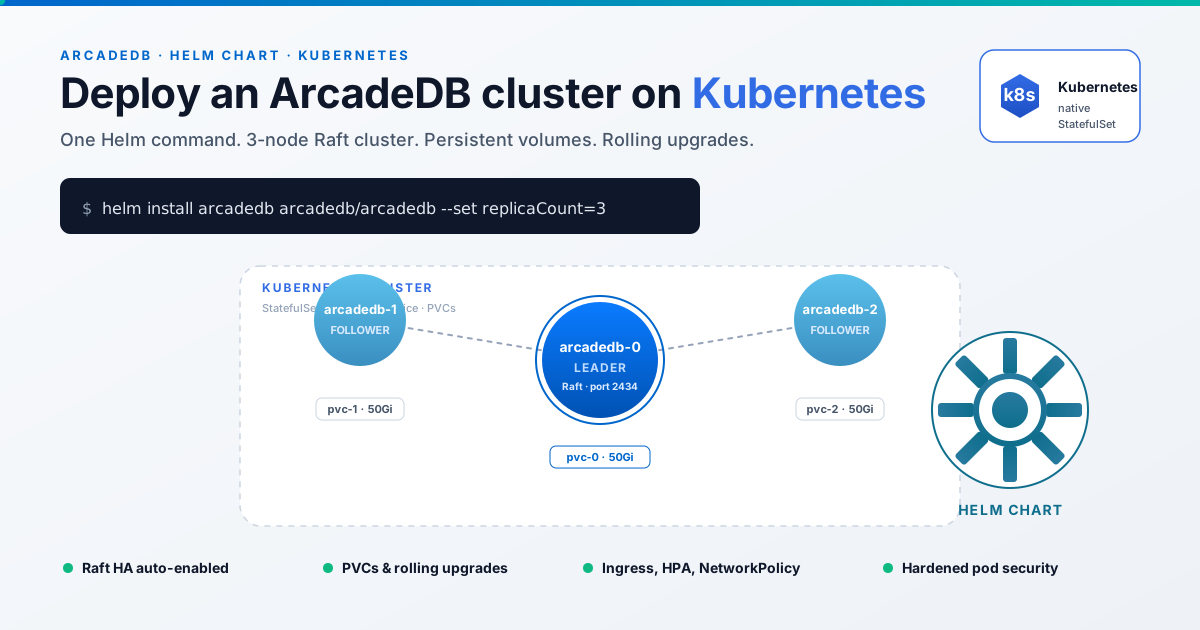
Running ArcadeDB as a single container is easy. Running it as a replicated service on a Kubernetes cluster used to mean writing a fair amount of YAML and reading the HA docs twice. With the official arcadedb-helm chart, it now takes one command. (For what the replicated service gives you in the first place, see the client-server page.)
In this post I walk through the chart, show how to bring up a three-node HA cluster, and point at the companion arcadedb-deployments repository if you want a runnable local example before touching your production cluster.
Why Run ArcadeDB on Kubernetes
ArcadeDB is built around an embedded engine that scales vertically very well. What you get from Kubernetes is the operational layer: rolling upgrades, persistent volumes, automatic restarts when a node dies, horizontal scale for read-heavy workloads, and replication across availability zones.
The Helm chart wraps that into a StatefulSet with stable network identities, a headless service for peer discovery, and probes wired to the /api/v1/ready endpoint. When replicaCount is greater than 1, the chart turns on Raft consensus across the pods. No extra flags, no manual peer lists.
What the Helm Chart Gives You
The chart lives under charts/arcadedb and is published on Artifact Hub. The current chart version is 26.4.2, the same as the ArcadeDB engine version it deploys.
The defaults are sensible. You get a StatefulSet with stable pod names (arcadedb-0, arcadedb-1, …) and ordered rollout, a headless service so each pod resolves its peers via DNS (arcadedb-0.arcadedb.default.svc.cluster.local), and a PersistentVolumeClaim template (8Gi ReadWriteOnce by default) mounted at /home/arcadedb/databases. Liveness and readiness probes hit /api/v1/ready.
Security is also taken care of: the pod runs as non-root UID/GID 1000, all Linux capabilities are dropped, privilege escalation is disabled, and the ServiceAccount token is unmounted because the database does not call the Kubernetes API. A NetworkPolicy can lock the Raft gRPC port down to ArcadeDB pods only, and there is HorizontalPodAutoscaler support that pre-sizes the Raft peer list to maxReplicas so scale-out joins are clean.
The whole chart is small enough to read in a single sitting, which I recommend before you push it to production.
Prerequisites
You need a Kubernetes cluster (1.27 or newer is fine), Helm 3.16 or newer, kubectl pointed at the target cluster, and a storage class that supports ReadWriteOnce. The defaults on EKS, GKE, AKS, and DigitalOcean all work. For local experimentation, kind 0.24 or newer is enough.
The 30-Second Install
helm repo add arcadedb https://helm.arcadedb.com/
helm repo update
helm install my-arcadedb arcadedb/arcadedb
That is it. You now have a single-pod ArcadeDB with a persistent volume and a ClusterIP service.
Port-forward to reach Studio:
kubectl port-forward svc/my-arcadedb 2480:2480
Open http://localhost:2480 in your browser. Done.
For a dev box, a CI fixture, or a smoke test, this is enough. Anything user-facing needs more.
Production Values: a Three-Node HA Cluster
For the multi-node setup, drop the following into a values.yaml:
replicaCount: 3

image:
  repository: arcadedata/arcadedb
  tag: "26.4.2"
  pullPolicy: IfNotPresent

arcadedb:
  rootPassword:
    secret:
      name: arcadedb-credentials
      key: rootPassword

persistence:
  enabled: true
  size: 50Gi
  storageClass: "fast-ssd"

resources:
  requests:
    cpu: "1"
    memory: "4Gi"
  limits:
    cpu: "2"
    memory: "8Gi"

service:
  type: ClusterIP

ingress:
  enabled: true
  className: "nginx"
  hosts:
    - host: arcadedb.example.com
      paths:
        - path: /
          pathType: Prefix
  tls:
    - secretName: arcadedb-tls
      hosts:
        - arcadedb.example.com

networkPolicy:
  enabled: true
Create the credentials secret separately, so the password never lives in your Helm values or your Git history:
kubectl create secret generic arcadedb-credentials \
  --from-literal=rootPassword='choose-something-strong'
Then install (or upgrade) the chart:
helm upgrade --install arcadedb arcadedb/arcadedb \
  --namespace arcadedb --create-namespace \
  -f values.yaml --wait --timeout 10m
With replicaCount: 3, the chart wires the StatefulSet for Raft HA. Each pod gets its own PVC, joins the cluster through the headless service, and the three-node quorum elects a leader.
Verifying the Cluster
Watch the pods come up:
kubectl -n arcadedb get pods -w
You should see arcadedb-0, arcadedb-1, and arcadedb-2 reach Running in order. Once all three are ready, ask the cluster who is in charge:
kubectl -n arcadedb port-forward svc/arcadedb 2480:2480 &
curl -u root:choose-something-strong http://localhost:2480/api/v1/server | jq .ha
The response includes the current leader, the list of replicas, and the network status of each peer. If you see three online servers and one of them flagged as leader, you have a working HA cluster.
To prove the failover works, delete the leader pod and watch the cluster re-elect:
kubectl -n arcadedb delete pod arcadedb-0
kubectl -n arcadedb get pods -w
The remaining nodes hold quorum, a new leader is elected within seconds, and Kubernetes brings the missing pod back. Its PVC is reattached, the data is intact, and it rejoins the Raft group as a follower.
Try It Locally First: the arcadedb-deployments Repo
Before opening a PR against your platform team’s repo, run the thing end-to-end on your laptop. The arcadedb-deployments repository has a ready-to-run example under kubernetes/.
The start.sh script creates a kind cluster named arcadedb, runs helm dependency update, installs the chart with --wait, applies a 3-replica values.yaml and the credentials secret, waits for /api/v1/ready to respond on every pod, and sets up a background kubectl port-forward to http://localhost:2480. test.sh then drives an end-to-end smoke test against the cluster.
Clone, run, done:
git clone https://github.com/ArcadeData/arcadedb-deployments.git
cd arcadedb-deployments/kubernetes
./start.sh
./test.sh
When you are finished:
./stop.sh
It is the fastest way to convince yourself (or your team) that the chart behaves the way you expect. Same chart, same values shape, same probes, smaller cluster.
The same repository ships an ha-cluster/ scenario built on Docker Compose if you want to compare the same topology without Kubernetes in the picture.
Operating the Cluster
A few practical notes for day-two operations.
Upgrades
Bump the chart and image tag together, then helm upgrade. The StatefulSet rolls pods one at a time, the readiness probe gates each step, and Raft tolerates the missing follower throughout. Always upgrade in a non-production environment first to validate the engine version.
Scaling
To scale out, increase replicaCount and run helm upgrade. New pods come up, join the Raft group as followers, and start serving reads.
Scale-down needs more care. Never drop below the quorum size of your current cluster, and always remove pods one at a time. Three or five nodes covers most workloads. Seven is the upper end before the Raft commit cost outweighs the redundancy you get back.
Backups
ArcadeDB has built-in automatic database backups. On Kubernetes, point the backup directory at a separate volume (or a CSI driver that snapshots to object storage) so backup data lives outside the database PVC. Take the snapshot at the leader to get a consistent view.
Observability
The chart exposes the standard ArcadeDB metrics on the HTTP port. Scrape them with your existing Prometheus stack and alert on Raft leader changes, replication lag, and PVC capacity.
Security
Change the default root password. Always. Use a Secret, never --set it on the command line. Enable the included NetworkPolicy to keep the Raft port internal to the namespace. If you expose Studio publicly, put it behind your usual ingress, OIDC proxy, or VPN.
Where to Go Next
- arcadedb-helm: chart source, values reference, and CI tests
- arcadedb-deployments: runnable Kubernetes and Docker Compose examples
- ArcadeDB HA Cluster docs: how Raft replication works under the hood
- ArcadeDB Academy: free courses, including hands-on labs
If something does not work the way this post describes, open an issue on the chart repo. PRs are welcome too. The chart is actively maintained, the CI pipeline lints every change, and the helm-unittest suite already covers most templates.