ArcadeDB Studio

Studio is the web workbench that ships with every ArcadeDB server. Write queries in eight languages, explore results as a graph, manage schema, users and backups, and profile slow queries, all from a browser and at no cost. Add the Studio AI Assistant when you want to ask questions in plain English.

Bundled with every server Apache 2.0, free SQL, Cypher, Gremlin and more Optional AI Assistant

Published

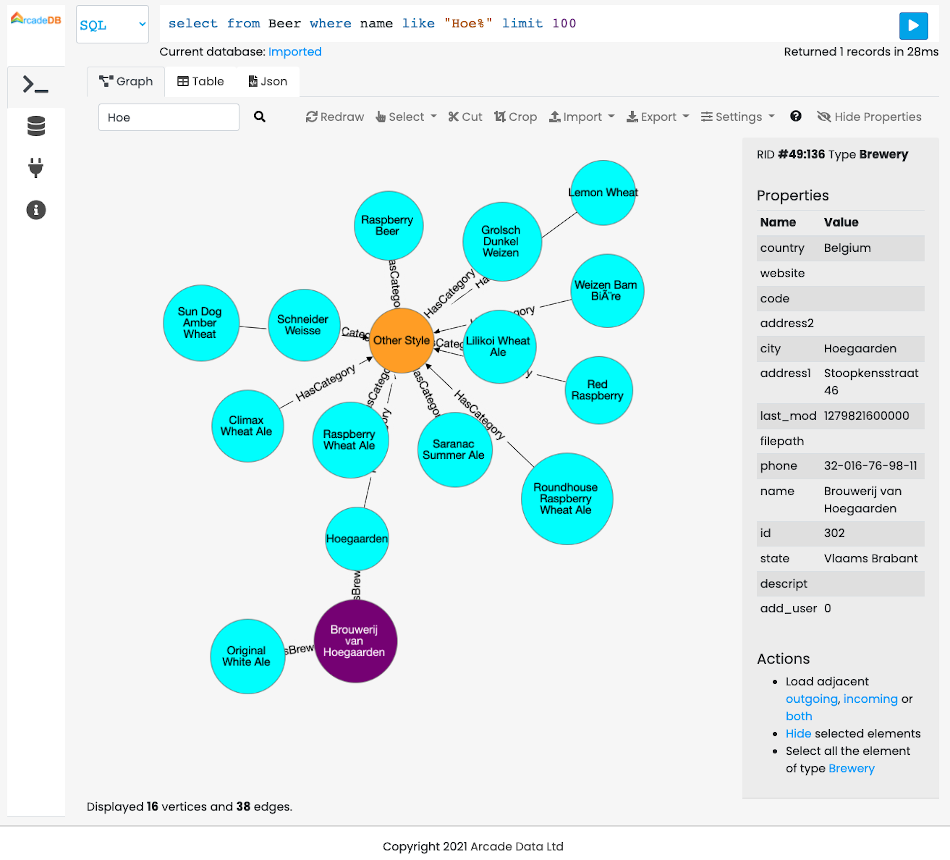
ArcadeDB Studio Query panel showing a SQL query on the OpenBeer database rendered as an interactive graph of beers, breweries, styles and categories
The Query panel: a SQL query on the OpenBeer sample database, rendered in the Graph view.

Open Studio in 30 seconds

There is nothing to install separately. Start a server, then point a browser at its HTTP port: for a default local install that is http://localhost:2480. Studio uses the same users as the server. This command starts ArcadeDB 26.10.1 with the OpenBeer sample database preloaded, the one in the screenshot above:

docker run --rm -p 2480:2480 -p 2424:2424 \
  -e JAVA_OPTS="-Darcadedb.server.rootPassword=playwithdata \
  -Darcadedb.server.defaultDatabases=Imported[root]{import:https://github.com/ArcadeData/arcadedb-datasets/raw/main/orientdb/OpenBeer.gz}" \
  arcadedata/arcadedb:26.10.1

Log in as root with the password playwithdata. Running ArcadeDB inside your own JVM instead? Studio is part of the server, so see client-server mode for how to run one alongside your application.

One editor for every query language

The Query panel is the everyday workspace. Pick a language, run the command with Ctrl+Enter / Cmd+Enter, and Studio picks the best view for the result.

Eight languages

SQL, SQL Script (multi-statement), OpenCypher on the native engine, Apache TinkerPop Gremlin, GraphQL, MongoDB, Redis and PromQL for time series. Syntax highlighting follows the selected language.

Index search forms

Query a vector, hybrid or full-text index from a form: pick the index, paste the query vector or a Lucene query, set k and an optional filter. The same operations as the HTTP vector and full-text endpoints.

Five result views

Table with sorting, paging, CSV export and an inline record editor; Graph; Chart (line, area or bar, from any language); JSON; and Explain with an optional flame graph of per-step timings.

History, saved queries, reference

Recent commands reload with one click, saved queries stay a click away, and a searchable reference of SQL functions and methods sits next to the editor. An Auto Limit cap keeps interactive runs safe on large datasets.

Explore the graph, one hop at a time

The Graph view draws the vertices and edges a query returns and keeps them on the canvas, so you can expand the graph incrementally instead of re-running bigger and bigger queries. It is the fastest way to sanity-check a knowledge graph or follow a suspicious chain of transactions in a fraud detection model.

Run the database without a terminal

Beyond queries, Studio is the administration console for the server and every database on it.

Database

  • Schema browser for document, vertex and edge types
  • Buckets, indexes and dictionary
  • Create, import, drop, reset and back up databases
  • Time Series sub-tab with a query builder and PromQL
  • Live metrics, including materialized and graph analytical views

Server

  • Health summary: CPU, JVM and OS memory, disk, cache hit ratio
  • HTTP, database and executor pool metrics
  • Sessions and a filterable event log
  • Server settings, scheduled backups and MCP configuration

Profiler

  • Records queries across HTTP, Java, Bolt, PostgreSQL, MongoDB, Redis and MCP
  • Groups them by canonical form with count, average, max and P99
  • Per-step timings for SQL, Cypher and Gremlin
  • Saved runs for before and after comparison

Security

  • Users with per-database group assignments
  • Groups with type-level CRUD permissions, result-set limits and read timeouts
  • API tokens with expiration, for scripts, services and MCP clients

Cluster

  • Raft topology: leader, followers, health and node cards
  • Election metrics
  • Add or remove peers from the leader
  • Rolling-upgrade readiness for group and token changes

API playground

  • Browse every HTTP endpoint with request and response examples
  • Try It: send real requests with session, Basic or Bearer auth
  • Transaction session IDs are carried between begin, command and commit

Connect your LLM from Studio

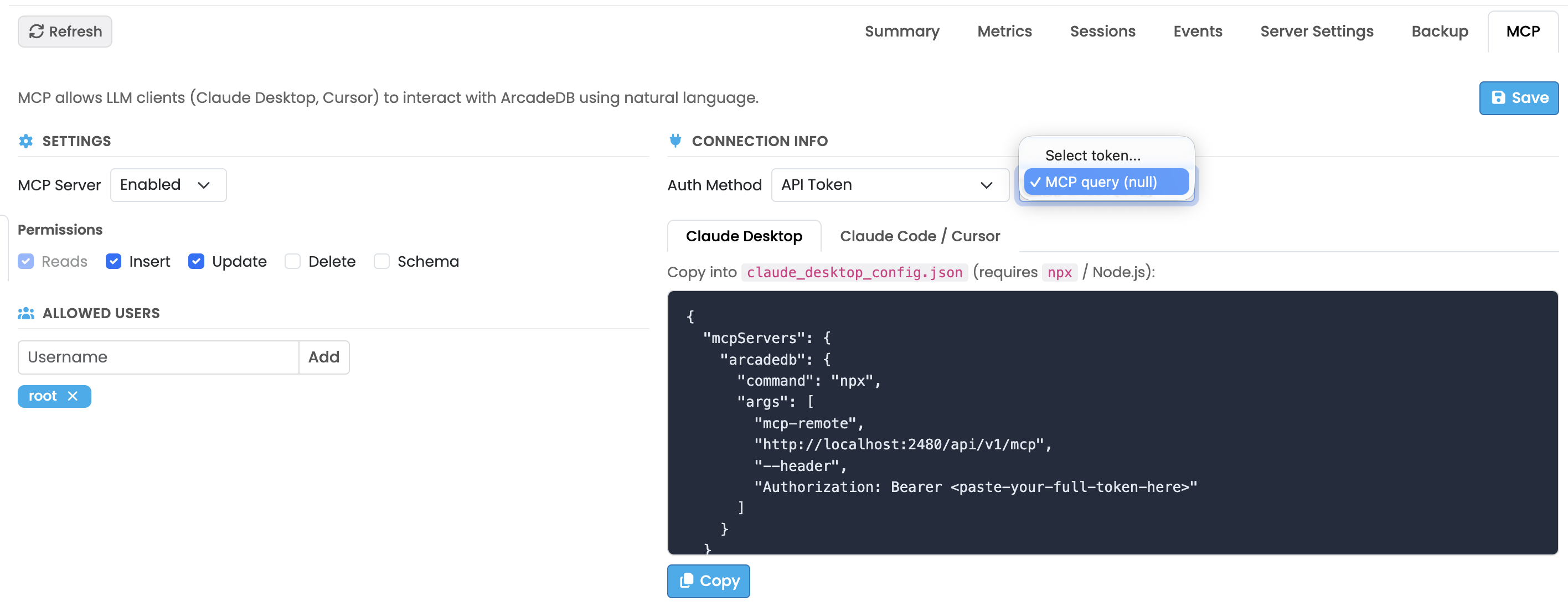
ArcadeDB has a built-in MCP server. From the Server panel you enable it, choose which operations it may perform, pick the users allowed to use it, and copy a ready-made configuration for Claude Desktop, Claude Code or Cursor. API tokens for those clients are created in the Security panel.

That is free and works with your own AI client. The step-by-step guide is in ArcadeDB MCP Server: Connect Your LLM to Your Database, and the bigger picture of using the graph as context for an LLM is on the GraphRAG page.

ArcadeDB Studio Server panel, MCP tab: MCP server enabled, insert and update permissions, allowed users, and a generated Claude Desktop configuration with a Copy button
Server panel, MCP tab.

Studio AI Assistant

The AI Assistant is a paid add-on that turns Studio into a chat-driven workspace. Ask about your database in plain language and get answers, schema insights and executable queries back. It reads your schema, can run read-only queries on your behalf, and proposes commands you run with one click.

What it does

  • Natural language to SQL, Gremlin and Cypher
  • Intelligent schema exploration and review
  • Query optimization suggestions and troubleshooting
  • Data modeling recommendations
  • Synthetic data generation
  • Analyze with AI on Profiler runs

You stay in control

  • Review First: the assistant never runs anything on its own.
  • Auto Run Read Only Queries: it may run read-only queries, and every call is logged in the conversation.
  • Writes and schema changes are never executed automatically, in either mode.
  • Each suggestion has Copy, Open in Query and Execute buttons.

Privacy

  • Schema, metadata, query structures and small data excerpts are sent to a third-party LLM provider to answer.
  • Your data is never used to train models and is not retained beyond the request.
  • It only works on the database you select in the panel.
  • For sensitive data, use test or anonymized datasets and a read-only Studio user.

AI Assistant pricing

Buy it standalone, or get it with any paid support plan. Every plan includes a monthly AI usage allowance per server or license. Allowances are pooled across your servers (three Silver servers give you $150 of AI use a month), start over on the first of each month, and do not roll over. When the allowance is used up, the assistant pauses until the next month; you can upgrade at any time.

Standalone
$19.99 /month
or $199.99 billed yearly
$20 of AI use / month per license
Silver support
$299 /mo per server
$50 of AI use / month per server
Gold support
$599 /mo per server
$100 of AI use / month per server
Platinum support
$1,499 /mo per server
$250 of AI use / month per server

Prices in USD. Support plans can also be billed yearly. Plan details, checkout and terms are on the pricing page.

How activation works

After purchase you receive a subscription key. Open the AI tab in Studio, enter the key and accept the AI Assistant Terms of Use. The subscription is stored on the ArcadeDB server and shared by every Studio user connected to it.
Try Studio now

Start a server with the command above and open http://localhost:2480. When you want the AI Assistant, pick a plan on the pricing page.

Frequently Asked Questions

Is ArcadeDB Studio free?

Yes. Studio ships with every ArcadeDB server and is part of the Apache 2.0 open-source project. Only the AI Assistant panel is a paid add-on; every other Studio feature is free.

How do I open ArcadeDB Studio?

Start an ArcadeDB server and point a browser at its HTTP port. For a default local install that is http://localhost:2480. Studio uses the same users as the server, so you log in with your ArcadeDB credentials.

Which query languages does Studio support?

The Query panel runs SQL, SQL Script, OpenCypher, Apache TinkerPop Gremlin, GraphQL, MongoDB, Redis and PromQL, and has forms for vector, hybrid and full-text index search. Results can be shown as a table, a graph, a chart, JSON, or an execution plan.

How much does the Studio AI Assistant cost?

The AI Assistant is available standalone at $19.99 per month per license ($199.99 billed yearly), with $20 of AI use per month. It is also included in every paid support plan, with a monthly AI allowance per server of $50 for Silver, $100 for Gold and $250 for Platinum. Allowances are pooled across your servers, start over on the first of each month and do not roll over.

Does the AI Assistant change my data on its own?

No. Write operations (inserts, updates, deletes, schema changes) are never executed automatically; they are returned as command blocks for you to review and run. In Review First mode the assistant does not run anything at all, and in Auto Run Read Only Queries mode it may only run read-only queries, each shown in the conversation.

Is my data used to train AI models?

To answer, the assistant sends schema definitions, metadata, query structures and small data excerpts to a third-party LLM provider. Per the AI Assistant Terms of Use, your data is never used to train any model and is not retained by the provider beyond the request. For sensitive workloads, use test or anonymized data and a read-only Studio user.