ArcadeDB is now on Azure Marketplace. You pick a VM size, and when the VM boots you have an ArcadeDB server running, billed through your Azure subscription. There is no container runtime to set up and no Java to install. It is the Azure sibling of our AWS Marketplace AMI, and the deployment guide lists it next to every other way to run ArcadeDB.
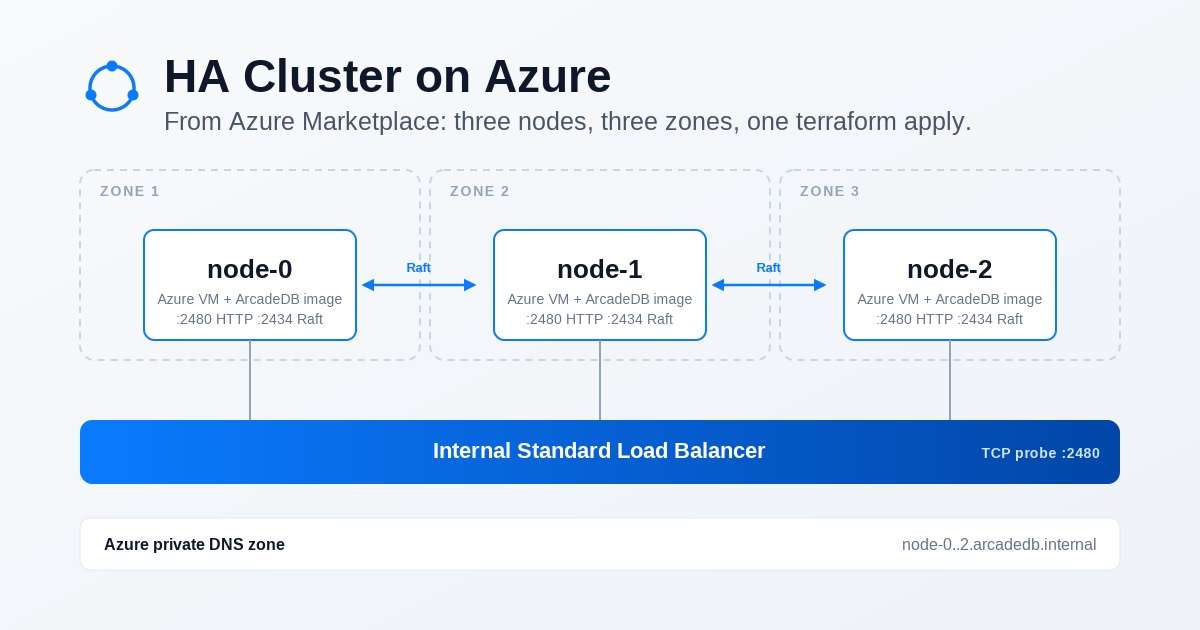
A single VM is the easy part. A cluster is where it gets fiddly, so the arcadedb-deployments repository now has two Terraform templates built on the image: one for a single VM, and one for a 3-node Raft cluster with a node in each availability zone. I’ll cover the listing first and then spend most of the post on the cluster. If you are on AWS, the AWS version of this walkthrough builds the same cluster on EC2.
ArcadeDB on Azure Marketplace
One listing covers both x64 and Arm64 (Ampere). On either one you get:
- ArcadeDB runs as the
arcadedbsystemd service on CIS-hardened Ubuntu 26.04 LTS. - SSH accepts keys only.
- There is no default password. Each VM generates its own ArcadeDB root password on first boot.
- Data lives in
/var/lib/arcadedb/databases, backups in/var/lib/arcadedb/backups, logs in/var/log/arcadedb.
The image carries an hourly software fee that depends on the VM’s vCPU count, on top of the Azure charges for the VM, its disks and data transfer:
| vCPUs | Software fee |
|---|---|
| 1 | $0.02/hour |
| 2 | $0.04/hour |
| 4 | $0.08/hour |
| 6 to 31 | $0.16/hour |
| 32 and more | $0.32/hour |
The first month is free: no software fee, only the Azure charges. You get the trial once per subscription, and it turns into the paid plan when it ends unless you cancel. The fee shows up on your Azure invoice, which spares your procurement team a new vendor, and it pays for part of ArcadeDB’s open source development.
You don’t have to use the image, though. ArcadeDB is Apache 2.0, and the Docker image and the downloads run the same engine on an Azure VM with no software fee. What the Marketplace image adds is the hardening, the per-VM password and a server that is ready at first boot.
Try it from the Azure portal in three steps
- On the listing, choose Get it now, then Create. Pick a region, a size (
Standard_D2s_v5orStandard_D2ps_v5to evaluate,D4s_v5/D4ps_v5or larger for production) and SSH public key authentication. In the network security group, allow inbound TCP 22 and 2480 only from your own IP range, never fromAny. -
Read the generated root password.
azureuseris the portal’s default administrator name:ssh -i my-key.pem azureuser@<vm-public-ip> cat ~/arcadedb-root-password.txt -
Open Studio at
http://<vm-public-ip>:2480and log in asroot. To keep port 2480 closed to the internet, tunnel it over SSH and openhttp://localhost:2480instead:ssh -i my-key.pem -L 2480:localhost:2480 azureuser@<vm-public-ip>
The server speaks plain HTTP. Put TLS in front of it before anyone outside a trusted network can reach it.
Single VM or 3-node HA cluster
The portal is fine for a first look. For anything you will want to rebuild later, use the Terraform templates:
| Single instance | 3-node HA cluster | |
|---|---|---|
| Nodes | 1 VM | 3 VMs, one per availability zone |
| Availability | No failover | Survives the loss of one node |
| Discovery | n/a | Azure private DNS zone (node-0..2.arcadedb.internal) |
| Entry point | VM private IP (optional public IP), port 2480 | Optional internal Standard load balancer (on by default) |
| Good for | Development, testing, small workloads | Production-style resilience |
Both run the same ArcadeDB client-server engine, started by the image’s systemd service.
Prerequisites for the ArcadeDB Azure HA cluster
- Terraform 1.5 or later and the Azure CLI, logged in with
az loginand a subscription selected (orARM_SUBSCRIPTION_IDset). - An existing resource group and subnet. The subnet needs three free addresses for the nodes (by default
.10,.11and.12of its prefix; setprivate_ipsif those are taken) and one for the load balancer. - A region with availability zones, and a
vm_sizeoffered in all three zones. Check withaz vm list-skus --location <region> --size <size> --query '[].locationInfo[].zones', or setavailability_zones. - vCPU quota for three VMs of that size in the region: 6 vCPUs of the DSv5 family for the default
Standard_D2s_v5. - An SSH key pair.
- Outbound internet access, if the nodes need it for OS updates, plugins or importing databases from URLs. The nodes have no public IP, an internal load balancer gives no outbound path, and new VNets default to private subnets, so attach a NAT gateway (or route through a firewall) on the subnet.
-
The Marketplace terms, accepted once per subscription for the architecture you deploy. Skip this and the VM creation fails:
az vm image terms accept --urn arcadedb:arcadedb:arcadedb-ubuntu:latest         # x64
az vm image terms accept --urn arcadedb:arcadedb:arcadedb-ubuntu-arm64:latest   # Arm64
The architecture follows vm_size. Arm64 sizes (Standard_D2ps_v5, Standard_D4pds_v5, Standard_E2ps_v5 and so on) get the arcadedb-ubuntu-arm64 image, all others arcadedb-ubuntu. Trusted launch (secure boot and vTPM) is on for x64 and off for Arm64, because Azure does not support it on the Ampere Arm64 sizes; override it with trusted_launch.
Deploy the cluster with Terraform
Clone the repository, go to azure/terraform/ha-cluster, and copy the example variables file:
cp terraform.tfvars.example terraform.tfvars
Fill in the five required values:
resource_group_name    = "rg-arcadedb"
subnet_id              = "/subscriptions/<subscription-id>/resourceGroups/rg-arcadedb/providers/Microsoft.Network/virtualNetworks/vnet-arcadedb/subnets/snet-arcadedb"
admin_ssh_public_key   = "ssh-ed25519 AAAA... [email protected]"
allowed_cidr           = "10.0.0.0/16"
arcadedb_root_password = "MySecurePass123!"
Then run the usual three commands:
terraform init
terraform plan
terraform apply
The plan creates:
- three network interfaces with static private IPs, created before the VMs, so each node’s address is fixed and survives a VM replacement;
- three Linux VMs (
<name_prefix>-node-0tonode-2) in zones 1, 2 and 3, with SSH key login only, an encrypted managed OS disk and no public IP; - an application security group for the three NICs and a network security group with the node and client rules;
- a private DNS zone (
arcadedb.internalby default), linked to the subnet’s VNet, with one A record per node; - an internal Standard load balancer with a zone-redundant frontend IP, a backend pool, a probe and a rule, unless you set
enable_lb = false.
Terraform does not touch the resource group or the subnet, and it creates no managed identity or role assignment.
The root password must be at least 8 characters, because ArcadeDB refuses to start with a shorter one, and may only contain A-Z a-z 0-9 @ ! # ^ + = . _ & -. It ends up in the VMs’ custom data and in the Terraform state, so protect the state and change the password after the first login.
How the ArcadeDB nodes form a Raft cluster
Each node’s cloud-init writes the root password to /etc/arcadedb/root-password (mode 0600, read through arcadedb.server.rootPasswordPath, so it never shows in ps) and a systemd override with the HA settings:
-Darcadedb.server.name=node-<N>
-Darcadedb.ha.enabled=true
-Darcadedb.ha.serverList=node-0.arcadedb.internal:2434:2480,node-1.arcadedb.internal:2434:2480,node-2.arcadedb.internal:2434:2480
-Darcadedb.ha.replicationFactor=3
-Darcadedb.server.readinessRequiresHA=true
These are the same settings as on AWS. What differs is everything around them, in two places.
The first is DNS. On AWS the records are created after the instances, so each node has to poll until its peers’ names resolve. Azure lets you skip that. Terraform creates the network interfaces with fixed private IPs first, then the A records and the VNet link, and only then the VMs. By the time a node boots, all three names already resolve, so the nodes just start in parallel. It is one of the few places where the Azure template ended up simpler than the AWS one.
The second is the load balancer health check, which went the other way. Azure Load Balancer treats only HTTP 200 as healthy, and /api/v1/ready answers 204, so an HTTP probe on it would mark every node as down. The template therefore uses a TCP probe on the HTTP port, every 5 seconds, and a node gets traffic as soon as ArcadeDB is listening. That is looser than on AWS. Followers forward writes to the leader, so any member can take a request, but a node that is still joining the cluster answers with an error until it has joined.
Keep the server names as they are. ArcadeDB Raft reads the number after node- as the node’s position in the server list, so node-<0-based index> is required. Raft traffic uses port 2434 and goes from node to node by name. The load balancer never sees it; it only carries client HTTP traffic on port 2480.
The high availability concepts and the HA operations guide explain Raft replication and these settings in more depth. For how the cluster behaves under partitions, crashes and clock skew, see the Jepsen test results.
Verify the cluster and test failover
The cluster is reachable inside the VNet, or from a network routed into it such as a VPN or a peered VNet. Node DNS names only resolve inside the linked VNet, so run these from a VM there (not from one of the nodes, see the gotchas below):
STUDIO=$(terraform output -raw studio_url)
curl -s "$STUDIO/api/v1/ready" -o /dev/null -w '%{http_code}\n'
curl -s -u root:<password> "$STUDIO/api/v1/server?mode=cluster"
studio_url points at the load balancer’s private IP, or at node-0.<zone> when enable_lb = false. The first command returns 204 once the node behind it has joined. The second shows the cluster membership, including the leader.
To test failover, write a record through the load balancer, stop the leader VM, and write again. The two survivors still hold a Raft majority, so they elect a new leader and carry on. Stop a second node and the cluster stops accepting writes, which is what you want from a majority-based system.
Gotchas when running ArcadeDB on Azure VMs
allowed_cidrmust cover your real clients. The internal load balancer keeps the client’s source IP, so the network security group sees the client address, not the balancer’s. Never set it to0.0.0.0/0.allowed_cidrdoes not restrict the VNet itself. Azure’s defaultAllowVnetInBoundrule lets in all traffic from inside the VNet and from peered or VPN-connected networks. Add a higher-priority deny rule or a subnet NSG if you need tighter control.- Do not call the load balancer from a node. When a VM in the backend pool calls its own internal Standard load balancer and the flow lands back on itself, the call times out. With three nodes that is about one call in three, which makes for a confusing afternoon. From a node, call the others by name (
node-N.arcadedb.internal). - Data lives on the OS disk. The databases and the Raft log are deleted with the VM. To replace a node, run
terraform apply -replace='azurerm_linux_virtual_machine.node[0]': it keeps the NIC, so the private IP and the DNS record stay the same, and the new VM rejoins empty and catches up from the leader. Replace one node at a time and wait until it answers/api/v1/readybefore touching the next. - Changing custom data replaces the VMs. Azure cannot change custom data in place, so changing the password or settings in
terraform.tfvarsrecreates the nodes. Replace them one at a time as above, or edit the systemd override on the hosts. - One zone name per VNet. A VNet cannot link two private DNS zones with the same name. For a second cluster in the same VNet, set a distinct
private_zone_nameandname_prefix. - A cluster costs real money. Three
Standard_D2s_v5VMs, three 30 GB Premium SSD disks, the Standard load balancer and the private DNS zone come to roughly $245 a month at pay-as-you-goeastusprices, before data transfer. After the free trial, the ArcadeDB software fee adds about $88 a month for three 2-vCPU nodes.
Single instance with Terraform
For development, testing or a small workload, one VM is enough. There is no DNS zone and no load balancer: you connect to the VM on port 2480.
Go to azure/terraform/single-instance, copy terraform.tfvars.example to terraform.tfvars, set resource_group_name, subnet_id, admin_ssh_public_key and allowed_cidr, then run the same three commands. Set public_ip = true for a Standard static public IP, and enable_ssh = true to open port 22 to allowed_cidr. Open the studio_url output from a machine inside allowed_cidr and log in as root.
arcadedb_root_password is optional here. Leave it empty and the image generates a unique password on first boot. Read it over SSH from ~/arcadedb-root-password.txt, or without SSH through the Azure control plane:
az vm run-command invoke -g <rg> -n <vm> --command-id RunShellScript \
  --scripts 'cat /etc/arcadedb/root-password'
How the ArcadeDB Azure images are tested
The images are built with Packer and tested in a private repository. Every release builds an x64 and an Arm64 image, boots each one, runs a smoke test and checks the first-boot password file before the image is added to the Marketplace offer.
The deployments repository has no Azure subscription, so its CI checks the templates statically: terraform fmt, terraform validate, and terraform test against a mocked provider. I ran all three on both templates while writing this post, and they pass.
Static checks only go so far, so our own pipeline also deploys the templates for real. On 2026-11-19, in eastus, with ArcadeDB 26.11.1:
- The single instance went up twice, once on x64 (
Standard_D2s_v5, Trusted launch on) and once on Arm64 (Standard_D2ps_v5, Trusted launch off). Both times ArcadeDB accepted the configured password, and a database was created and a record written and read back. - The HA cluster went up once, on
Standard_D2s_v4nodes in zones 1, 2 and 3, with the load balancer on. The three nodes formed one cluster with one leader. A record written on a follower showed up on all three nodes. A write and a read through the load balancer, from a separate VM, both worked. Then we stopped the leader VM: a survivor took over, and a write on it was readable on the other survivor.
Each deployment was destroyed afterwards, with nothing left behind.
That is a smoke test, not a soak test, and I’d rather be upfront about the gaps. The runs used the Compute Gallery image that the Marketplace offer is built from, not the Marketplace image itself. They did not cover the HA cluster on Arm64, replacing a node, changing custom data on a running cluster, restoring from a backup, the image-generated password with Terraform, or sustained load. I also did not re-run the deployments for this post: the commands come from the repository documentation.
Clean up
These templates create billable resources. When you are done:
terraform destroy
This deletes the VMs and their OS disks, so all data is lost. Take a backup first if you need it. The private DNS zone is deleted with its records; if you added records to the zone by hand, delete them first.
Links
- The listing: ArcadeDB on Azure Marketplace
- Templates and READMEs: arcadedb-deployments/azure
- Every way to run ArcadeDB: the deployment guide
- Azure Marketplace image documentation
The Marketplace image comes with community support through GitHub issues. For an SLA, see the support plans.