Running a database on AWS is easy until you need more than one node. Then you are wiring subnets, security groups, DNS and a load balancer before the first write.
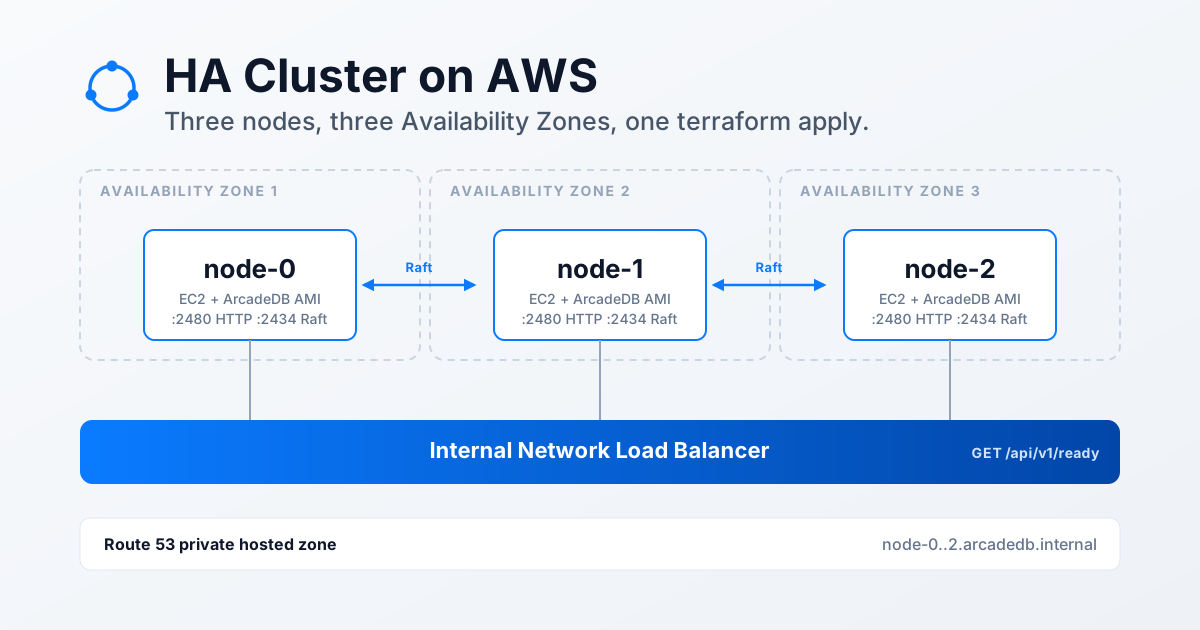
ArcadeDB now ships an AMI on AWS Marketplace, and the arcadedb-deployments repository has Terraform and CloudFormation templates that turn it into a running server: a single instance, or a 3-node high-availability cluster using Raft consensus. This post walks through the cluster, because it has the most moving parts, and then points at the other three options.
Single instance or 3-node HA cluster
| Single instance | 3-node HA cluster | |
|---|---|---|
| Nodes | 1 EC2 instance | 3 EC2 instances, one per Availability Zone |
| Availability | No failover | Survives the loss of one node |
| Discovery | n/a | Route 53 private hosted zone (node-0..2.arcadedb.internal) |
| Entry point | Instance IP, port 2480 | Optional internal Network Load Balancer (on by default) |
| Good for | Development, testing, small workloads | Production-style resilience |
Both topologies run the same ArcadeDB client-server engine, started as a systemd service on the AMI. Each is available as Terraform and as CloudFormation.
Prerequisites for the ArcadeDB AWS HA cluster
Four things need to be in place before terraform apply. Skip the first and the launch fails; skip the second and the nodes never find each other.
- A Marketplace subscription. Launching an unsubscribed Marketplace AMI fails, so subscribe to the ArcadeDB listing in the Marketplace console first.
- A VPC with DNS support and DNS hostnames enabled (
enableDnsSupportandenableDnsHostnames). Without them the private hosted zone does not resolve and the nodes cannot find each other. - Three subnets in that VPC, each in a different Availability Zone. The Terraform plan fails if two subnets share a zone. The CloudFormation template does not check it: two subnets in the same zone deploy fine but lose the protection against a zone outage.
- Terraform 1.2 or later (AWS provider 5.0 or later) and IAM permissions for EC2, Elastic Load Balancing and Route 53.
The AMI comes in two architectures. Set marketplace_product_code to the one that matches your instance_type:
| Architecture | Instance families | Product code |
|---|---|---|
| x86_64 | t3, m6i, m7i, r6i, r7i, c6i, c7i |
a8ux0w7t0kz9iam85pf4lgoa9 |
| arm64 (Graviton) | t4g, m7g, r7g, c7g |
7i9pstc6vwgjehw76ou7xa1wa |
Deploy the cluster with Terraform
Clone the repository, go to aws/terraform/ha-cluster, and copy the example variables file:
cp terraform.tfvars.example terraform.tfvars
Fill in the required values. The Marketplace product code goes in the same file:
arcadedb_root_password   = "MySecurePass123!"
vpc_id                   = "vpc-xxxxx"
subnet_ids               = ["subnet-aaaaa", "subnet-bbbbb", "subnet-ccccc"]
marketplace_product_code = "a8ux0w7t0kz9iam85pf4lgoa9"
Then run the usual three commands:
terraform init
terraform plan
terraform apply
The plan creates three aws_instance resources (node-0, node-1, node-2, one per subnet, with IMDSv2 required, an encrypted gp3 root volume and no public IP), a shared security group, a Route 53 private zone with three A records, and an internal Network Load Balancer with its target group and listener. No IAM role or instance profile is created.
The root password has a restricted character set (A-Z a-z 0-9 @ ! # ^ + = . _ & -, with at least one lowercase letter, uppercase letter, digit and special character). It ends up in the instance user data and in the Terraform state, so protect the state and change the password after the first login.
How the ArcadeDB nodes form a Raft cluster
Every node gets the same systemd override, with the HA settings:
-Darcadedb.server.name=node-<N>
-Darcadedb.ha.enabled=true
-Darcadedb.ha.serverList=node-0.arcadedb.internal:2434:2480,node-1.arcadedb.internal:2434:2480,node-2.arcadedb.internal:2434:2480
-Darcadedb.ha.replicationFactor=3
-Darcadedb.server.readinessRequiresHA=true
Three things to know:
- The server name must be
node-<0-based index>. ArcadeDB Raft uses the numeric suffix as an index into the server list. Raft traffic uses port 2434 and the HTTP API and Studio use 2480. - Nodes boot in parallel, but the DNS records are created after the instances. So each node waits up to 10 minutes for all three peer names to resolve before it starts ArcadeDB (it starts anyway, with a warning, if they never do). In the test run all three nodes were ready about 4 minutes after the instances started.
readinessRequiresHA=trueties readiness to cluster membership. A node reports ready onGET /api/v1/readyonly after it has joined the cluster, and that endpoint is the load balancer’s health check. Only cluster members receive traffic, and followers forward writes to the leader, so any node can take a request.
The high availability concepts and the HA operations guide in the docs explain Raft replication and the settings above in more depth. For how this stack behaves under partitions, crashes and clock skew, see the Jepsen test results, and for the same cluster on Kubernetes, the Helm chart walkthrough.
Verify the cluster and test failover
The cluster is reachable inside the VPC, or from a network routed into it such as a VPN or a peered VPC. Node DNS names only resolve inside the VPC, so run these from there:
STUDIO=$(terraform output -raw studio_url)
curl -s "$STUDIO/api/v1/ready" -o /dev/null -w '%{http_code}\n'
curl -s -u root:<password> "$STUDIO/api/v1/server?mode=cluster"
studio_url points at the load balancer, or at node-0 when you set enable_nlb = false. The first command should return a success status once the node has joined. The second shows the cluster membership, including the leader.
To test failover, write a record through the load balancer, stop the leader’s EC2 instance, and write again. This is the sequence the maintainers’ own pipeline ran, described below. With one node down, the two survivors still hold a Raft majority and elect a new leader. Note that the surviving nodes keep reporting three members, because a stopped node stays in the configured peer set.
Gotchas when running ArcadeDB on EC2
allowed_cidrmust cover your real clients. The internal load balancer preserves the client’s source IP, so the node security group sees the client address, not the balancer’s. A client outsideallowed_cidris dropped even when it reaches the load balancer. The default is10.0.0.0/16. Never set it to0.0.0.0/0, especially together withassociate_public_ip = true, which would expose the API to the internet.- Do not call the load balancer from a node. Because client IPs are preserved, a node calling the balancer can be routed back to itself and the connection times out. From a node, use the node DNS names (
node-N.arcadedb.internal) instead. - A cluster costs real money. Three
m6i.largeinstances, the load balancer, three 20 GB gp3 volumes and a hosted zone add up to roughly $230 a month at on-demandus-east-1prices, before data transfer and any Marketplace software charge. Cross-AZ traffic is billed as data transfer. - Changing user data later is not enough. The script only runs on first boot, so changing the password or settings on a running cluster means replacing the nodes one at a time or editing the systemd override on the hosts.
ArcadeDB HA cluster with CloudFormation
ha-cluster.yaml builds the same cluster as the Terraform example: three nodes, a Route 53 private zone, and an optional internal Network Load Balancer. It creates three AWS::EC2::Instance resources (Node0 to Node2, one per subnet), a launch template that only sets IMDSv2, a shared security group, the hosted zone with three A records, and the load balancer with its target group, listener and own security group. It creates no IAM role or instance profile, so the stack needs no --capabilities flag.
Three things differ from the Terraform example:
| Terraform | CloudFormation | |
|---|---|---|
| AMI | marketplace_product_code, looked up for you |
AmiId parameter: the AMI ID for your region |
| Subnets in distinct zones | Checked at plan time | Not checked |
| Load balancer health checks | Allowed from the node subnets’ CIDRs | Allowed from the load balancer’s own security group |
The last row exists because CloudFormation cannot read a subnet’s CIDR from a parameter.
Prerequisites
The Marketplace subscription is the same as before. Then three checks, because the template cannot do them for you:
- The AMI ID must come from the region you deploy to and match the architecture of
InstanceType. A mismatch (an arm64 AMI onm6i.large, say) fails when the instances launch. -
The VPC needs DNS support and DNS hostnames. If they are off, enable them:
aws ec2 modify-vpc-attribute --vpc-id vpc-xxxxx --enable-dns-support '{"Value":true}' aws ec2 modify-vpc-attribute --vpc-id vpc-xxxxx --enable-dns-hostnames '{"Value":true}' -
The three subnets must be in three different Availability Zones. Two in the same zone deploy without an error, so check first:
aws ec2 describe-subnets --subnet-ids subnet-aaaa subnet-bbbb subnet-cccc \
  --query 'Subnets[*].[SubnetId,AvailabilityZone,VpcId,CidrBlock]' --output table
If you run more than one stack in the same VPC, give each its own NamePrefix and PrivateZoneName. The load balancer and target group names (<NamePrefix>-nlb, <NamePrefix>-tg) must be unique in the region, and two private zones with the same name cannot be attached to one VPC.
Deploy and read the outputs
aws cloudformation deploy \
  --stack-name arcadedb-ha \
  --template-file ha-cluster.yaml \
  --parameter-overrides \
    AmiId=ami-xxxxx \
    VpcId=vpc-xxxxx \
    Subnet0Id=subnet-aaaa \
    Subnet1Id=subnet-bbbb \
    Subnet2Id=subnet-cccc \
    AllowedCidr=10.0.0.0/16 \
    ArcadeDBRootPassword='MySecurePass123!' \
    NamePrefix=arcadedb-ha
The stack goes in this order: the hosted zone first, then the instances, then the A records, which need the instance IPs. The user data only contains the static node DNS names, never instance IPs, so there is no circular dependency. The image has no cfn-signal, so the stack reports complete before the cluster is ready. Read the outputs, then check readiness from inside the VPC:
aws cloudformation describe-stacks --stack-name arcadedb-ha \
  --query 'Stacks[0].Outputs' --output table

STUDIO=$(aws cloudformation describe-stacks --stack-name arcadedb-ha \
  --query "Stacks[0].Outputs[?OutputKey=='StudioUrl'].OutputValue" --output text)
curl -s "$STUDIO/api/v1/ready" -o /dev/null -w '%{http_code}\n'
curl -s -u root:<password> "$STUDIO/api/v1/server?mode=cluster"
The outputs are StudioUrl (the load balancer, or node-0 when EnableNlb is false), NlbDnsName, InstanceIds, PrivateIps, NodeDnsNames, ZoneName, ZoneId and SecurityGroupId. The parameters mirror the Terraform variables (AllowedCidr for allowed_cidr, EnableNlb for enable_nlb, ArcadeDBMaxRAM for arcadedb_max_ram, and so on). The allowed_cidr and load-balancer gotchas above apply unchanged.
Delete the stack
aws cloudformation delete-stack --stack-name arcadedb-ha
aws cloudformation wait stack-delete-complete --stack-name arcadedb-ha
As with terraform destroy, this deletes the instances and their root volumes, so all data is lost. Back up first. If you added records to the hosted zone by hand, delete them before the stack or the zone deletion fails.
Single instance with Terraform or CloudFormation
For development, testing or a small workload, one node is enough. There is no Route 53 zone and no load balancer: you connect to the instance on port 2480.
With Terraform, go to aws/terraform/single-instance, copy terraform.tfvars.example to terraform.tfvars, set vpc_id, subnet_id and arcadedb_root_password (plus marketplace_product_code for the AMI), then run the same three commands. studio_url and api_url are among the outputs. Clean up with terraform destroy.
terraform init
terraform plan
terraform apply
With CloudFormation, single-instance.yaml takes the same inputs as parameters. By default it also creates an IAM role, an instance profile and an automatic recovery alarm, plus CloudWatch monitoring, so the call needs --capabilities CAPABILITY_IAM (set CreateIamResources to false to skip them):
aws cloudformation create-stack \
  --stack-name arcadedb-production \
  --template-body file://single-instance.yaml \
  --parameters \
    ParameterKey=AmiId,ParameterValue=ami-xxxxx \
    ParameterKey=InstanceType,ParameterValue=m6i.large \
    ParameterKey=KeyName,ParameterValue=my-key-pair \
    ParameterKey=VpcId,ParameterValue=vpc-xxxxx \
    ParameterKey=SubnetId,ParameterValue=subnet-xxxxx \
    ParameterKey=AllowedCIDR,ParameterValue=10.0.0.0/16 \
    ParameterKey=ArcadeDBRootPassword,ParameterValue='MySecurePass123!' \
    ParameterKey=ArcadeDBServerMode,ParameterValue=production \
    ParameterKey=ArcadeDBMaxRAM,ParameterValue=4096 \
  --capabilities CAPABILITY_IAM
When the stack is created, open the StudioURL output, sign in as root, and create your first database. Like the cluster stack, it does not wait for ArcadeDB to start, so poll /api/v1/ready (HTTP 204) first. KeyName is optional: leave it empty and the instance launches without SSH access. To resize later, run aws cloudformation update-stack with a new InstanceType; to remove everything, aws cloudformation delete-stack --stack-name arcadedb-production. Both Terraform and CloudFormation put the root password in the instance user data, so change it after the first login.
How the ArcadeDB AMIs are tested
The AMIs are built and tested in a private repository. The deployments repository has no AWS account, so its CI only checks the templates statically: terraform fmt and terraform validate, and cfn-lint.
The real deployment test is done by the maintainers’ own pipeline. On 2026-11-08 both HA examples were deployed once (default VPC of us-east-1, t3.large nodes) and passed these checks, then were destroyed without leftovers:
- the three nodes formed one cluster with one leader;
- a record written through
node-0was readable on all three nodes; - a write through the load balancer succeeded and was readable afterwards;
- after stopping the leader, a surviving node became leader and writes still succeeded.
That is one run, not a soak test. It did not cover replacing a node, changing user data on a running cluster, restoring from a backup, or sustained load, and the READMEs mark node replacement as unverified. I did not re-run the commands in this post; they are taken from the repository documentation.
Clean up
These examples create billable resources. When you are done, destroy them. With Terraform:
terraform destroy
With CloudFormation:
aws cloudformation delete-stack --stack-name arcadedb-ha
Either way, this deletes the instances and their root volumes, so all data is lost. Take a backup first if you need the data. The hosted zone is deleted with its three records; if you added records to it by hand, delete them first or the zone deletion fails.
Links
- Templates and READMEs: arcadedb-deployments/aws
- Every way to run ArcadeDB, including the Marketplace listing: the deployment guide
- AWS Marketplace AMI documentation
The Marketplace image comes with community support through GitHub issues. For an SLA, see the support plans.